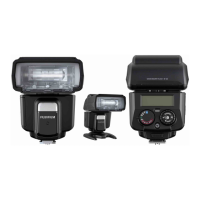
The Fujifilm EF-60 is a shoe-mount flash designed to enhance photography with various lighting modes and remote capabilities. This owner's manual provides comprehensive guidance on its operation, from basic setup to advanced functions, ensuring users can effectively integrate it into their flash photography workflow.
Function Description
The EF-60 serves as an external flash unit, offering a range of modes to suit different shooting scenarios. It supports both on-camera and off-camera flash photography, with a focus on wireless remote control.
- LED Light Mode: This mode is ideal for shooting movies or as a continuous light source. The light output can be adjusted in 9 steps, providing flexibility for various lighting needs. It can also function as a catch light or an auto focus (AF) assist lamp, aiding in focusing in low-light conditions.
- Secondary Mode SF (Slave Flash): In this mode, the EF-60 acts as a secondary flash, triggered by the light from another primary flash unit. It's designed for use when the primary flash (commander) is set to manual mode.
- Secondary Mode SD (Slave Digital): Similar to SF mode, the EF-60 is triggered by a primary flash, but it specifically ignores monitoring pre-flash for TTL (Through-The-Lens) operation. This mode is suitable when the primary flash (commander) is in TTL mode.
- Manual (M) Mode: This mode allows for precise control over the flash output. Users can manually adjust the light emission in 25 steps, from 1/1 (full power) to 1/256, in 1/3 EV steps. This is useful for achieving consistent lighting in controlled environments.
- Full Automatic (A) Mode: Designed for beginners, this mode allows the camera to fully control the flash light for optimal exposure. When the EF-60 is set to A mode, the TTL automatic light control system works in conjunction with the camera's exposure modes (P, A, S, M). The flash head's zoom unit automatically adjusts to cover focal lengths from 24mm to 200mm (35mm equivalent) as the lens focal length changes.
- TTL Mode: This mode provides automatic flash control by the camera, ensuring optimal exposure. Users can also make fine adjustments using the flash compensation function, which can be adjusted from -2.0 EV to +2.0 EV in 1/3 EV steps. The control wheel and buttons facilitate quick and reliable dimming correction.
- Wireless Remote Mode (Radio type / Optical type): The EF-60 synchronizes as a wireless TTL remote flash, emitting TTL light. It supports both optical and radio wireless communication.
- Optical Wireless Remote: When used with a flash compatible with commander mode (e.g., EF-X500), multi-light shooting via optical wireless is possible. Users can select a group (A, B, or C) and control the flash settings from the commander.
- Radio Wireless Remote: The EF-60 is compatible with Nissin Digital's Nissin Air System (NAS), featuring a built-in remote function for radio wireless control. TTL, M (manual), and Zoom (manual zoom) can be remotely controlled by a commander (e.g., EF-W1, Air10s). Pairing with a commander is required for this functionality.
Usage Features
The EF-60 is designed for ease of use with several practical features.
- Mounting and Removing: The flash unit slides into the camera's hot shoe and locks with a "click." To remove, simply press the unlock button and slide it off.
- Power On/Off: Pressing the Power button turns the unit on, indicated by a red Pilot button that turns green when ready to shoot. A test flash can be performed by pressing the Pilot button. To turn off, press the Power button once.
- Mode Dial: A rotating mode dial allows users to quickly select the desired flash mode.
- Control Wheel and Buttons: These controls are used for adjusting settings such as light output in LED mode, flash output in manual mode, and flash compensation in TTL mode. They also facilitate channel setting and zoom adjustments.
- Channel Setting: The EF-60 operates on the 2.4 GHz band. In environments with potential radio interference from other devices (Wi-Fi, Bluetooth, etc.), users can change the communication channel. This can be done automatically or manually by pressing and holding the "Channel" button and rotating the control wheel.
- Setting the Coverage (Zoom): In SF, SD, M, TTL, and Optical wireless remote modes, manual zoom can be set. Pressing "M. Zoom" for one second allows users to adjust the flash head's coverage by rotating the control wheel. The default setting is "A" (Auto).
- Beep On/Off: The EF-60 emits a beep sound during charging and when commander settings are changed in wireless modes. This can be toggled on or off by pressing and holding the beep button.
- Operation Lock Button: Pressing the lock button for one second at the center of the control wheel and buttons locks the current settings, preventing accidental changes. The power also cannot be turned off while locked (though the mode dial can still be used). Pressing it again for one second unlocks the unit.
- Remote Shooting Method: The EF-60 can be installed anywhere and synchronized with a commander attached to the camera. A test flash confirms synchronization, enabling remote shooting. Up to 30 flashes can be paired.
- FP (High Speed Sync.): The EF-60 supports FP mode, allowing synchronization with shutter speeds up to 1/8,000 second. This is enabled by setting AUTO FP (HSS) in the camera's "FLASH FUNCTION SETTING" menu.
- Red-eye Correction: When "RED EYE REMOVAL" is activated in the camera menu, a pre-flash is fired before the main flash to reduce the red-eye effect.
- Rear Curtain Sync.: Setting "REAR curtain sync." in the camera menu causes the flash to fire just before the shutter closes, creating a trailing light effect.
- Auto Focus Assist Light: In low-contrast or dark conditions, the EF-60 emits an autofocus assist light to aid in focusing. This light does not appear in the captured image.
- Light Diffusing Panel: A built-in diffusing panel can be pulled out and placed in front of the flash head to support a shooting angle of view of 16mm, softening the light.
- Bounce: The flash head can be rotated 90° upward, 180° to the left, and 180° to the right. This allows users to reflect flash light off ceilings or walls, creating softer, more natural shadows. When bouncing, the flash coverage is fixed at 50mm (except for radio wireless remote).
- Soft Box (Accessory): An included soft box accessory can be attached to further diffuse the flash light, creating an even softer illumination.
- Fill-in Reflector: This panel can be pulled out to direct light into the subject's eyes during bounce shooting at short distances, making facial expressions brighter. It can be used in conjunction with the soft box.
Maintenance Features
The EF-60 includes features and recommendations to ensure its longevity and proper functioning.
- Power Saving Mode: To conserve battery energy, the EF-60 automatically enters power saving mode. In A, TTL, and M modes, it synchronizes with the camera's power. In SD, SF, and wireless remote modes, it enters power saving after 5 minutes of idle state, indicated by a blinking Pilot button. Pressing the camera's shutter button halfway or any flash button reactivates it. If idle for over 60 minutes, the unit turns off completely.
- Overheat Prevention Function: To protect the flash circuitry, the EF-60 automatically turns off if high-power full flashes are repeated continuously over 20 to 30 times. The Pilot button flashes red every 1.5 seconds when overheat protection is active. The function deactivates automatically once the unit cools down. In FP mode, the charging interval is limited to 12 seconds if the flash head overheats.
- Battery Management: The EF-60 uses 4 x AA batteries (Alkaline or NiMH). It is recommended to use all four batteries of the same brand and type, and replace or recharge them all at the same time. If the recycle time exceeds 30 seconds, it's an indication to replace or recharge batteries.
- Troubleshooting: The manual provides guidance for common issues:
- Flash does not charge: Check battery direction and ensure they are not exhausted.
- Flash does not fire: Verify the flash is firmly mounted, hot shoe contacts are clean, and power is on (not off due to auto power function).
- Photos overexposed or underexposed: Check the flash mode and ensure it is set to "TTL" if automatic exposure is desired.
- General Care: When attaching the unit to a metal accessory shoe, care should be taken not to short-circuit the contacts. If the hot shoe contacts are dirty, wipe them with a dry cloth.

 Need help?
 General
 Weight and Dimensions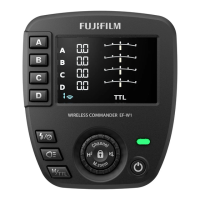


 To Next Page