13
• Rotate the Mode dial to “A” mode.
• Press the shutter button of your camera halfway to focus the
subject.
• Shutter speed, aperture and flash mark ( ) are indicated in
camera’s view Finder or LCD.
• Press the shutter button to shoot.
• When the focal length of the lens is changed, the zoom unit
in the flash head of EF-60 is automatically moves, covering
the focal length efficiently. Covers 24mm to 200mm (35mm
equivalent).
Full Automatic Mode
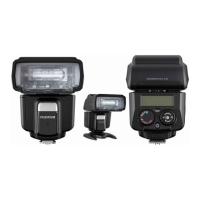
In all of the camera's exposure modes listed above, EF-60
will fully work in TTL automatic-flash system.
Camera exposure mode
When EF-60 is set to A mode, the TTL automatic light
control system works in the following camera’s exposure
modes. Full auto mode is a mode for beginners, where
most operations can be performed on the camera side.
Mode Dial
When the camera's shooting mode is [P], [A], [S] or [M], TTL
automatic flash control can be performed.



 To Next Page