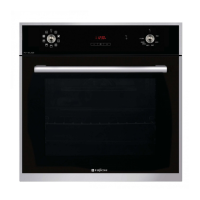
This document is the operating and installation manual for the FUJIOH Built-in Multifunctional Steam Oven, model FV-ML71. It provides comprehensive instructions for safe operation, installation, maintenance, and troubleshooting of the appliance.
Function Description
The FUJIOH FV-ML71 is a built-in multifunctional steam oven designed for various cooking methods, including baking, grilling, steaming, and combination cooking. It offers a range of preset recipes and customizable settings to facilitate diverse culinary tasks. The oven is intended for domestic use and emphasizes safety precautions for both adults and children.
Important Technical Specifications
- Product: Built-in Multifunctional Steam Oven
- Model Number: FV-ML71
- Voltage (AC): 220-240V~
- Frequency: 50 - 60Hz
- Rated Power: 2200W
- Oven Capacity: 45 L
- Back Heating Element: 1600W
- Outer Top Heating Element: 820W
- Inner Top Heating Element: 1200W
- Chamber Light: 15W
- Steam Heating Element: 1500W
- Circulating Fan: 30W
- Cooling Fan: 12W
The oven requires a fixed wiring installation by an authorized electrician, adhering to current electrical rules and regulations. It must be earthed, and an isolation switch must be incorporated into the fixed wiring, easily accessible after installation. The electrical meter, circuit breaker, power supply cable, and socket must be adequate for the maximum power load.
Usage Features
The FV-ML71 offers a user-friendly interface with a display screen for selecting cooking functions and settings.
Oven Overview:
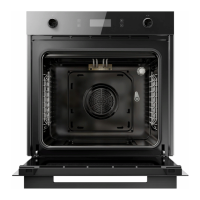
The oven features a control panel display (K), oven vent (A), top heating element (B), grill (C), door-lock (D), oven lamp (E), door switch (F), water reservoir inlet (G), water reservoir outlet (H), water heating element (I), hinge slot (J), fan forced heating (L), and gutter (M).
Cooking Functions:
- Bake: For baking or grilling various foods.
- Steam: For steaming different types of food, including meat, fish, vegetables, and baked goods.
- Unite (Combination Cooking): A function that combines steaming and grilling/baking to achieve juicy interiors and crispy exteriors.
- Recipe: Provides a selection of preset recipes with cooking steps for ease of use.
- High Temperature Steam: A dedicated function for steaming at higher temperatures, suitable for stews, meats, or reducing steaming time.
Settings:
The "Setting" menu allows users to adjust date and time, language (Chinese and English available), software updates, screen brightness, and Wi-Fi connectivity. The oven can connect to the internet via Wi-Fi.
Operation:
- First Use: Before initial use, users are advised to remove and clean all accessories, remove any protective film, run each baking element (Fan Force, Grill, Full Grill) at maximum temperature for 45 minutes to eliminate odors, clean the oven cavity, and flush the built-in water reservoir three times. Finally, run the steaming function for 10 minutes.
- Water Reservoir: The built-in water reservoir needs to be flushed three times before first use and emptied after every use to prevent scale build-up and bacterial growth. Filtered or distilled water is recommended to prevent blockages and stains.
- Cooking Process: Users can select food types, adjust cooking temperature and time by sliding numbers on the display, and start cooking. The display shows working time and current temperature. An "OK" prompt appears when cooking is finished, and the door lock releases.
- Safety during Steaming: The oven door locks automatically during steaming. To check food, press the pause button to unlock the door. Steam will be released when the door is opened, so caution is advised. The oven stops pumping water in the last 3 minutes of steaming to reduce residual water on the heating element. The fan motor continues for 15 minutes after cooking.
- Door Temperature: The oven door surface temperature can reach up to 55°C during cooking. When opening a hot oven door, it should be opened gradually to allow steam to escape slowly and prevent scalding.
Maintenance Features
Regular cleaning and maintenance are crucial for the appliance's longevity and performance.
General Cleaning:
- Water Reservoir: Empty after every use to prevent scale build-up.
- Oven Cavity: Clean with soapy water and wipe dry. For white deposits or scales from hard water, use a cloth wetted with vinegar.
- Shelves and Trays: Wash and dry after use.
- Gutter: Check for water after steaming and sponge dry if necessary.
- Door Seal: Clean with warm soapy water and a sponge after each use. Replace if torn or damaged.
- Heating Element: For scale build-up, use warm water with 5% citric acid cleanser or white vinegar.
- Glass Door: Clean with an appropriate glass cleanser.
- Stainless Steel Front Panel: Clean with a soft, non-abrasive cloth and warm soapy water, following the grain direction. Avoid harsh chemicals, abrasive cleaners, or sharp metal scrapers.
Important Cleaning Warnings:
- Always disconnect power before cleaning or maintenance.
- Do not use steam cleaners, as they can damage the control panel display and PCB boards.
- Only use neutral detergents; avoid abrasive products or solvents.
- Do not use cleaning sprayers, harsh abrasive cleaners, or sharp metal scrapers on the oven to prevent scratching.
- Do not use cleaning agents containing soda, acid, or chlorine.
- Long-term stains on stainless steel surfaces can cause permanent damage.
Removing the Oven Door:
For easier cleaning of the interior, the oven door can be removed. Instructions are provided for lifting the door off its hinges and reattaching it, ensuring the hinge seat is correctly hooked.
Replacing the Oven Bulb:
To replace the oven bulb, the appliance must be electrically disconnected. Unscrew the glass protection cap, replace the bulb with a new one suitable for high temperatures (300°C, 220-240V~, 15W, E14), reassemble the cap, and reconnect the oven.
Troubleshooting:
The manual includes a troubleshooting section with common problems, possible causes, and solutions. For complex issues or damaged parts, users are advised to contact authorized customer service. Maintenance and service must be carried out by a qualified service person.
Disposal:
The product should not be disposed of with domestic waste. It must be taken to an authorized recycling facility for electrical and electronic appliances to ensure environmentally friendly and healthy disposal.

 Need help?

 To Next Page
 General