Using the Display
Turning On the Display
Turn on the display before turning on the computer. When the power is on, the LED on the power
button lights blue and the screen image will appear after about 3 seconds. If the LED doesn’t light
blue or no image appears, please verify if the display is properly connected.
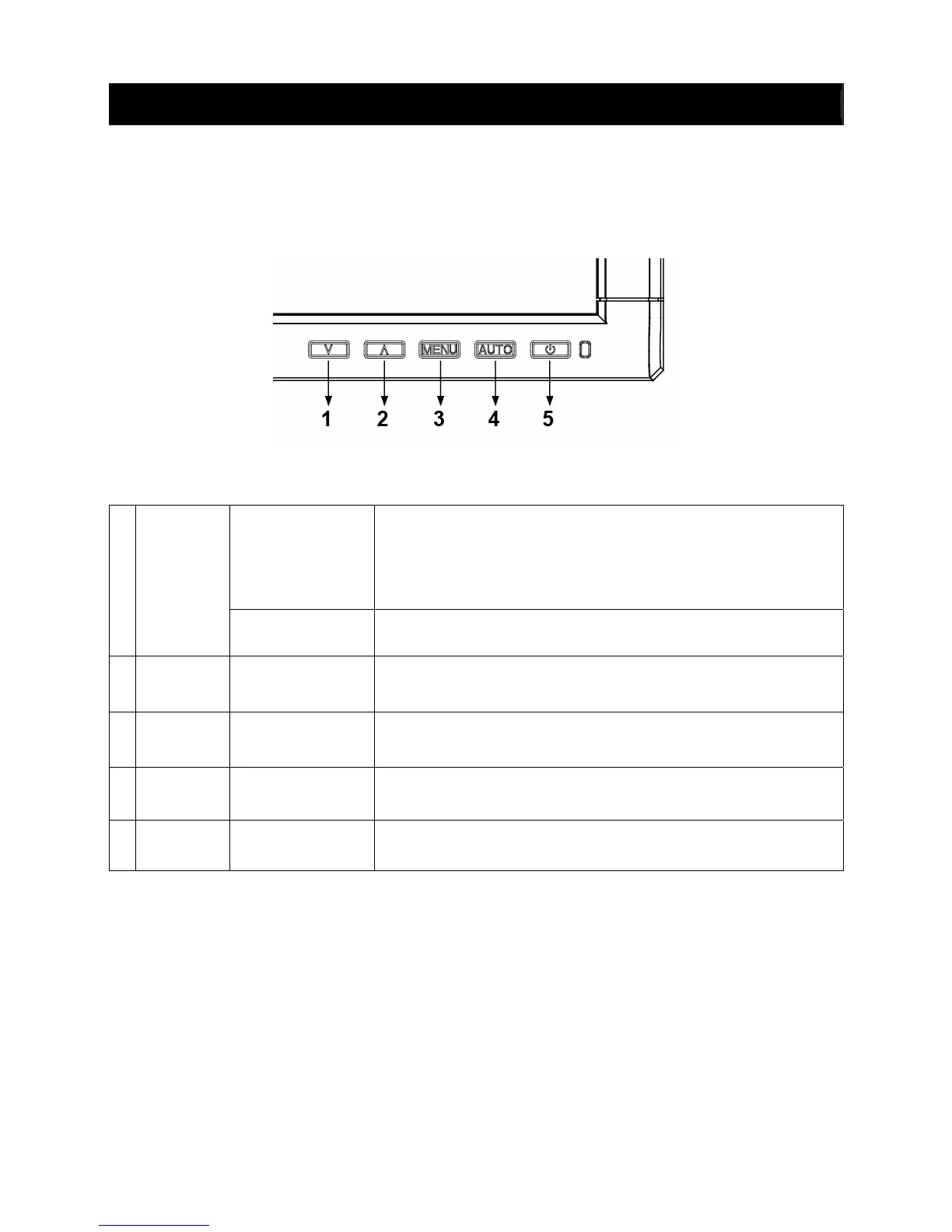
Function Controls
Hot key
&
Down / Decrease &
Up / Increase
OSD Off: Press
∨ “Mute” and “recover”. (hold for 1.5 sec)
Press
∧ open input select menu. (hold for 1.5 sec)
OSD On: Use these buttons to select or adjust the values of the
selected function.
1,2
∨ ∧
Power-Button lock
Operating of
∧ and ∨ buttons at the same time for approx. 2
seconds.
3
MENU
Hot key &
SELECT
OSD Off: Open OSD.
OSD On: Select function. (submenu)
4
AUTO
Hot key &
EXIT
OSD Off: Auto adjustment function. (hold for 1.5 sec)
OSD On: Exits OSD.
5
POWER
Power Switch
Power On/Off .
Blue-Operation mode / Orange-Power saving mode.
3,5
MENU &
POWER
OSD lock function Operating of menu and power buttons at the same time.



 To Next Page
 Loading...