Installing/removing m ain m emo ry En
glish - 7
Installing/removing main mem
ory
Technic al data
Technology
DDR3 1333/1600 MHz unbuffered DIMM modules 240 pin; 1.5 V;
64 bit, no ECC
Total siz e
1to32GByteDDR3
Module size
1, 2, 4 or 8 GByte per module
A current list of the memo ry modules re commended for this mainboard is available
on the Internet at: "
http://www.fujitsu.com/fts/products".
At least one memory mo dule must be installed. Memory m odules with different
memory capacities can be combined.
Only unbuffered DDR3 memory m od ules without ECC may be used .
DDR3 memory modules must comply with the PC3-10600 or PC3-12800 specification.
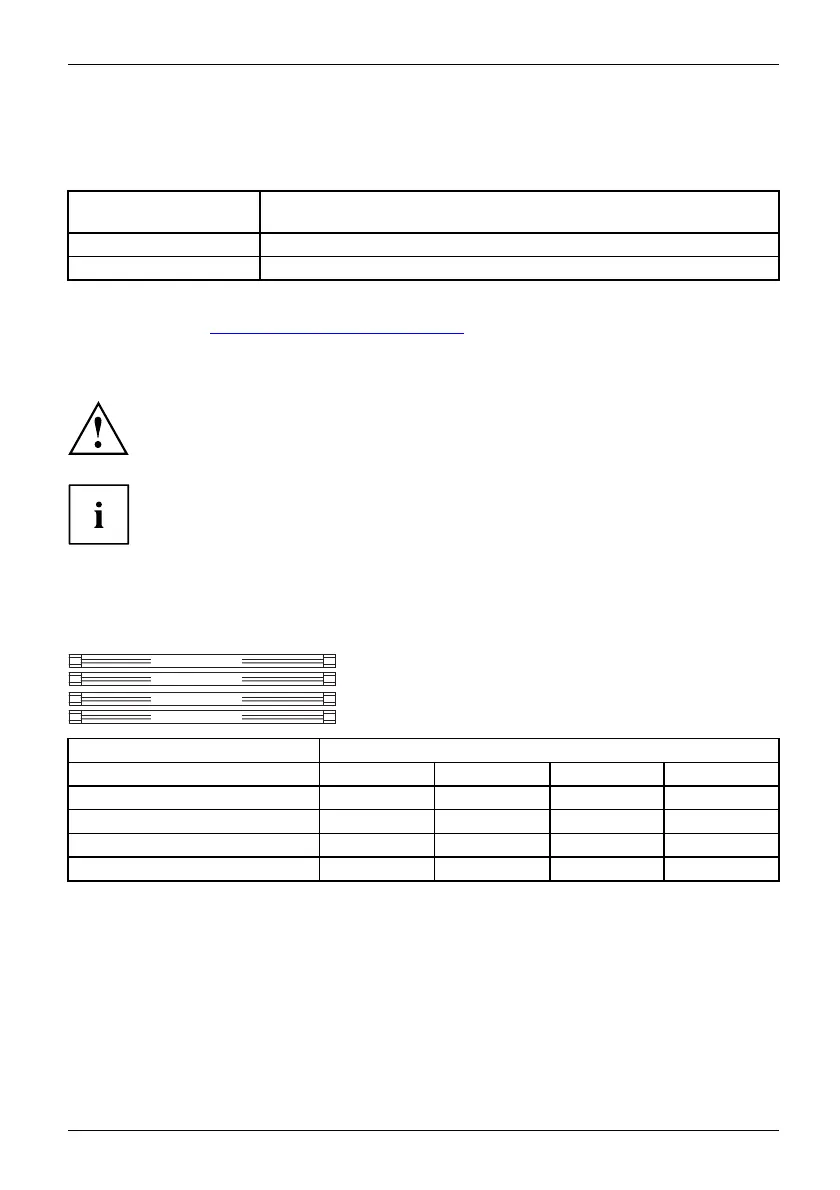
If you use more than one memory m odule, the n make sure to distribute the
memory modules over both memory channels. By doing this you use the
performance advantages of the dual-channel mode.
Maximum system performance is achieved when identical memory modules
are used in Channel A and Channel B.
To simplify equipping, the slots are colour coded.
Depending on how the syste m is c on figured, the visible main m emory can be reduced.
Channel B, Slot 2
Channel B, Slot 4
Channel A, Slot 1
Channel A, Slot 3
Number of m
emory modules inserted
Slot to be used 1 2 3 4
Channel A, slot 1
xxxx
Channel
B, slot 2
xxx
Channel A, slot 3
xx
Channel B, Slot 4
x
The i
nstallation/removal is described in the "Basic information on mainboard" manual.
Fujitsu 21



 To Next Page