Need help?
Do you have a question about the Fujitsu D3236-S and is the answer not in the manual?
General safety guidelines for handling mainboards and important notes for D3243-S power supply.
Visual representations and system block diagrams for D323x-S and D3243-S models.
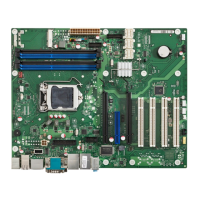
Identification of external connectors and details on onboard components.
Summary of feature differences across D323x-S and D3243-S models.
Details regarding the I/O shield specifications and compatibility.
Pinouts for front panel, internal and external serial COM port connectors.
Details on USB 2.0/3.0, LAN, SATA, and mSATA connectors pin assignments.
Pinouts for DVI-I, DisplayPort V1.2, VGA and LVDS connectors.
Pinouts for Mini-PCIe, fan connectors, audio, S/PDIF, GPIO, power, and chassis intrusion.
Details on temperature sensors and fan connectors for D323x-S and D3243-S.
Tools for monitoring system health and customizing fan behavior.
Information on component durability for 24/7 operation and temperature limits.
Default system monitoring settings fixed by BIOS for D323x-S and D3243-S.
Requirements for ATX power supplies, including load conditions and connector details.
Summary of video output options, display modes, and resolution capabilities.
Details on configuring VGA, DVI, HDMI, and DisplayPort outputs, including resolutions.
Configuration for LVDS displays, multi-display setups, and related cabling.
Details on mainboard support for Windows 7 and Windows 8.1, including driver availability.
Information on supported Linux distributions, including known issues and hints.
Tools for customizing BIOS boot logo, editing CMOS settings, and OEM identification.
Tool for monitoring system health and customizing fan behavior.
Tools for fan control, LVDS adjustment, and system monitoring APIs.
Issues related to driver support, memory modules, and power supply requirements.
Notes on SATA interface, graphics driver for Collage Mode, and mSATA support.
Details on USB3.0 performance and known issues with PCI/PCIe slots.
Support for Haswell Refresh processors and Intel iAMT/vPRO manageability.
Configuration of BIOS modes for 'Always On' and 'Never Off' operating modes on D3243-S.
Information on battery lifetime, TPM jumper settings, and BIOS enablement.
Explanation of the System Watchdog and procedures for BIOS update/recovery.
Details on integrated BIOS hardware diagnostic tool and disk erase utility.
 General
| Form Factor | ATX |
|---|---|
| Socket Type | LGA 1150 |
| Chipset | Intel Q87 |
| Memory Type | DDR3 |
| Maximum RAM | 32 GB |
| Audio | Realtek ALC671 |
| Memory Slots | 4 x DIMM |
| SATA | 6 x SATA 6Gb/s |
| Storage Interfaces | SATA 6Gb/s |
| Onboard Video | Yes |
| USB | USB 3.0, USB 2.0 |
| Ethernet | Intel I217LM Gigabit LAN |
| Video Outputs | DVI-D, DisplayPort |


 To Next Page