CONTENTS
INTRODUCTION
1 NAMES AND FUNCTIONS OF PARTS
2 BASIC SCANNER OPERATIONS
2.1 Turning the scanner ON
2.2 Loading Documents on the ADF for
Scanning
2.3 Scanning Documents
2.4 How to Use the Scanner Driver
3 SCANNING VARIOUS TYPES OF
DOCUMENTS
4 DAILY CARE
5 REPLACING CONSUMABLES
6 TROUBLESHOOTING
7 DOCUMENT SPECIFICATIONS FOR ADF
8 OPTIONS
9 SCANNER SPECIFICATIONS
Appendix
2.3 Scanning Documents(2)
1
2
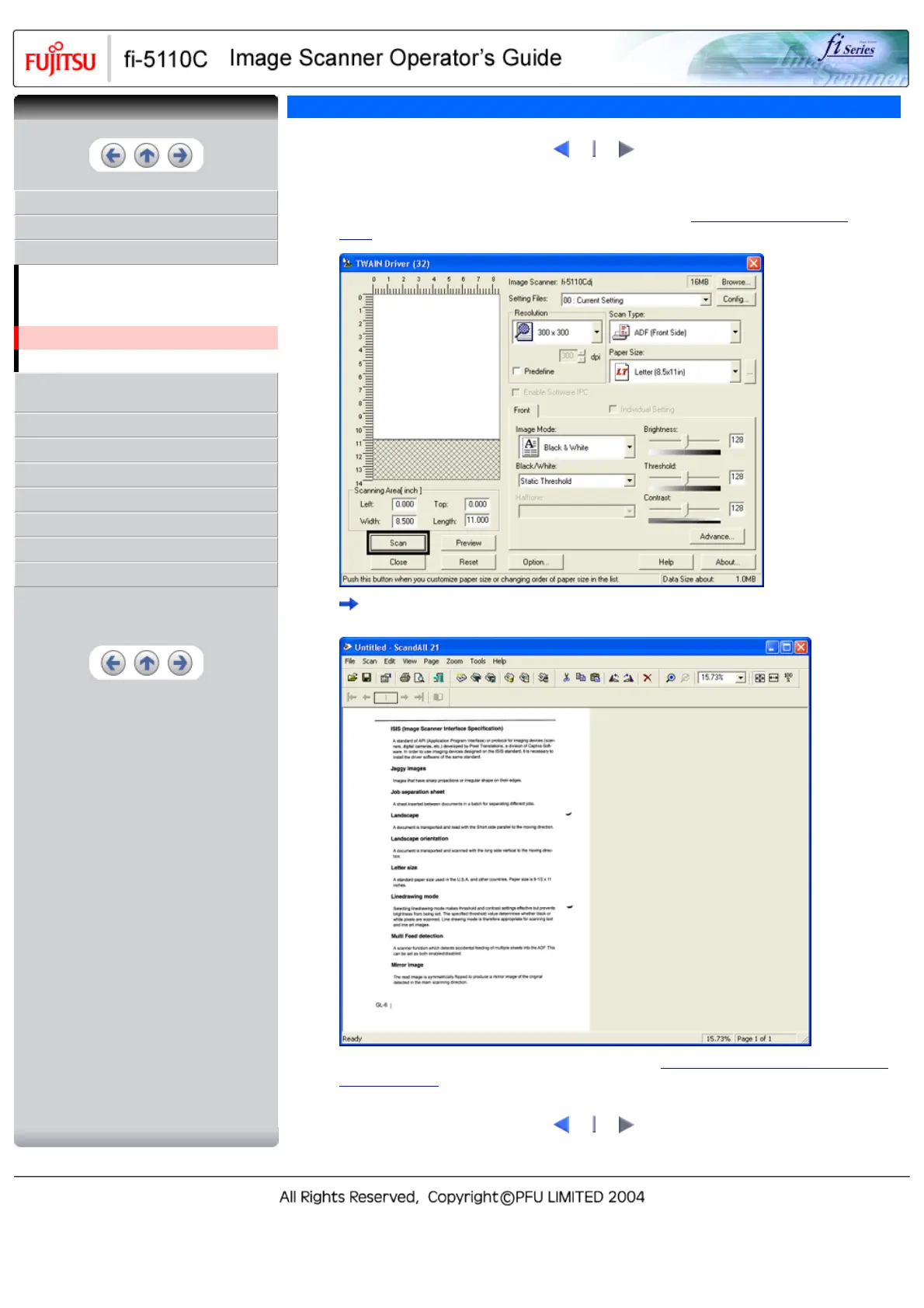
5. Set the scan resolution, paper size and other scan conditions, and click the [Scan] button.
For details on settings in the [TWAIN Driver] dialog box, refer to "
2.4 How to Use the Scanner
Driver" .
The document is scanned, and an image of the scanned document appears on the ScandAll 21
screen.
For details on scanning other types of documents, refer to "Chapter 3 SCANNING VARIOUS TYPES
OF DOCUMENTS" . For details on ScandAll 21 functions and operations, refer to ScandAll 21 Help.
1
2
CONTENTS



 To Next Page
 Loading...










