CONTENTS
INTRODUCTION
1 NAMES AND FUNCTIONS OF PARTS
2 BASIC SCANNER OPERATIONS
3 SCANNING VARIOUS TYPES OF
DOCUMENTS
4 DAILY CARE
4.1 Cleaning Materials
4.2 Cleaning the Scanner Exterior
4.3 Cleaning the Inside of the Scanner
5 REPLACING CONSUMABLES
6 TROUBLESHOOTING
7 DOCUMENT SPECIFICATIONS FOR ADF
8 OPTIONS
9 SCANNER SPECIFICATIONS
Appendix
4.3 Cleaning the Inside of the Scanner (2)
1
2
3 4 5
1. Open the ADF by pulling the ADF open lever.
CAUTION
Be careful, the ADF may close and pinch your finger.
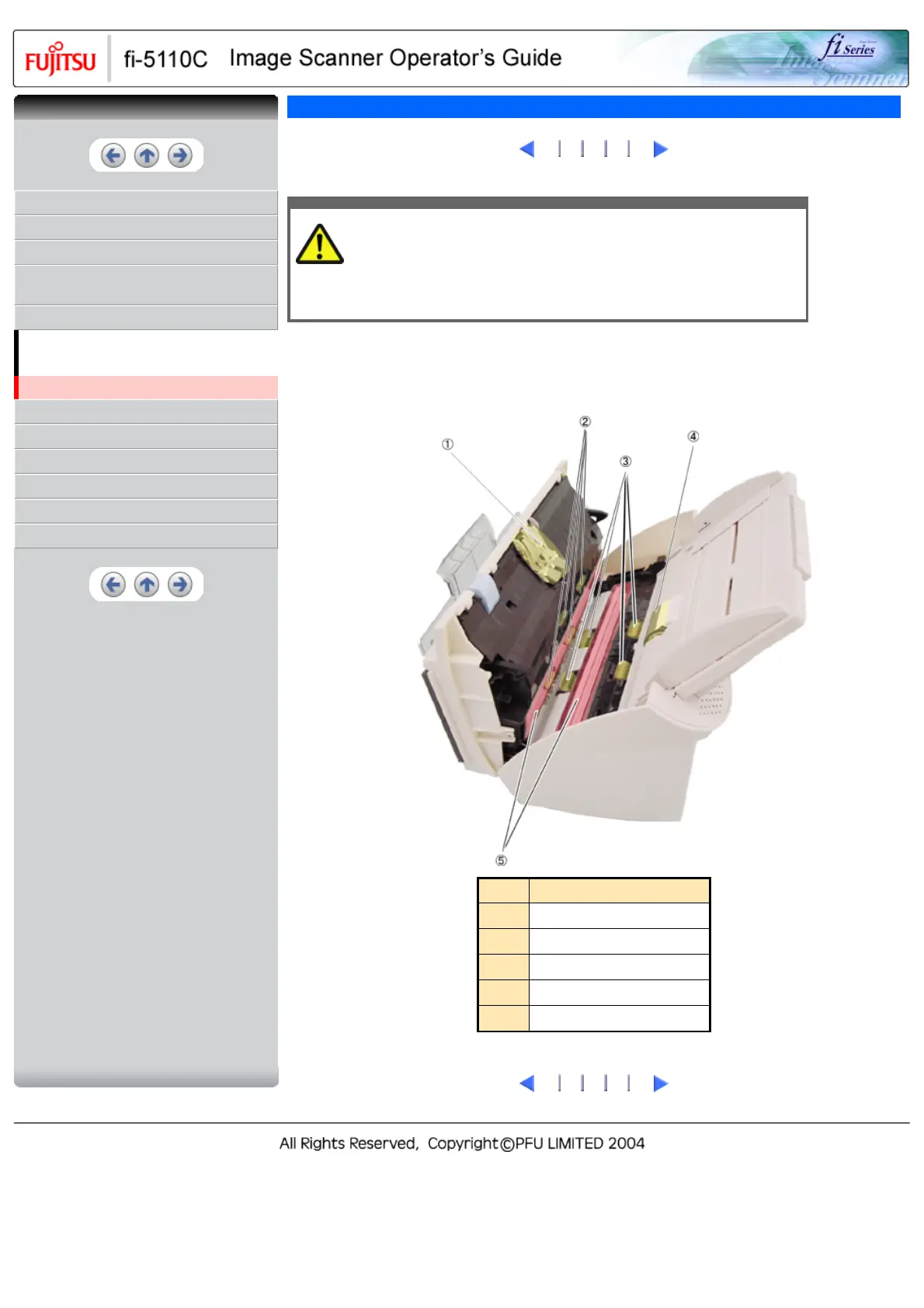
2. Clean the following locations with a cloth moistened with cleaner F1.
No.
Name
1
Pad ASSY
2
Plastic Rollers (x4)
3
Feed Rollers (x4)
4
Pick Roller
5
Glasses (x2)
1
2
3 4 5
CONTENTS



 To Next Page
 Loading...










