© Fulton Group N.A., Inc. 2022
3-10
OPERATION EDR-SOLA-IOM-2022-0216 SECTION 3
! WARNING
All information in this manual is for
reference and guidance purposes,
and does not substitute for required
professional training, conduct,
and strict adherence to applicable
jurisdictional/professional codes and
regulations.
Non-Fulton product information is for
reference purposes only. No Fulton
document should substitute for full
review of documentation available
from the component manufacturer.
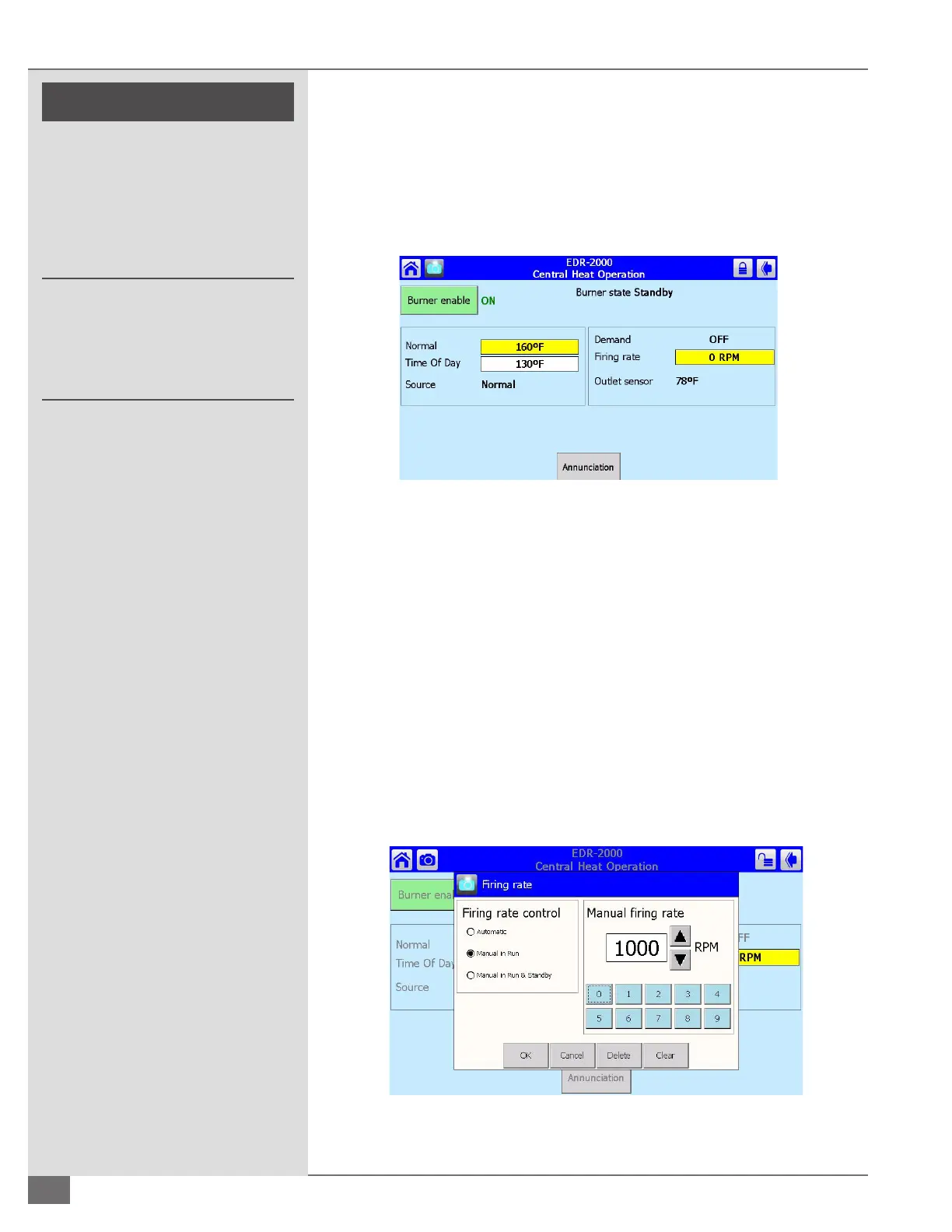
will put you into the screen shown in Figure 32. When the Setpoint or Firing Rate
requires changing, a password is required. Once the password is entered correctly,
the top right section of the screen will show the padlock unlocked as shown in
Figure 32. See Figures 33 and 34 for changing the Setpoint and Firing Rate.
NOTE: If the boiler is not placed back in automatic mode following maintenance,
the boiler will not operate properly.
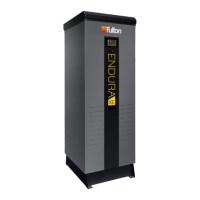
Central Heat Operation - Firing Rate Screen
In this screen (Figure 33) the control can be changed from Automatic to Manual.
When in Automatic, the control will go to the ring rate necessary to achieve the
setpoint. When in Manual, the control will go to the point that is entered into
the Manual Firing Rate box; specic RPMs can be entered. After a ring rate is
entered, press OK and the Firing Rate Screen will close and the boiler will go that
selected ring rate. When nished with maintenance, return to this screen and
place the boiler back into Automatic mode.
Central Heat Operation - Setpoint Screen
In this screen (Figure 34) the Setpoint can be changed. Press the up and down
arrow or press Clear and enter the desired Setpoint. Then press OK.
FIGURE 32 CENTRAL HEAT OPERATION SCREEN
FIGURE 33 CENTRAL HEAT OPERATION FIRING RATE SCREEN





 To Next Page