© Fulton Group N.A., Inc. 2022
3-20
OPERATION EDR-SOLA-IOM-2022-0216 SECTION 3
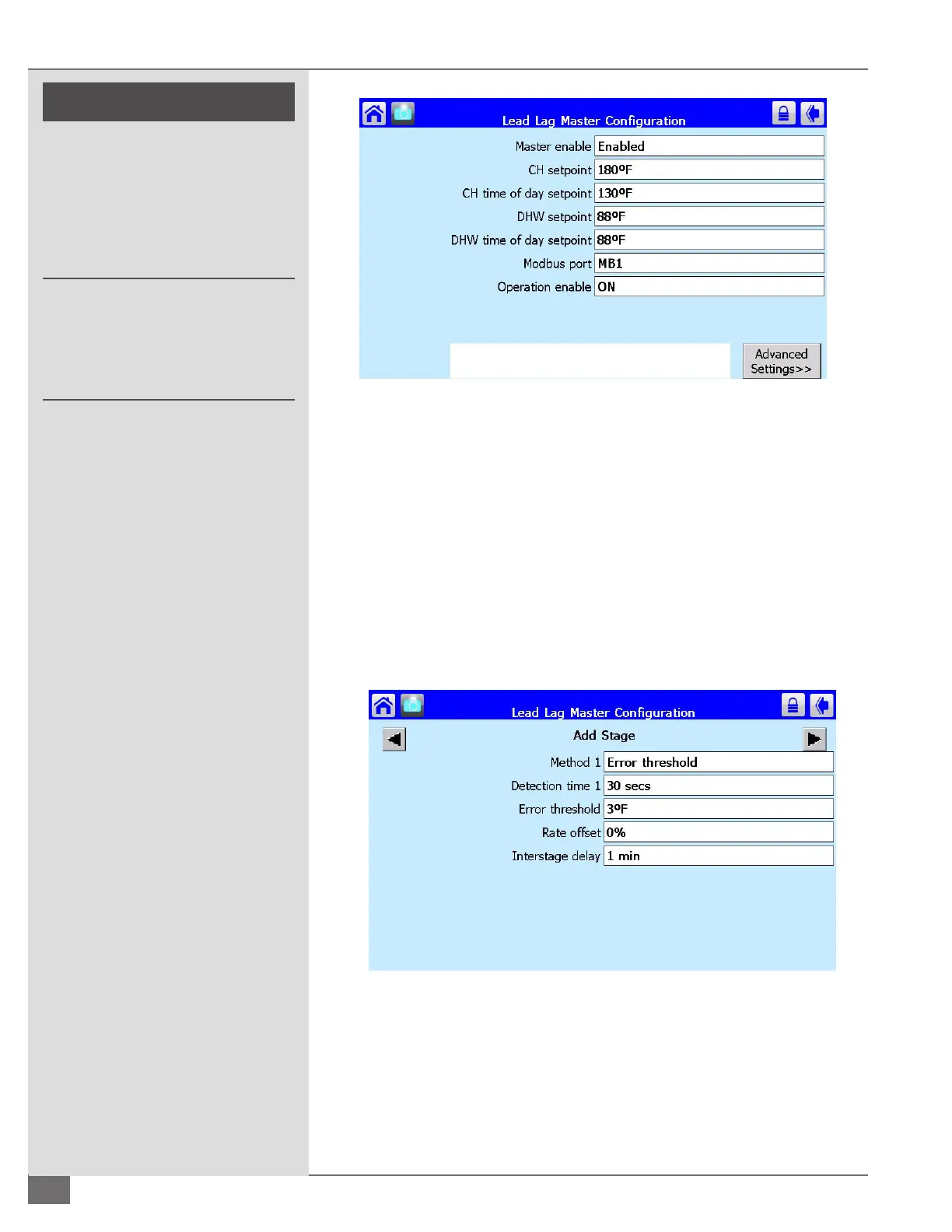
FIGURE 52 LEAD LAG MASTER CONFIGURATION
From the Lead Lag Master Conguration screen Select the box labeled Advanced
Settings in the bottom right hand corner. Use the left and right arrows to scroll to
Add stage. The row labeled Method 1 needs to be set to error threshold. Refer to
Figure 53 for factory default settings:
Interstage delay: The amount of time that must expire before the detection
begins.
Detection Time: The amount of time that must expire, after the interstage
delay time has expired, before a boiler is added.
Error Threshold: A stage is added when the error becomes excessive based
on degrees away from set point.
FIGURE 53 ADD STAGE
! WARNING
All information in this manual is for
reference and guidance purposes,
and does not substitute for required
professional training, conduct,
and strict adherence to applicable
jurisdictional/professional codes and
regulations.
Non-Fulton product information is for
reference purposes only. No Fulton
document may substitute for full
review of documentation available
from the component manufacturer.





 To Next Page