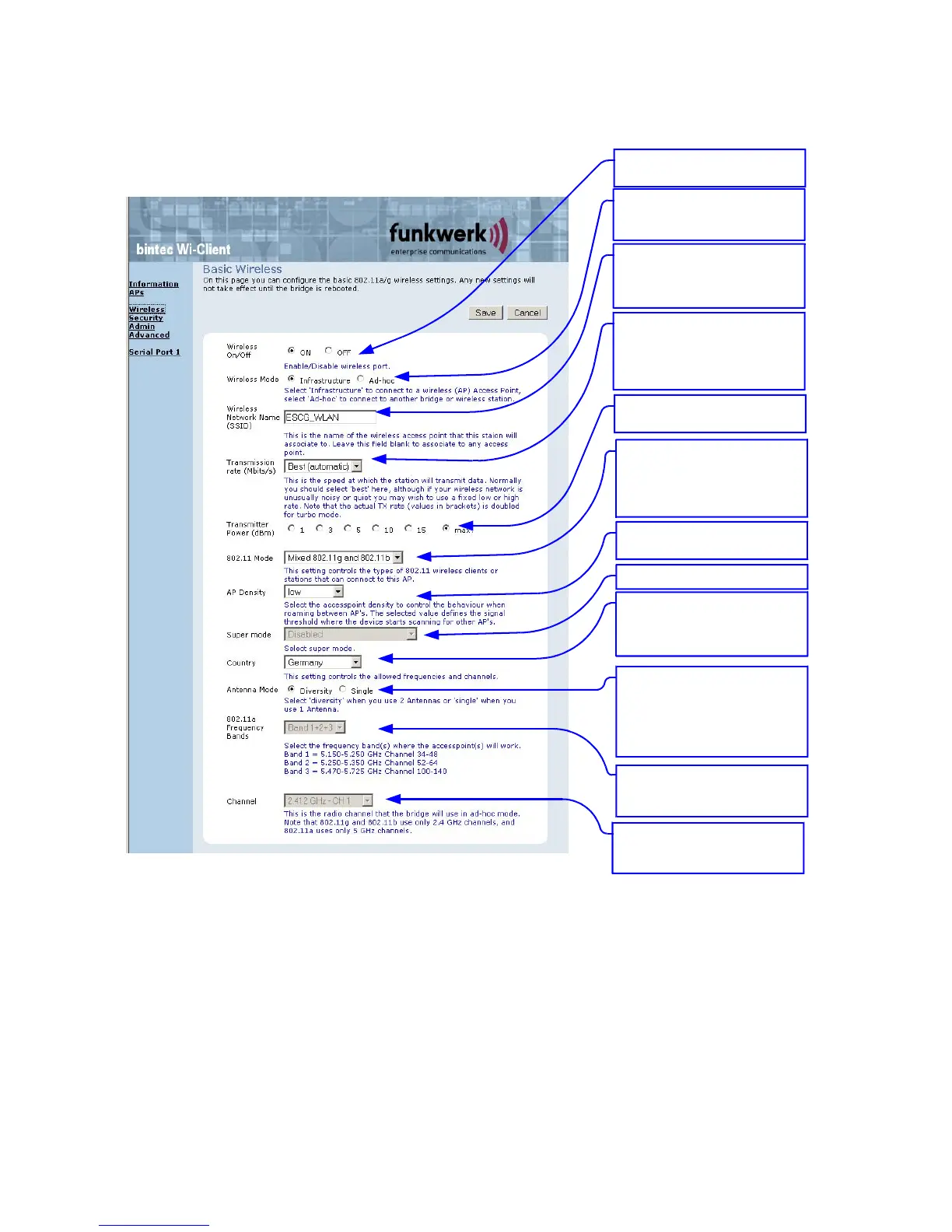
Wireless page
Configuring the WLAN interface
The WLAN radio can be switch off or
here.
Wireless mode
Infrastructure = Connect to AP
Ad hoc = peer to peer connection
SSID, Service Set Identifier.
Name of the WLAN network.
This name must be the same as the
access points SSID
Transmission rate.
Best = automatic depending on signal
strength.
If useful, you can select a fixed
bitrate.
802.11 mode.
802.11b = 2.4GHz 11MBit
802.11g = 2.4GHz 54MBit
802.11b/g = 2.4GHz 11 + 54MBit
802.11a = 5GHz 54MBit
AP Density:
influences the roaming behaviour
Super mode: is not supported
Country
Select the country in which the
ESCG is used. This determines the
number of available channels.
802.11a Frequency Bands:
possible channel restriction for the 5GHz
(802.11a) operation.
Channel
This channel has to be selected
in ad hoc mode only
Antenna mode
single = when one antenna is used
diversity = when two antennas are
used. With two antennas the radio
can select the antenna that delivers
the best signal.
The Transmit Power can be adjusted
here.
Illustration 7: Wireless page
By clicking the “Save“ button all changes on this page are stored. Use “Cancel” to undo any changes. After
clicking “Save” the program prompts the user to make a reboot. This should be done after all necessary
changes on all pages have been made.
WI-Client Manual Version 2.16 V3 10



 To Next Page