28
DVD Operation
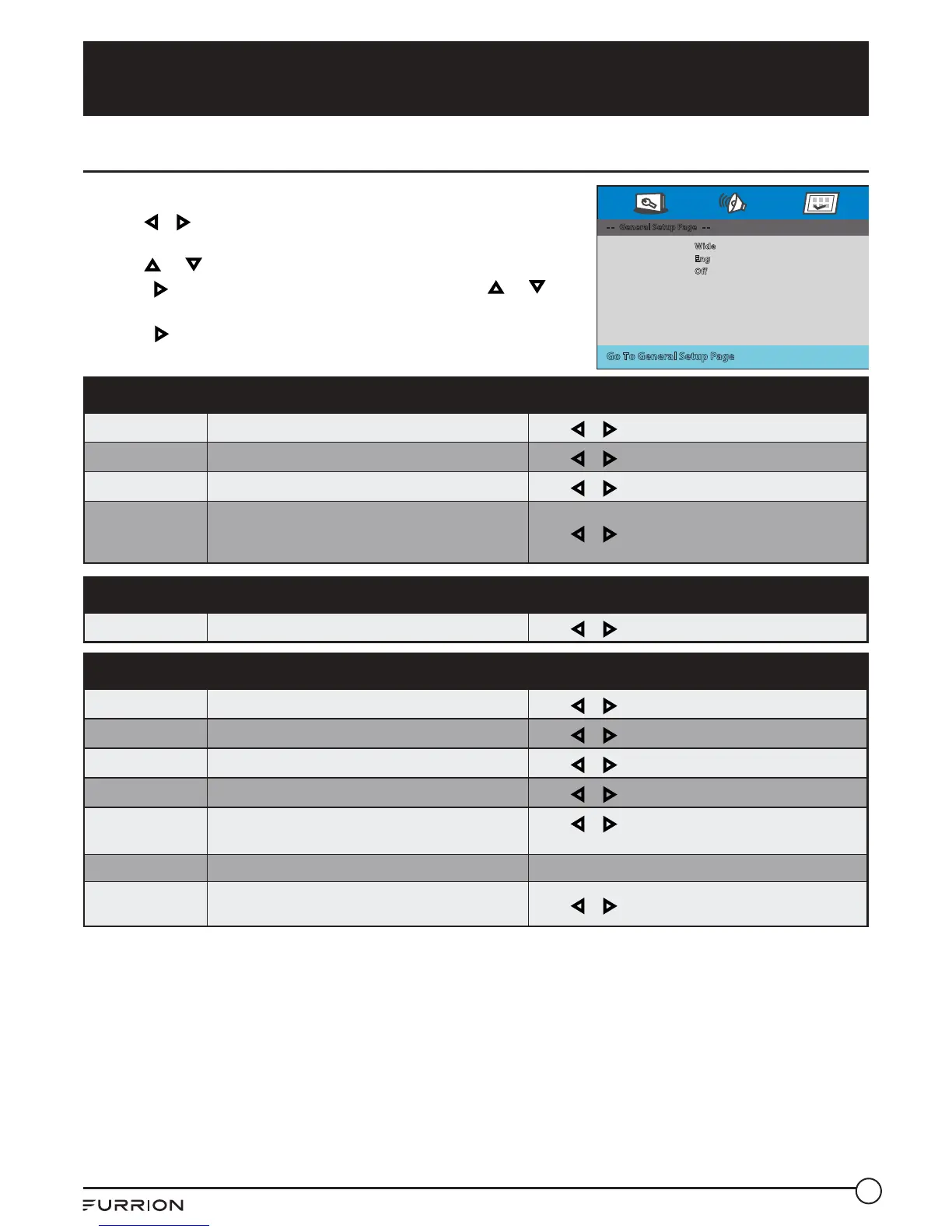
DVD Player Setup
1. During disc playback, press SETUP to go to Preference Page.
2. Use or keys to switch among General Page, Audio Setup
Page and Preference Page.
3. Use or to highlight the item you would like to reset.
4. Press to select the switch to the submenu, use or select
your desired setting.
5. Press to return to the previous menu or press SETUP at any
time to exit the setting.
General Setup
TV Display Sets the picture ratio
Press
or to select desired picture ratio
OSD Lang Sets the OSD display language
Press
or to select the desired language
Screen Saver Toggles the screensaver On or O
Press
or to set the screensaver On or O
Last Memory
Toggles the Last Memory option On & O.
Last Memory memorizes when playback is
stopped and recalls it when the disc is next played.
Press
or to set the Last Memory On or O
Sound Setup
Downmix Sets the Audio Downmix mode
Press
or to select Stereo/ LT/ RT
Preferences
TV Type Sets the Output type
Press
or to select Auto/ PAL/ NTSC
Audio Sets the preferred DVD audio language
Press
or to select the desired language
Subtitle Sets the preferred subtitle language
Press
or to select the desired language
Disc Menu Sets the preferred DVD Menu language
Press
or to select the desired language
Parental Sets a parental lock on compatible DVD discs
Press
or to select KID SAF, G, PG, PG 13, PGR,
R, NC17 or ADULT
Password Sets a password for the parental lock Use the numerical buttons to enter a password
Default
Restores the DVD player settings to it’s original
settings
Press
or to select Reset
- - General Setup Page - -
Go To General Setup Page
TV Display
OSD Lang
Last Memory
Wide
Eng
Off



 To Next Page