23
3.2 MODE SW
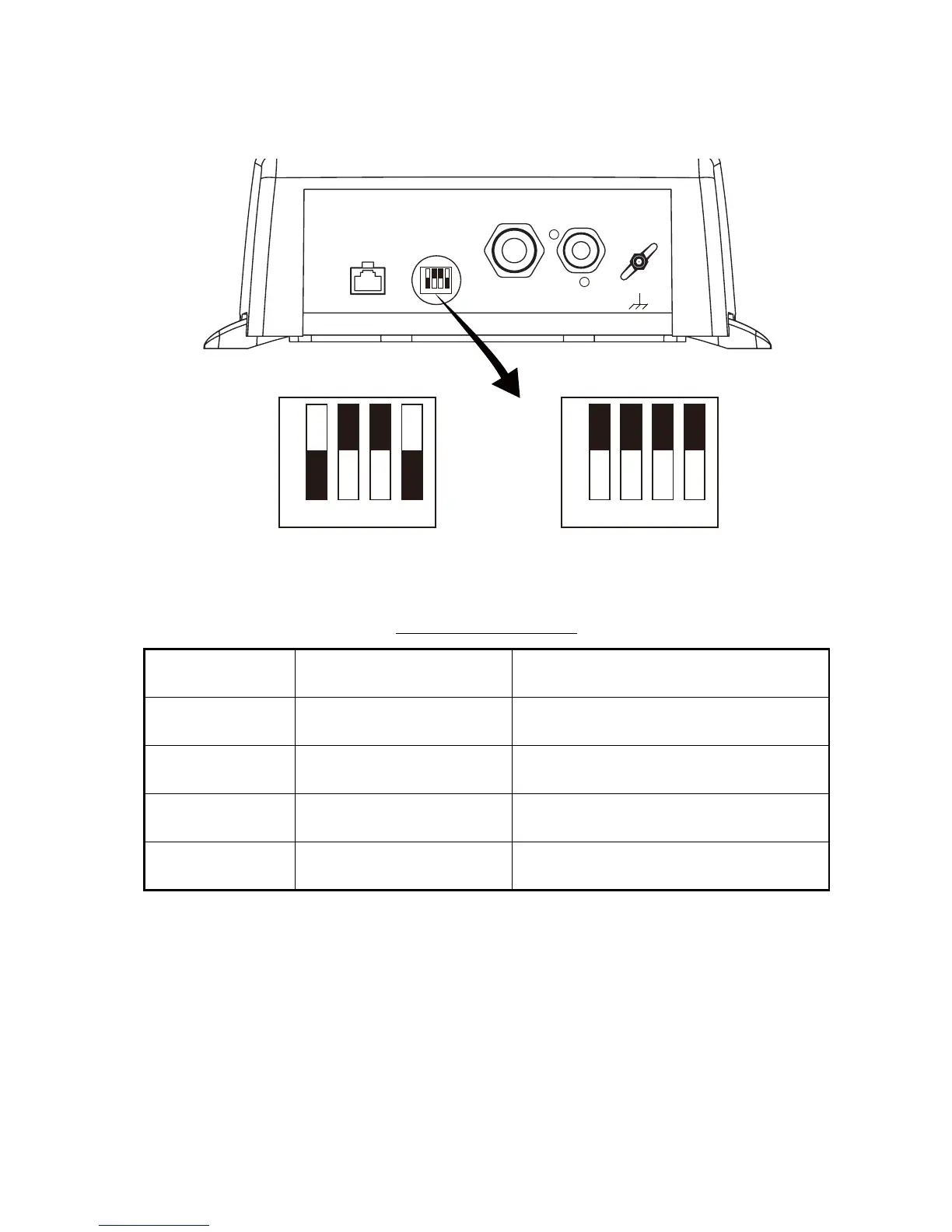
The MODE switch provides the functions described in the table below. Remove the
rubber cap to access the switch and set switches with a plastic screwdriver or the like.
For NavNet 3D, turn off all switches.
Description of MODE SW
SW
No.
Function, description Setting content
1
(Default:ON)
Power from NavNet OFF: Sounder powered on/off by NavNet
ON: Sounder not powered on/off by NavNet
2
(Default: OFF)
IP number
(Currently no use)
OFF: IP0
ON: IP1
3
(Default: OFF)
Factory testing OFF: Testing OFF
ON: Testing ON
4
(Default: ON)
Automatic IP setting
(Currently no use)
OFF: Automatic IP enabled
ON: Automatic IP disabled
NETWORK
MODE SW
1 2 3 4
XDR 12-24 VDC
1.1-0.4 A
1
+
3 GND
ON
1 2 3 4
2 -
ON
1 2 3 4
OFF
NavNet 3D MODE switch settings
ON
1 2 3 4
OFF
NavNet/NavNet vx2/NavNet TZtouch
MODE switch settings
#1: ON
#2: OFF
#3: OFF
#4: ON
ALL
OFF



 To Next Page