3. MAINTENANCE, TROUBLESHOOTING
3-3
3.3 Diagnostic Test
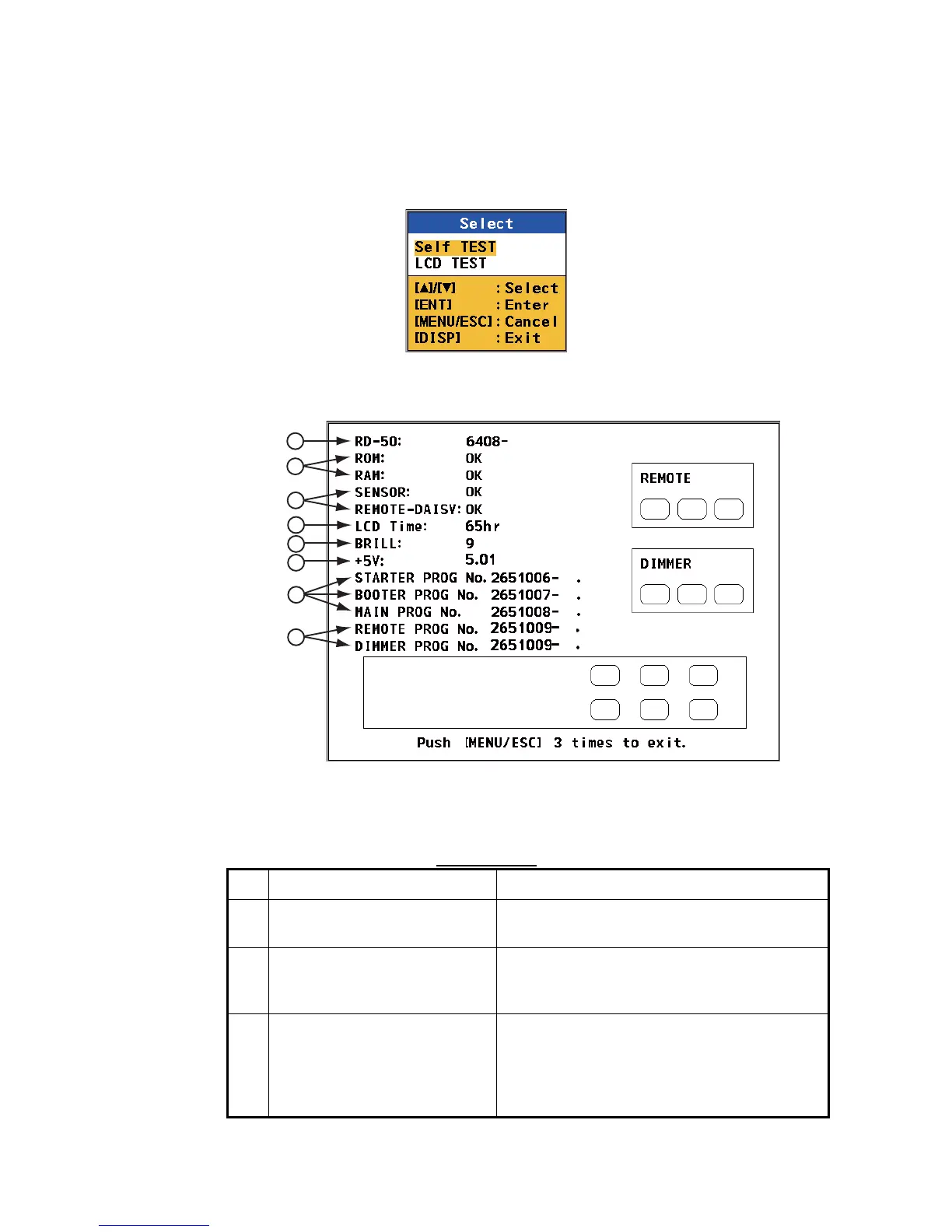
The diagnostic test checks the system for correct operation.
1. Press the MENU/ESC key to open the menu.
2. Press S or T key to select [TESTS] and press the ENT key.
TESTS options
3. Press S or T key to select [Self TEST] and press the ENT key.
Self TEST screen
Self test items
No. Items Description
1 Model name, serial number The model name "RD-50" and its serial number
are displayed.
2 ROM, RAM The results of the ROM/RAM test are displayed
as "OK" or "NG" (No Good). If any NG is dis-
played, contact your dealer.
3 Serial loopback test (SENSOR,
REMOTE-DAISY)
A test jumper is required for this test. (The re-
sult is blank if no jumper is connected.) The re-
sult of the loopback test is displayed as "OK" or
no indication (means NG). (Field technician
only)
1
2
3
4
5
6
7
8
XX
XX
XX
XX
XX
XX
XX
XX
XX
XX
XXXX
XXXX: Serial number
XX.XX: Program version number



 To Next Page