EasyManua.ls Logo

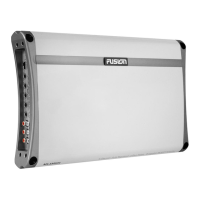
Fusion MS-AM402 - User Manual

Fusion MS-AM402
16 pages
Print Icon
To Next Page IconTo Next Page
Loading...
User/Installation Manual
FUSIONENTERTAINMENT.COM
MS-AM402
MARINE AMPLIFIER

Questions and Answers

  • J
    Jocelyn MaldonadoAug 3, 2025
    What to do if the Fusion Amplifier power LED is not on?
    • K
      kshahAug 3, 2025
      If the power LED on your Fusion Amplifier is not on, it could be due to a blown or missing fuse at the battery. Replace it with the correct type and rated fuse. Alternatively, there may be improper connections. Ensure the ground wire, power wire, and remote wires are connected to the correct terminals.
  • I
    Ian SmithAug 10, 2025
    What to do if my Fusion MS-AM402 Amplifier has an internal malfunction?
    • L
      lewischristineAug 10, 2025
      If your Fusion Amplifier may have an internal malfunction, disconnect all wires except ground, power, and remote. Then turn the amplifier on. If the protection light is still on, return it for service.
  • L
    Leslie HarrellAug 17, 2025
    Why is the power LED not on in my Fusion Amplifier?
    • L
      Lisa KellyAug 17, 2025
      If the Fusion Amplifier's power LED is not turning on, it could be due to a blown or missing fuse at the battery. Replace it with the correct type and rated fuse. Another possibility is improper connections. Ensure that the ground, power, and remote wires are correctly connected to their respective terminals.
  • V
    Victoria RussellAug 25, 2025
    What does it mean if the status LED is on for Fusion MS-AM402 Amplifier?
    • M
      Maria RomanAug 25, 2025
      If the status LED is on, it means that speaker wires are shorted. Check that there are no speaker wires shorted to any other wire and also check if any wire is shorted to ground.

Summary

Control Descriptions

Crossover Selector and Filters

Sets operation mode (OFF, LP, HP) and filters frequencies for speaker protection.

Subsonic Filter and Level Control

Adjusts subsonic frequencies and matches input signal level to head unit output.

Power, Ground, and Remote Connections

Guides on connecting power, ground, and remote turn-on wires for amplifier operation.

Installation

General Connection and Power Wiring

Details voltage checks, power cable routing, and fuse/breaker requirements.

Grounding, Speaker Load, and Remote Turn-on

Covers proper grounding, minimum speaker impedance, and remote turn-on wiring.

Inputs and Gain Setup

Level Control Adjustment

Explains how to match amplifier input level to head unit output for optimal gain.

Trouble Shooting

Power LED Not ON

Troubleshooting steps for when the power indicator LED is not illuminated.

Status LED ON Issues

Diagnosing issues when the status LED is on, including overheating or shorts.

Fusion MS-AM402 Specifications

General IconGeneral
BrandFusion
ModelMS-AM402
CategoryAmplifier
LanguageEnglish

Related product manuals