118
)XQFWLRQVRI0RGHO0HQX+HOLFRSWHU)XQFWLRQV!
*<52PL[LQJ
7KLVIXQFWLRQXVHGWRDG
FDQEHVZLWFKHGZLWKHDFK
FRQ
H
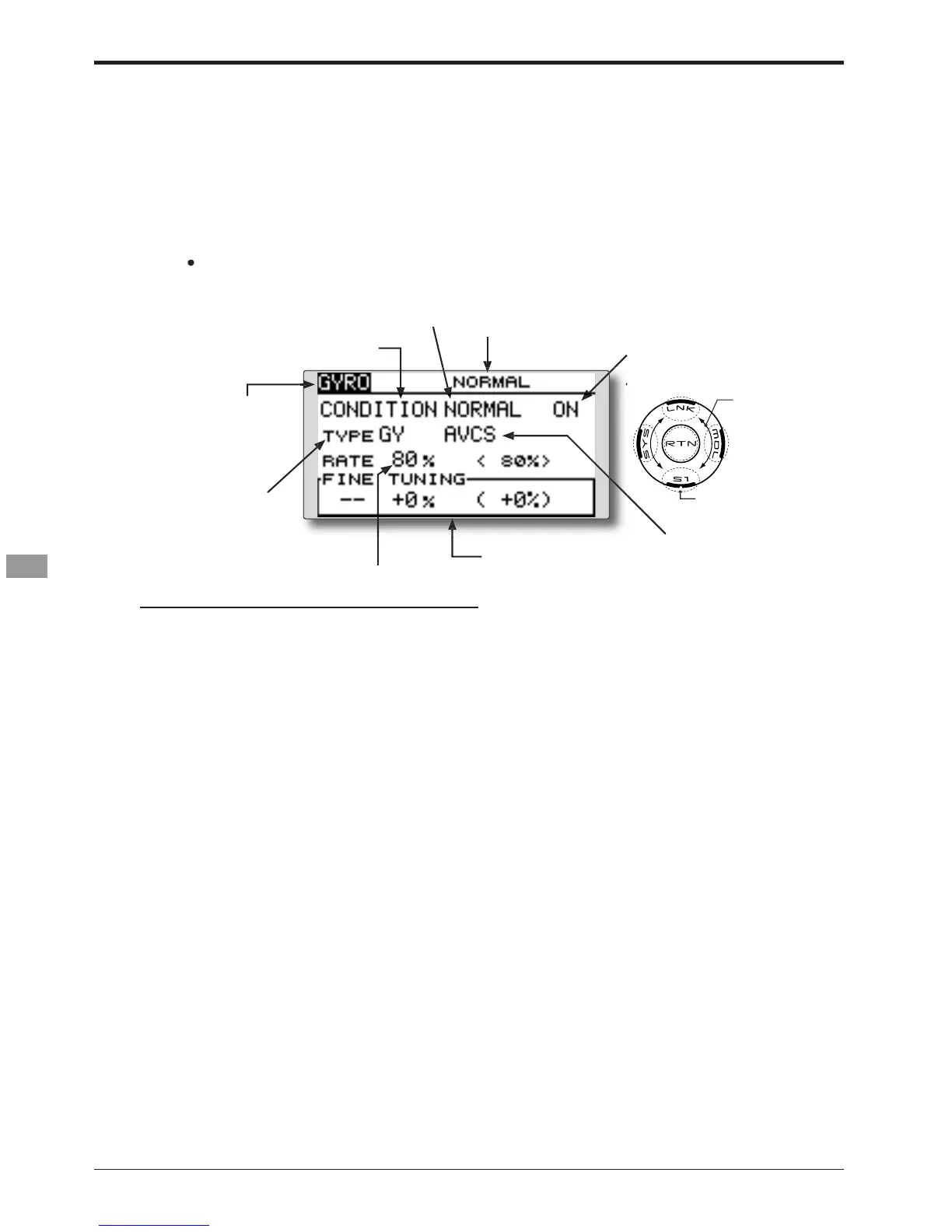
setup screen shown below by touch
VHOHFWHGFRQGLWLRQQDPH
our receiver.
Always set to [--] both
function at the Function menu in
RQ
Move the cursor to the gyro type select
tem and touch the RTN button to sw
he data input mode. Select the
NORM]: When other than Futaba GYA
ouch the RTN button to chan
e.
:KHQD)XWDED*<$J\URLVXVHGDQG>*<@W\SHLVVHOHFWHG
he sensitivity set value is directly read in both the AVCS
eration mode and return to the cursor
Move the cursor to the rate
V
Move the cursor to the [--] item and touch
:KHQWKH571EXWWRQLVWRXFKHGIRURQHVHFRQGWKH
VHQVLWLYLW
LVUHVHWWRWKHLQLWLDOYDOXH
T



 To Next Page