213
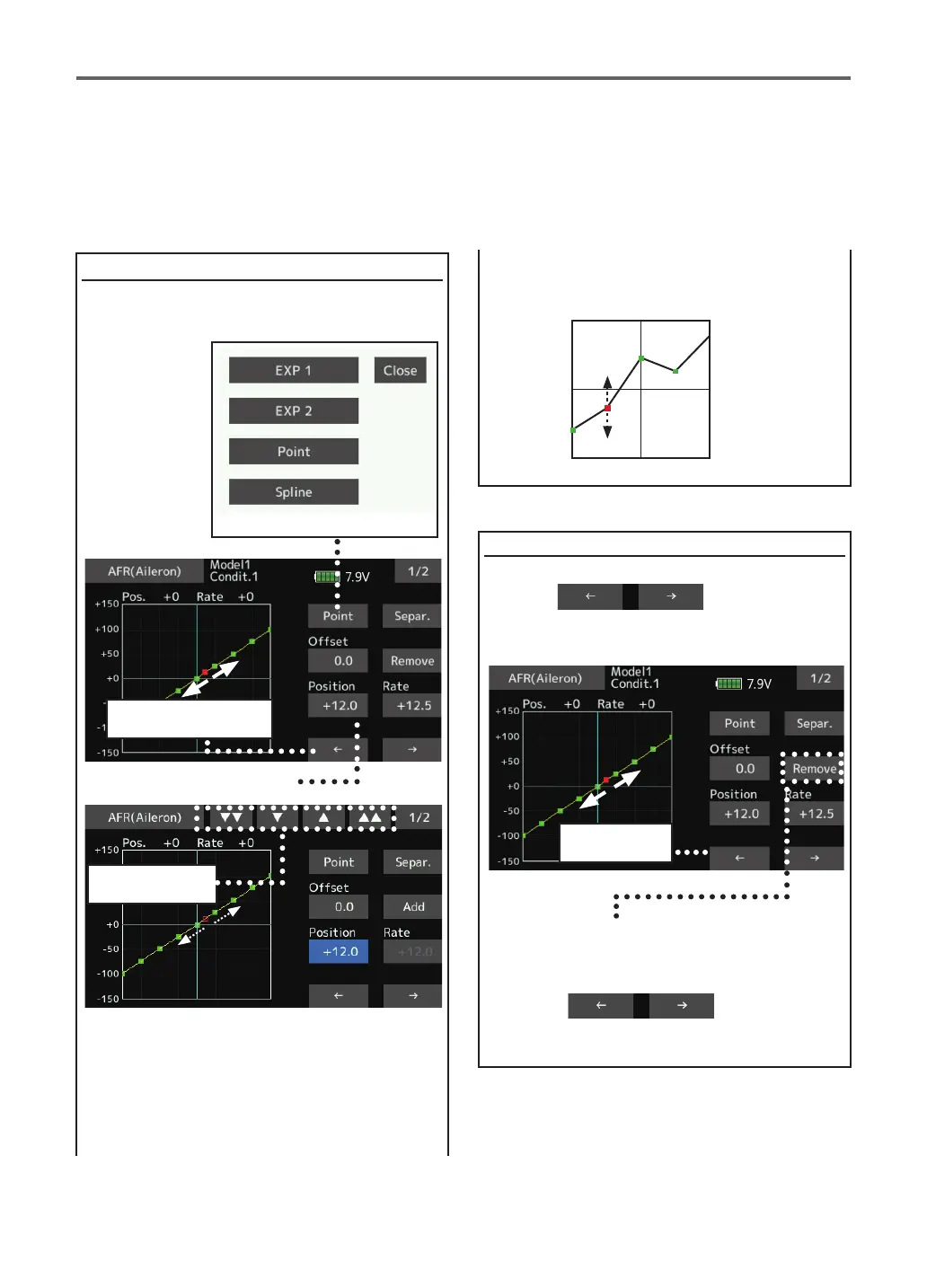
Point addition method
Point deletion method
Point curves or spline curves of up to 11/17 points
can be used. (Initial value: 7/9 points) The set
points can be freely increased, decreased, and
oset.
1.Open the screen of a mixing curve with the
curve function.
2. Tap the [Remove] button. (The selected
point becomes an outlined point □ )
3. Use the move between points button [← ]
or [→ ].
*The point is deleted.
2.Tap the "Position" button.
3. Tap the "▼▼" "▼" "▲" "▲▲" button and
select the position (mark □) you want to
add.
1. Use the move between points button [← ]
or [→ ]
and select the point. (The red point ■ is the
selected point.)
4. When the "Add" is tapped, the point is
added.
(
□
)
→
(
■
)
*A new point is created.
5. Press "Rate" and use the up/down arrows to
adjust the rate points up or down.
The red point
(■)
moves (to green point)
Move between
point
The kind of mixing curve
A red mark
( □ )
moves freely



 To Next Page