77
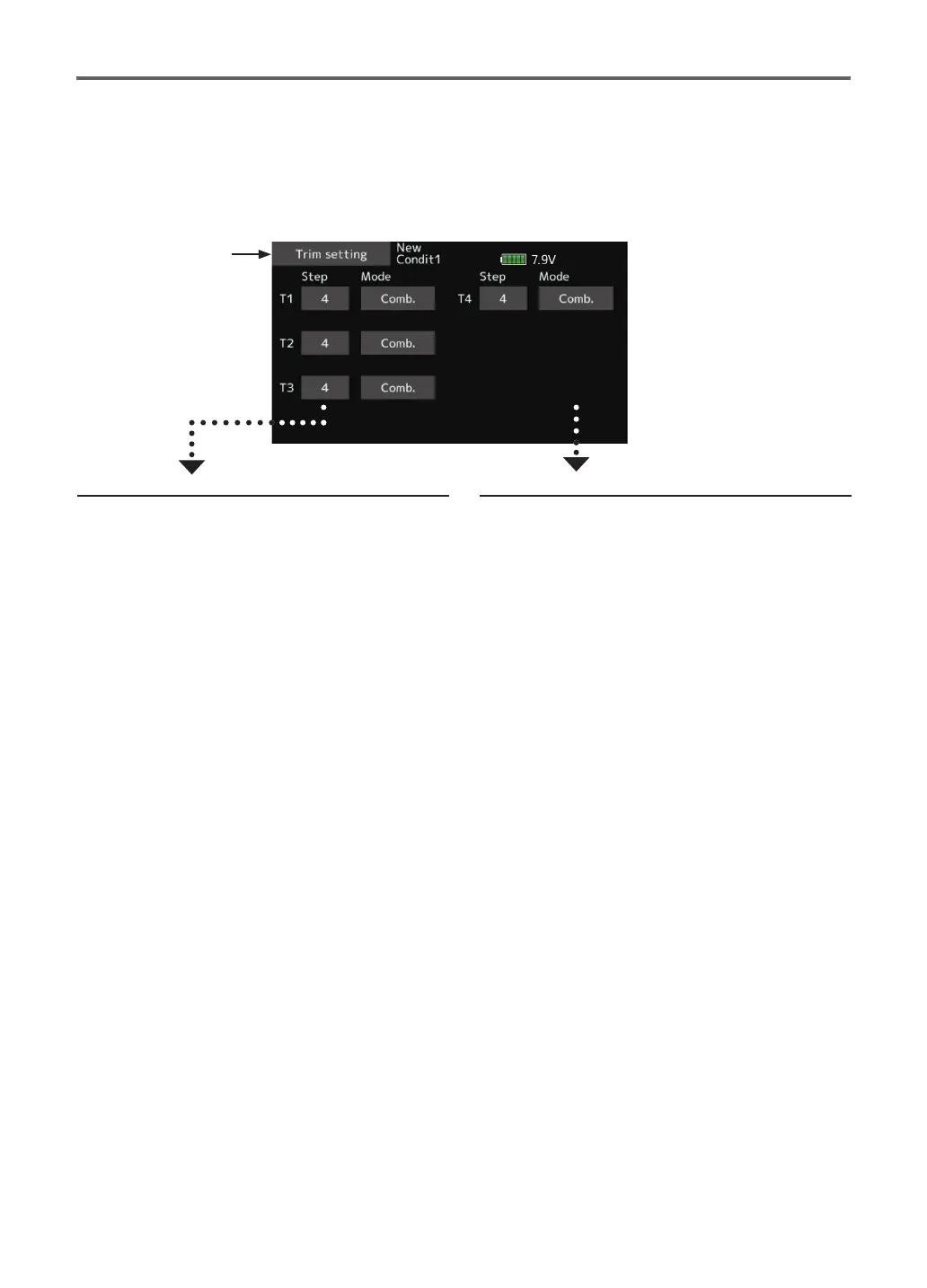
Trim setting
Digital trim settings
This function adjusts the digital trim's control step
amount and operation mode (T1-T4).
Control step amount setting
1. To set the control step amount, first tap the
screen to the data input mode.
Set the control step amount by tapping the
"
▲▲
" "
▲
"
"
▼▼
" "
▼
" button.
Initial value: 4
Adjustment range: 1~200
(When the value is tapped, the control step
amount is reset to the initial value.)
*When the value is made large, the change per step becomes
larger.
Separate/combination mode selection
[Comb.]: Combination mode. The trim data
are reected at all the ight conditions.
[Separ.]: Separate mode. Trim adjustment for
each ight condition.
● Select [Trim setting] at the linkage menu and call
the setup screen shown below.
When the flight conditions are set, the trim
operation can be coupled with any of the conditions
selected through combination mode.
●Return to Linkage
menu


 To Next Page