28
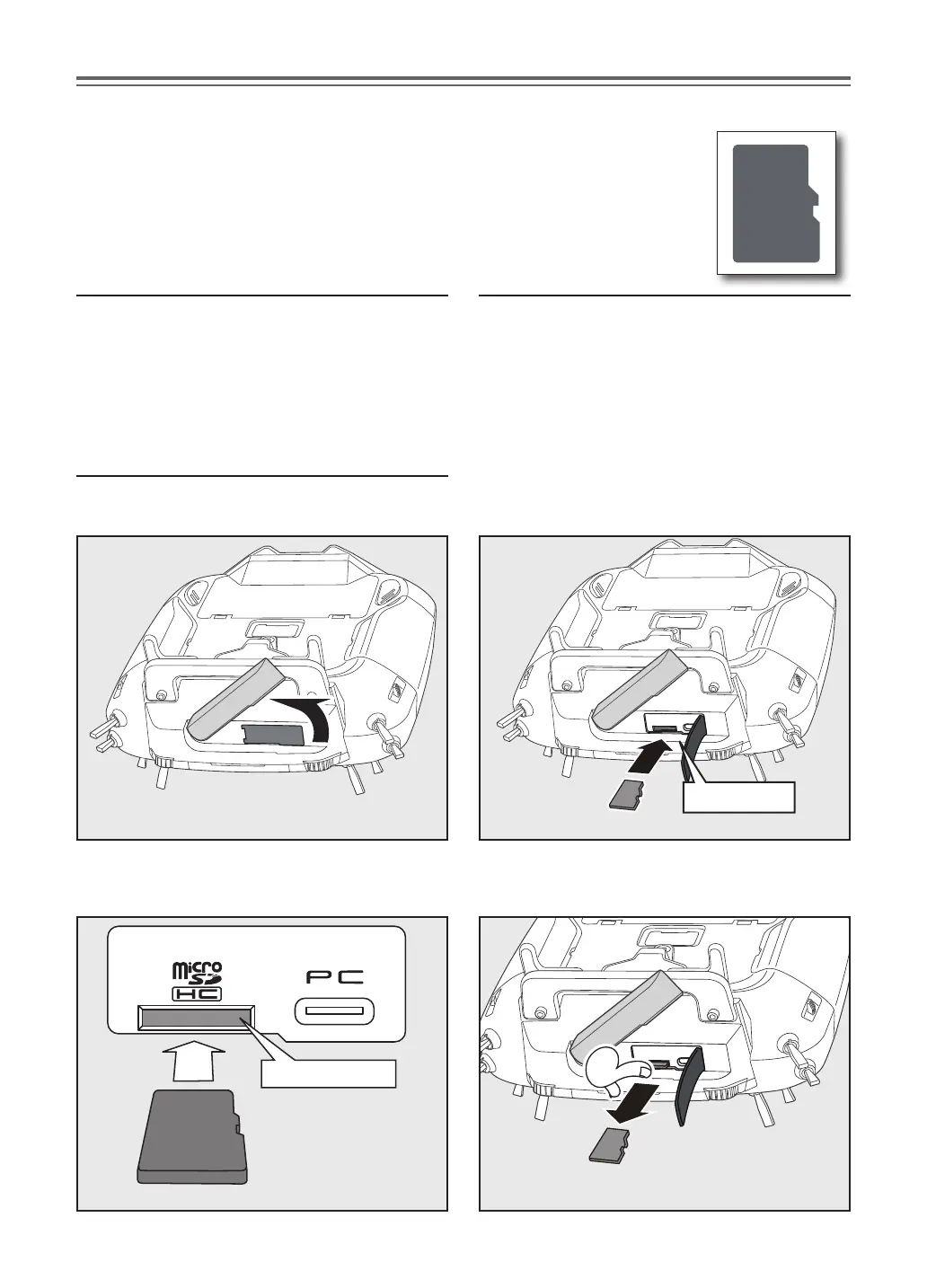
1 ) Rotate the antenna. 2 ) Open the rubber cover and insert the
micro SD card into the micro SD card slot.
Card slot
SD card slot
*Pay attention to the proper
orientation of the SD card, as
shown here.
3 ) When the micro SD card is pressed in once
again, the card will be released from the
card slot and can be removed.
micro SD card (secure digital memory card) (not included)
The T16IZ transmitter model data can be stored by using any commonly
found micro SD card. When T16IZ update software is released, the software is
updated using an micro SD card. The T16IZ is capable of using SD and SDHC
cards (SD:32MB-2GB SDHC:4GB-32GB).
micro SD card reader/writer
Saving model data and update les (released from
Futaba) into the micro SD card, you can use those
files on your T16IZ transmitter. Equipment for
reading and writing SD cards is available at most
electronics stores.
Stored data
When you have a problem of saving or reading data
after a long period of use, please get a new micro
SD card.
*We are not responsible for, and oer no compensation for,
memory card data that fails or is damaged for any reason.
Be sure to keep a backup of all important data stored in your
micro SD card.
Inserting/removing the micro SD card
The micro SD card slot is shown in the next gure.


 To Next Page