WATERPROOF WIRELESS SPEAKER
G-DROPG-DROP
GET IN CONTROL
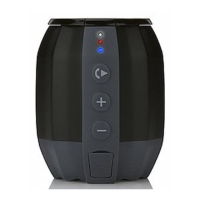
POWER ON / OFF
Press the Power Button to turn G-DROP on and again to turn G-DROP off.
VOLUME CONTROL
Increase or decrease the volume by using the + or – buttons. The White LED
will flash once each time indicating the volume change. When maximum or
minimum volume is reached, the White LED will not flash. G-DROP will
remember the volume setting when it is turned off.
MUSIC PLAYBACK
• Pressing the PLAY Button while in Bluetooth mode will play or pause the
audio playback on your Bluetooth device.
• Pressing the >> Button while in Bluetooth mode will skip to the next
track on your Bluetooth device.
• Pressing the >> Button quickly 2x while in Bluetooth mode will skip to
the last track on your Bluetooth device.
EQUALIZER (EQ)
G-DROP has 2 EQ presets (EQ1 / EQ2). Press the EQ Button to toggle between
them. The White LED will flash 1 or 2 times when the EQ Button is pressed to
indicate preset EQ1 or EQ2, respectively. The default setting is EQ1.


 To Next Page