8
1.5.2. Indicator function of control panel
1.5.2.1. Indicator status display of LCD control panel
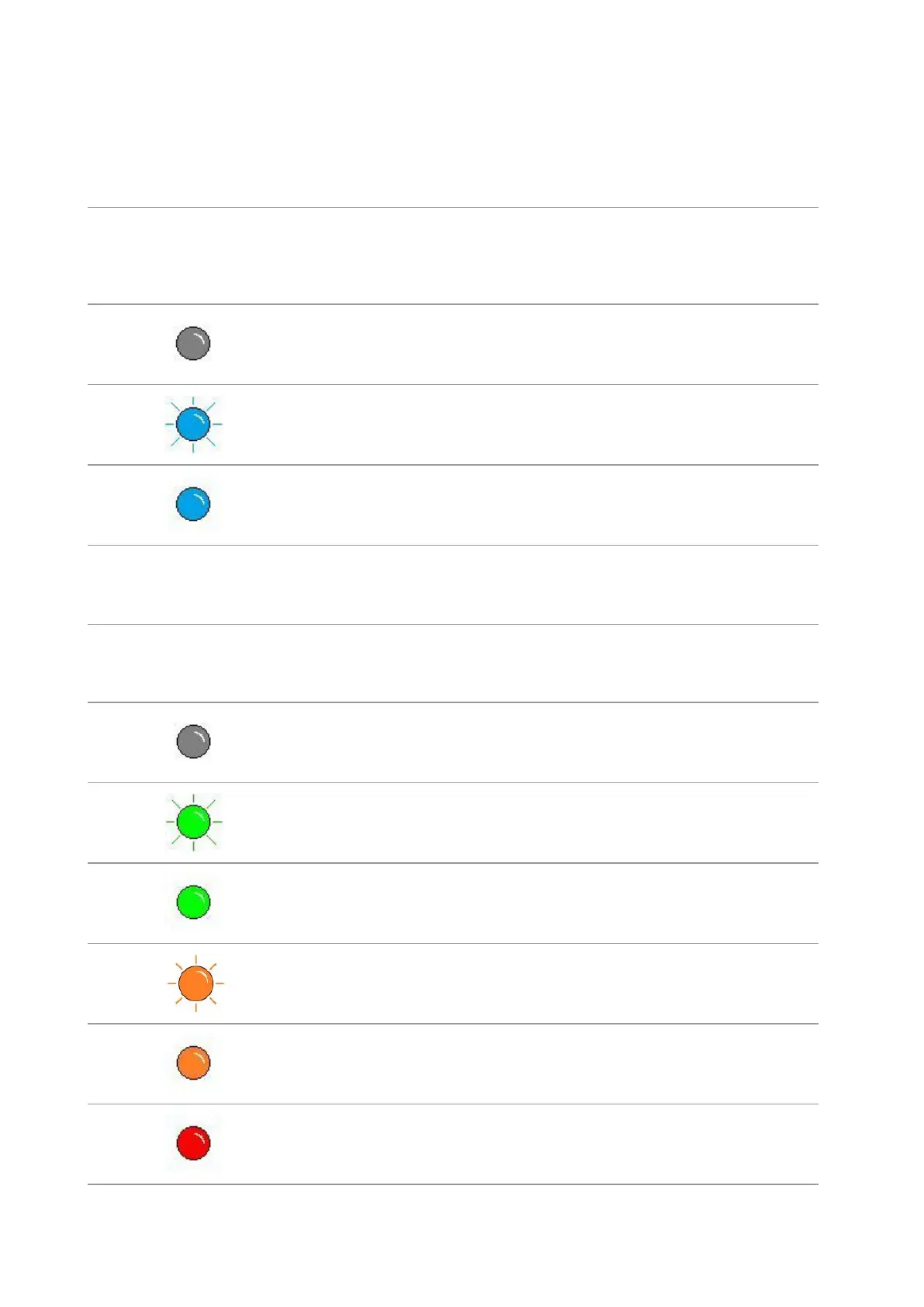
Display meanings of Wi-Fi / save toner indicator are as follows:
Display of
Wi-Fi/save
toner
indicator
Status description
(applicable to Wi-Fi
model only)
Status description (applicable
to non-Wi-Fi model only)
Wi-Fi disconnected and
sleep mode
Turn save toner state function and
sleep mode
Blue indicator
normally on
Turn on save toner function
Display meanings of toner cartridge / status indicator are as follows:
Display of toner
cartridge/status
indicator
Warming up, printing, print cancelling
Green indicator
normally on
Orange indicator
normally on
Toner cartridge error (uninstalled ink cartridge,
unmatching ink cartridge, invalid toner
cartridge)
Red indicator normally
on
Printer errors such as paper error (paper out,
paper jam, paper feed failure), opened front
cover


 To Next Page
 Loading...