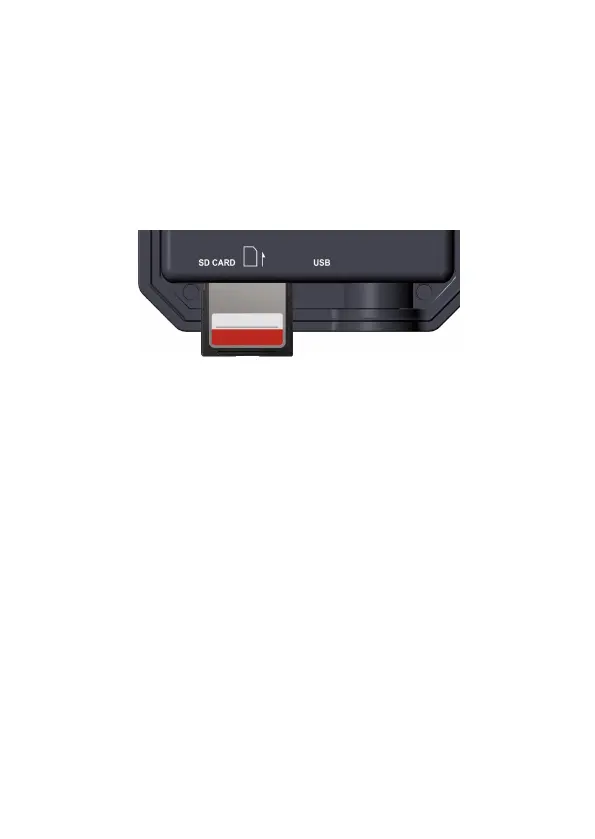
5.2. Inserting the SD Card
For the E8P Max, you don't need to insert any SD card.
For the E8P, E8PCF and E8PWF models: insert the SD card
(with the camera powered off), before beginning to operate the
camera. Don't insert or remove the SD card when the camera is
powered on or in the surveillance mode (Figure 7).
Figure 7: Inserting the SD Card
The following describes how to insert and remove the SD card:
Insert the SD card into the card slot with its label side
upwards. A "click" sound indicates that the card is installed
successfully. If the wrong side of the card is facing up, you
will not be able to insert it without force, there is only one
correct way to insert cards. If the SD card is not installed
correctly, the device will not display an SD card icon on the
screen in ON mode. Formatting the SD card by using the
camera's "Format SD Card" menu option before first use is
recommended, especially when a card has been used in
other devices.
To take out the SD card, just gently push in the card (do not
try to pull it out without pushing in first). The card is
released from the slot and ready to be removed when you
hear the click. Be sure the camera's power is switched OFF
before inserting or removing SD cards or battery.



 To Next Page