nüvi 2505 Quick Start Manual 3
3
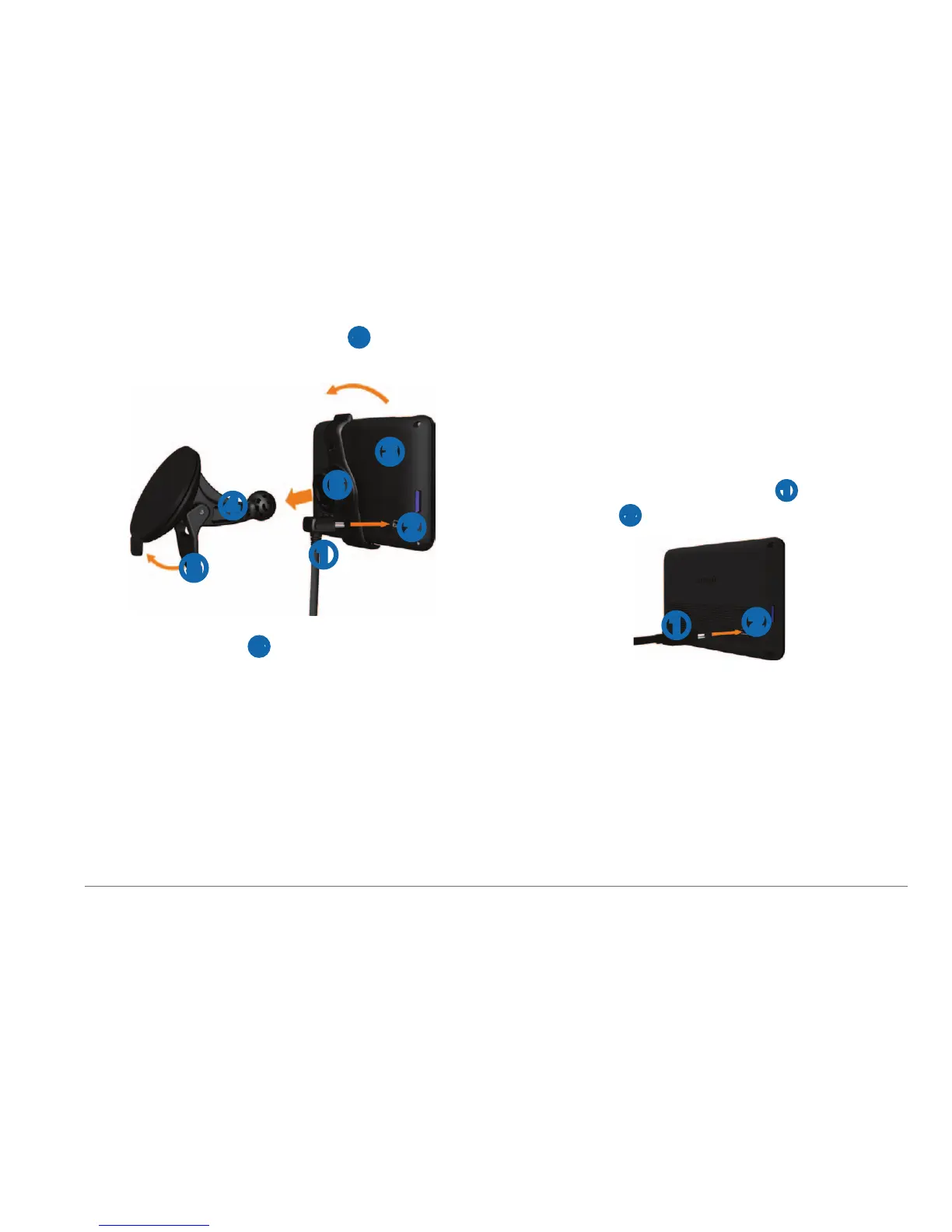
While pressing, ip the lever ➎ back toward
the windshield.
➊
➋
➍
➌
➎
➏
4
Snap the mount ➏ onto the suction cup.
5
Fit the bottom of your device into the mount.
6
Tilt your device back until it snaps into place.
7
Plug the other end of the vehicle power
cable into a power outlet in your vehicle.
8
If necessary, connect the external antenna to
the vehicle power cable and secure it to the
windshield using the suction cups.
About myDashboard
You can use myDashboard to register your
device, check for software and map updates,
access product manuals and support, and more.
Setting Up myDashboard
1
Connect the mini-USB cable ➊ to the mini-
USB port
➋ on the device (page 2).
➊
➋
2
Connect the mini-USB cable to the USB port
on your computer.
3
Go to www.garmin.com/dashboard.
4
Follow the on-screen instructions.
Registering your Device
1
From myDashboard, click Register Now.



 To Next Page