4 nüvi 310/360 Owner’s Manual
BASIC OPERATION
Resetting Your nüvi
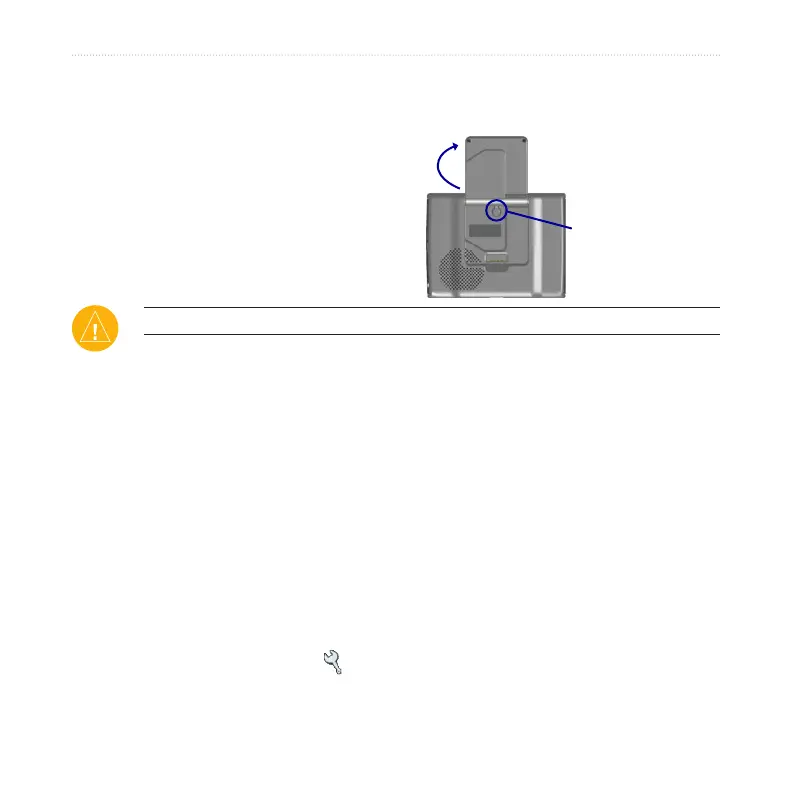
If your nüvi locks up (freezes up), turn off the nüvi, and then turn it back on. If this
does not help, reset your nüvi.
➊
➋
To reset the nüvi:
1. Raise the antenna.
2. Press the Reset button.
Clearing User Information
CAUTION: If you use this function, you are deleting all user-entered information.
1. Hold your finger on the upper-right corner of the nüvi’s screen while you turn
on the nüvi. Keep your finger pressed until the pop-up window appears.
2. Touch
Yes. All factory settings are restored. Your Recent Selections and
audible bookmarks are also deleted.
Using the Anti-Theft Feature
The Garmin Lock™ is an anti-theft feature. You can set a 4-digit PIN (personal
identification number) that must be entered every time the nüvi is powered on; and
you can set a security location. Write down your PIN, and keep it in a safe place. If
you forget your PIN, you can go to your Security Location to unlock the nüvi.
1. Open the GPS antenna.
2. On the Menu page, touch Settings > Garmin Lock.



 To Next Page