34 nüvi 310/360 Owner’s Manual
USING AN FM TMC TRAFFIC RECEIVER
Viewing Traffic Incidents
1. On the Menu page, touch to display a list of traffic incidents.
2. Select an item to view details.
3. Select an option.
Avoiding Traffic
The Map page displays when there is a traffic incident on your current route or
on the current road. When you are following a route, touch to avoid the traffic.
1. From the map page, touch .
2. Select an item to view details.
3. Touch Avoid.
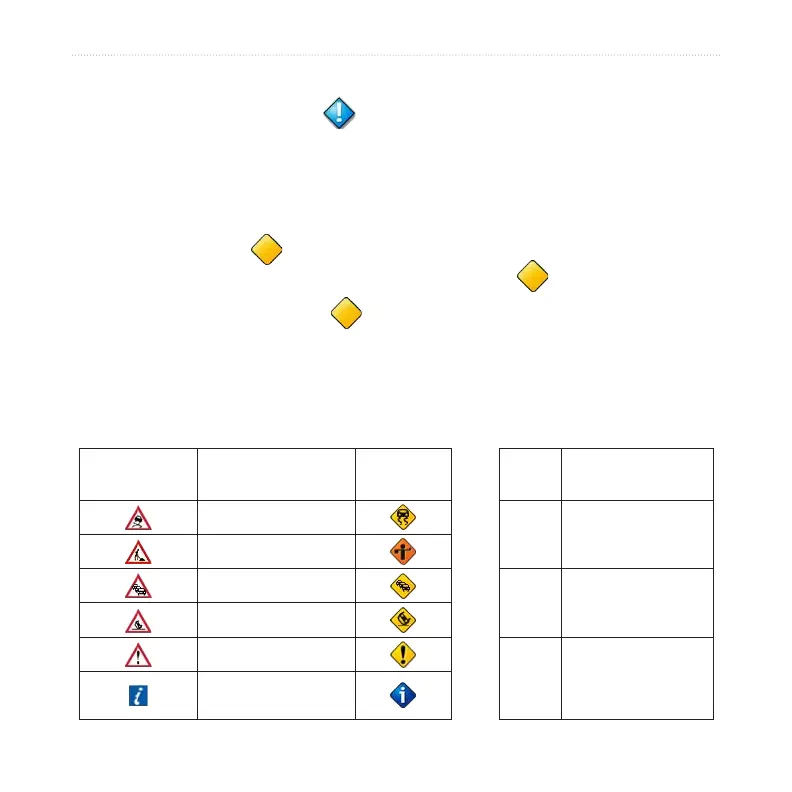
Traffic Symbols and Color Codes
International Meaning
North
American
Color
Severity and
Meaning
Road Condition
Green
Low; traffic is
flowing normally
Road Construction
Congestion
Yellow
Medium; traffic is
congested
Accident
Incident
Red
High; traffic is
heavily congested
or stopped
Information



 To Next Page