24 nüvi 310/360 Owner’s Manual
TRAVEL KIT
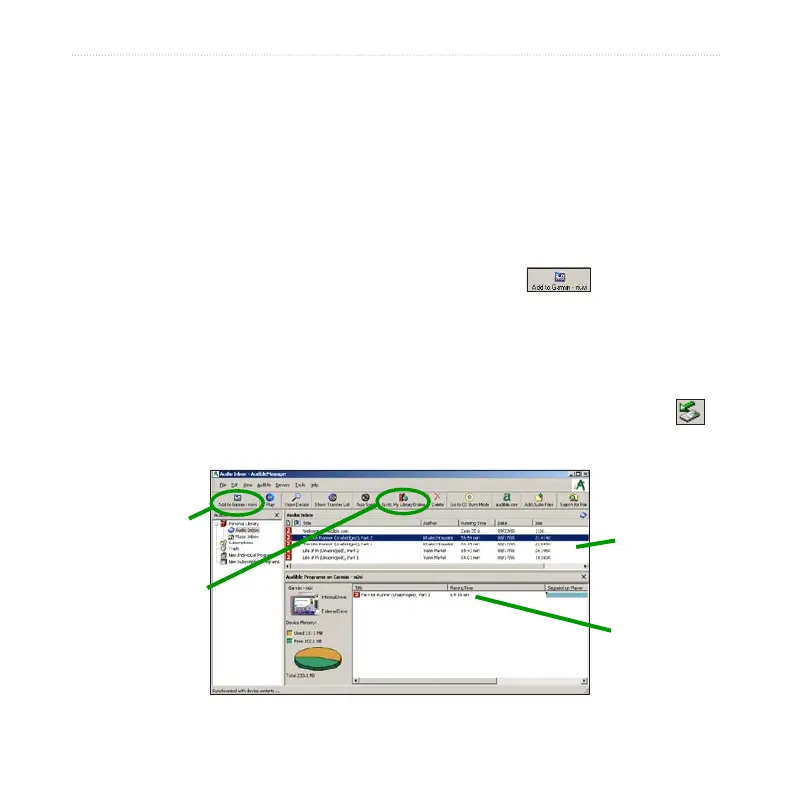
Step 4: Transfer the book to your nüvi
Refer to AudibleManager’s Help file for detailed instructions about downloading
books to your computer and loading them on your nüvi. You must first activate your
nüvi before transferring books.
1. Open AudibleManager.
2. Select the Internal Drive or External Drive (SD card) in the lower portion of the
window.
3. Select the book title. Click the Add to Garmin - nüvi button in the top
left corner.
4. Select how much of the book you want to load. You can load small sections at
a time to save memory. Click OK. AudibleManager transfers the book to your
nüvi.
5. When you are finished, double-click the
Unplug or Eject Hardware icon
.
Click Stop, and then click OK.
AudibleManager Program
Books in your
AudibleManager
library
Book loaded
on your nüvi
Add to Garmin -
nüvi icon
Go to My Library
Online icon



 To Next Page