5
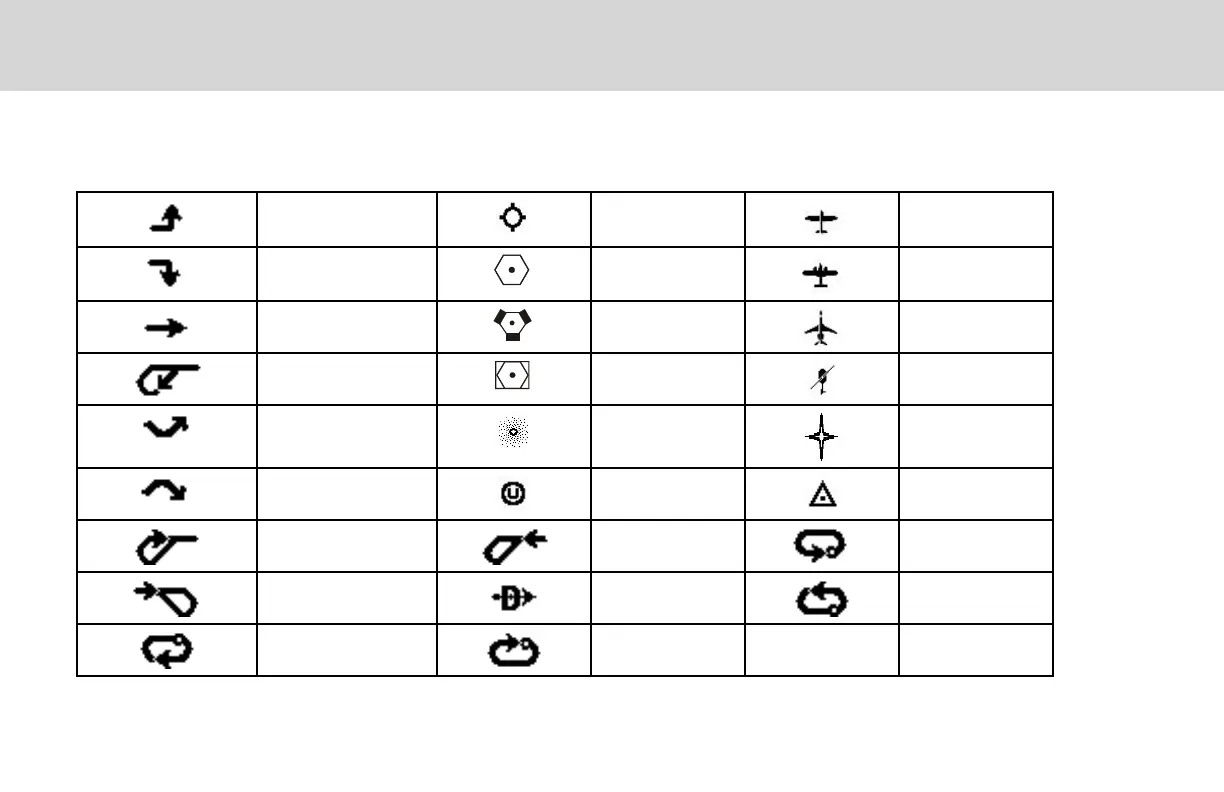
The following symbols are used on the map display to depict active legs of flight, waypoint types, and your aircraft.
DISPLAY SYMBOLS
Turn Left for next flight
plan leg
Airport Ownship - Single
Turn Right for next
flight plan leg
VOR Ownship - Twin
No course change VORTAC Ownship - Jet
Left Procedure Turn
Outbound
VOR-DME Ownship -
Helicopter
Arc to the Left NDB Flight Plan
Waypoint
Arc to the Right User Waypoint Intersection
Left Procedure Turn
Inbound
Entering Procedure
Turn Left
Left Hand Holding
Pattern Inbound
Entering Procedure Turn
Right
Direct-To Left Hand Holding
Pattern Outbound
Right Hand Holding
Pattern Outbound
Right Hand Holding
Pattern Inbound


 To Next Page