NEAREST ICONS
From the Main Menu, touch the
icon to access the Nearest Page.
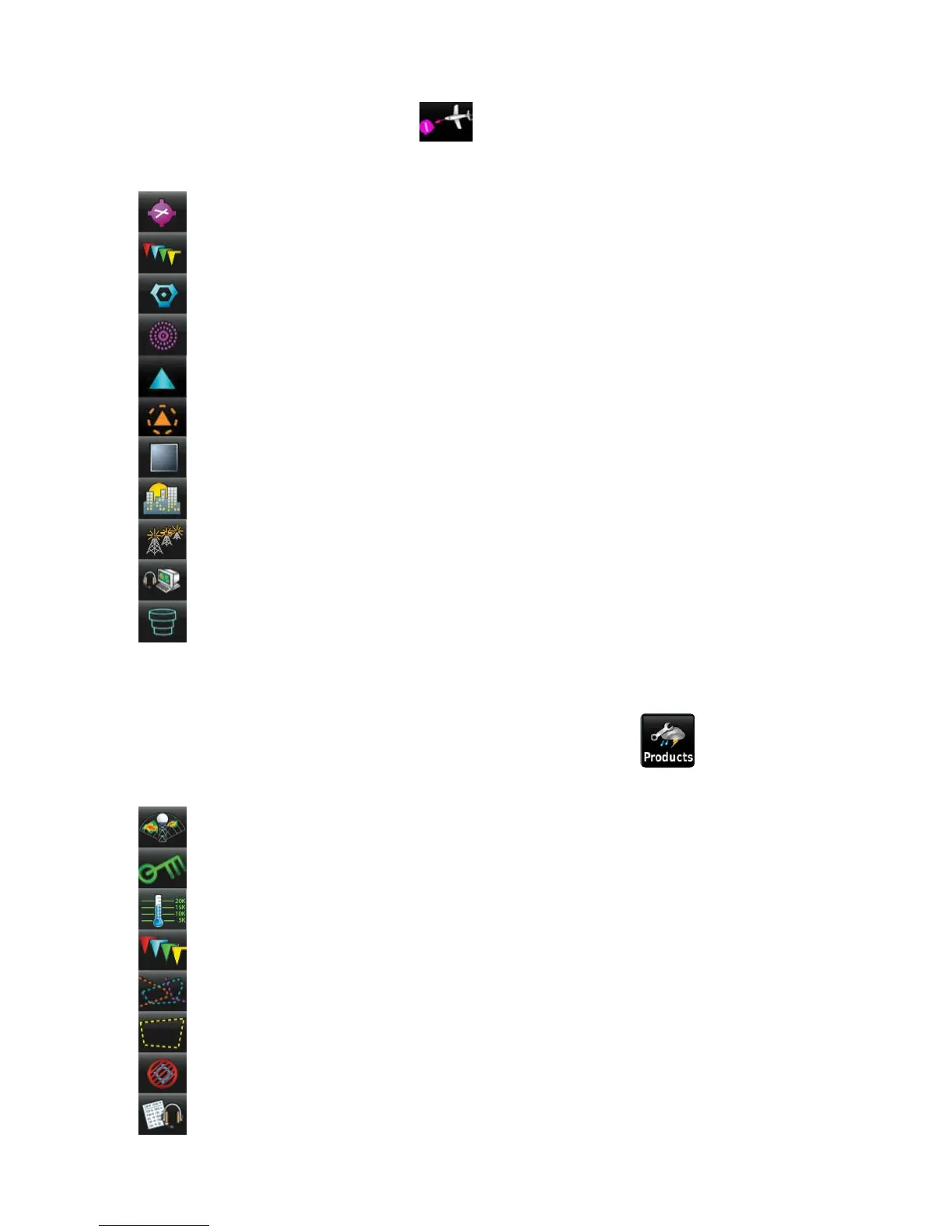
Touch these Nearest Group Icons to display the associated function:
Airport Displays nearest airports.
Airport WX Displays nearest airport weather.
VOR Displays nearest VORs.
NDB Displays nearest NDBs.
Intersection Displays nearest intersections.
VRP Displays nearest Visual Reporting Point (VRP) (Atlantic).
User WPT Displays nearest user waypoints.
City Displays nearest cities.
ARTCC Displays nearest ARTCCs (Air Route Traffic Control Centers).
FSS Displays nearest Flight Service Stations (FSS).
Airspace Displays nearest airspace.
WEATHER ICONS
With the Weather Page displayed, touch the Products icon to access the
Weather Products:
NEXRAD Radar Displays NEXRAD (NEXt-generation RADar).
Winds Aloft Displays Winds Aloft.
Temps Aloft Displays Temperatures Aloft.
METAR Displays METARs.
AIRMET Displays AIRMETs.
SIGMET Displays SIGMETs.
TFR Displays TFRs.
Pilot Reports Displays PIREPs.









 To Next Page