4 nüvi 800 Series Owner’s Manual
Getting Started
Step 5: Assemble and
Mount the Speech
Recognition Remote
Control
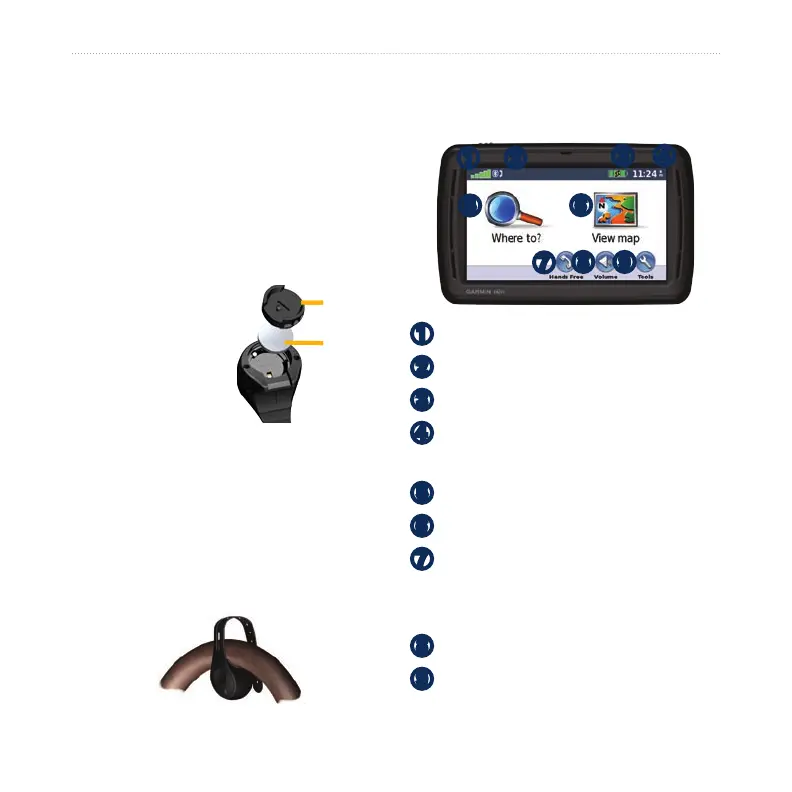
1. Insert the round, lithium CR2032 coin
battery into the remote control with
the positive side facing up.
2. Align the arrow on
the battery cover
with the arrow on
the outer edge
of the remote
control.
3. Use a coin to twist
the cover clockwise until it is closed.
Mount the remote control in a
convenient location in your vehicle, such
as on your steering wheel. Use the strap
to secure the remote control in place.
Understanding the Menu
Page
➊ ➋
➌ ➍
➎
➏
➐
➑
➒
➊
GPS satellite strength
➋
Bluetooth
®
technology status
➌
Battery status
➍
Current time—touch to change time
settings.
➎
Touch to nd a destination.
➏
Touch to view the map.
➐
Touch to make a call when
connected to a compatible mobile
phone (nüvi 860 and 880 only).
➑
Touch to adjust the volume.
➒
Touch to use tools such as media
players, settings, and Help.
Battery
cover
Battery
Battery
cover
Battery


 To Next Page