nüvi 800 Series Owner’s Manual 9
Where to?
NOTE: Depending on the version
of the maps loaded on your nüvi, the
button names can change and some
steps could be ordered differently.
Finding a Place by
Spelling the Name
If you know the name of the location you
are looking for, you can spell it using the
on-screen keyboard. You can also enter
letters contained in the name to narrow
the search.
1. Touch Where to? > Points of
Interest > Spell Name.
2. Using the on-screen keyboard, enter
letters in the name. Touch Done.
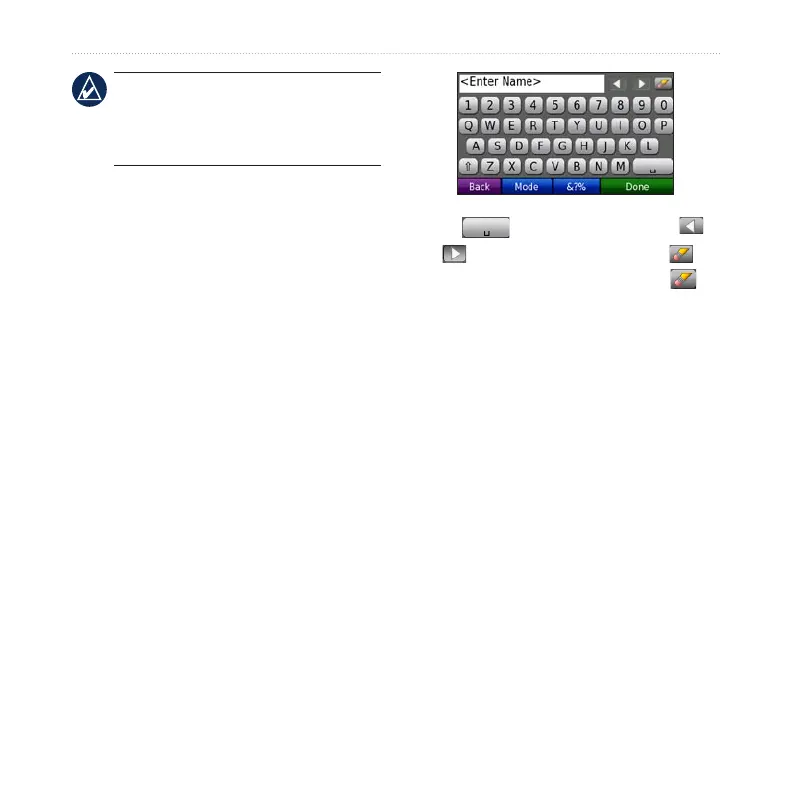
Using the On-Screen
Keyboard
When an on-screen keyboard appears,
touch a letter or number to enter it.
Touch to add a space. Touch
and to move the cursor. Touch to
delete a character. Touch and hold to
erase the entire entry.
Touch Mode to select the keyboard
language mode. Touch &?% to enter
special characters, such as punctuation
marks.
Setting a Home Location
You can set a home location for the place
you return to most often.
1. Touch Where to? > Go Home.
2. Select an option.


 To Next Page