EasyManua.ls Logo

Garmin Atemos 100 - User Manual

Garmin Atemos 100
102 pages
Print Icon
To Next Page IconTo Next Page
Loading...
CONFIDENTIAL
This drawing and the specifications contained herein are the property of
GARMIN Ltd. or its subsidiaries and may not be reproduced or used in whole or
in part as the basis for manufacture or sale of products without written
permission.
Garmin Ltd. or its subsidiaries
C/O Garmin International, Inc.
1200 E. 151
st
Street
Olathe, Kansas 66062 USA
Sheet 1 of 1
Specification Control Document
Drawing Number:
190-02264-90
Description:
Atemos 100 Quick Start Manual (ML)
Revision:
A
Drawn By:
MEH 07/12/17
Revision History
Rev.
Date
Description of Change
A
07/12/17
Production Release
Printing Specifications
Tolerance:
±0.0787" (±2 mm)
Material:
Cover: 120-lb coated. Text: 100-lb matte finish offset. Approved equivalents allowed.
Color:
4-color process.
Bindery:
Perfect bound. Approved equivalents allowed.
Folds:
Not applicable
Trimmed Dimensions:
9.5 x 4.75 in.
Finished Dimensions:
4.75x4.75 in.
Notes:
This part shall comply with Garmin Banned & Restricted Substances (GPN 001-00211-00).
Content Management System (CMS) Details
GUID:
GUID-8E32AC5E-25BA-4C62-8420-FB570DCE8F87
Version:
1
Language(s):
EN-US, FR-FR, IT-IT, DE-DE, ES-XM, PT-PT, NL-NL, CS-CZ, HU-HU, RO-RO
Notes
Question and Answer IconNeed help?

Do you have a question about the Garmin Atemos 100 and is the answer not in the manual?

Summary

Getting Started

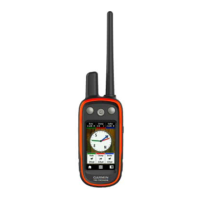
Atemos 100 Handheld Device Overview

Overview of the Atemos 100 handheld device, including key components and warnings.

Accessing the Owners Manual

Instructions on how to obtain the latest owner's manual from the Garmin website.

Installing the Battery Pack

Procedure for safely installing the lithium-ion battery pack into the device.

Charging the Handheld Device

Steps to charge the handheld device battery, including pre-charge precautions and connection details.

Turning On and Off the Device

Instructions on how to power on and power off the handheld device using the power key.

Touchscreen Interaction

Guide to using the touchscreen for navigation, menu access, and page management.

Locking the Touchscreen

How to lock the touchscreen to prevent accidental input.

Acquiring Satellite Signals

Steps to ensure both devices acquire satellite signals for proper operation.

Dog Collar Device Setup

Adding Dog Collar via MURS;VHF

Method to add a dog collar device using MURS/VHF communication for pairing.

Adding Dog Collar with Track and Train Codes

Procedure to add a dog collar using track and train codes when not near the dog.

Wireless Dog Collar Sharing (ANT+)

How to share dog collar information wirelessly using ANT+ technology between devices.

Wireless Pairing of Dog Collar

Step-by-step guide to pair a dog collar device wirelessly with the handheld unit.

Adding Dog Collar via Track;Control Codes

Procedure to add a dog collar using track and control codes when pairing is not possible.

Retrieving Dog ID and Codes

How to find and view the dog's ID, track, and train codes.

Dog Tracking

Tracking Your Dog on the Map

Using the map to view your dog's location, tracks, and direction.

Zooming and Navigation Controls

Instructions for zooming in/out on the map and using navigation features.

Using the Dog Tracking Compass

How to open and use the dog tracking compass for directional guidance.

Navigating Directly to Your Dog

Steps to use the map and compass to navigate to your dog's current location.

Pausing Individual Dog Tracking

How to temporarily pause tracking for a single dog during a hunt.

Pausing All Dog Tracking

Method to pause tracking for all dogs simultaneously during a hunt.

Device Information and Updates

Viewing Device Information

How to access device ID, software version, and license agreement details.

Product Update Services

Information on using Garmin Express for software and map updates.

Setting Up Garmin Express

Steps to install and set up Garmin Express software for device management.

Atemos 100 Handheld Device Specifications

Device Operating and Charging Specs

Details on operating temperature range, charging temperature, wireless frequencies, and water rating.

Battery Information and Safety

Important warnings and precautions regarding the lithium-ion battery and its handling.

Long-Term Storage Guidelines

Recommendations for storing the device long-term to maintain battery capacity.

Summary

Getting Started

Atemos 100 Handheld Device Overview

Overview of the Atemos 100 handheld device, including key components and warnings.

Accessing the Owners Manual

Instructions on how to obtain the latest owner's manual from the Garmin website.

Installing the Battery Pack

Procedure for safely installing the lithium-ion battery pack into the device.

Charging the Handheld Device

Steps to charge the handheld device battery, including pre-charge precautions and connection details.

Turning On and Off the Device

Instructions on how to power on and power off the handheld device using the power key.

Touchscreen Interaction

Guide to using the touchscreen for navigation, menu access, and page management.

Locking the Touchscreen

How to lock the touchscreen to prevent accidental input.

Acquiring Satellite Signals

Steps to ensure both devices acquire satellite signals for proper operation.

Dog Collar Device Setup

Adding Dog Collar via MURS;VHF

Method to add a dog collar device using MURS/VHF communication for pairing.

Adding Dog Collar with Track and Train Codes

Procedure to add a dog collar using track and train codes when not near the dog.

Wireless Dog Collar Sharing (ANT+)

How to share dog collar information wirelessly using ANT+ technology between devices.

Wireless Pairing of Dog Collar

Step-by-step guide to pair a dog collar device wirelessly with the handheld unit.

Adding Dog Collar via Track;Control Codes

Procedure to add a dog collar using track and control codes when pairing is not possible.

Retrieving Dog ID and Codes

How to find and view the dog's ID, track, and train codes.

Dog Tracking

Tracking Your Dog on the Map

Using the map to view your dog's location, tracks, and direction.

Zooming and Navigation Controls

Instructions for zooming in/out on the map and using navigation features.

Using the Dog Tracking Compass

How to open and use the dog tracking compass for directional guidance.

Navigating Directly to Your Dog

Steps to use the map and compass to navigate to your dog's current location.

Pausing Individual Dog Tracking

How to temporarily pause tracking for a single dog during a hunt.

Pausing All Dog Tracking

Method to pause tracking for all dogs simultaneously during a hunt.

Device Information and Updates

Viewing Device Information

How to access device ID, software version, and license agreement details.

Product Update Services

Information on using Garmin Express for software and map updates.

Setting Up Garmin Express

Steps to install and set up Garmin Express software for device management.

Atemos 100 Handheld Device Specifications

Device Operating and Charging Specs

Details on operating temperature range, charging temperature, wireless frequencies, and water rating.

Battery Information and Safety

Important warnings and precautions regarding the lithium-ion battery and its handling.

Long-Term Storage Guidelines

Recommendations for storing the device long-term to maintain battery capacity.

Garmin Atemos 100 Specifications

General IconGeneral
Dimensions2.4" x 4.5" x 1.3" (6.1 x 11.4 x 3.3 cm)
Weight7.7 oz (218 g) with batteries
Battery lifeUp to 20 hours
Water ratingIPX7
High-sensitivity receiverYes
Dog trackingYes
Water ResistanceIPX7
Sleep MonitoringNo
InterfaceUSB
ConnectivityUSB

Related product manuals