8 echo 200, echo 300c, echo 500c, and echo 550c Owner’s Manual
Viewing Pages
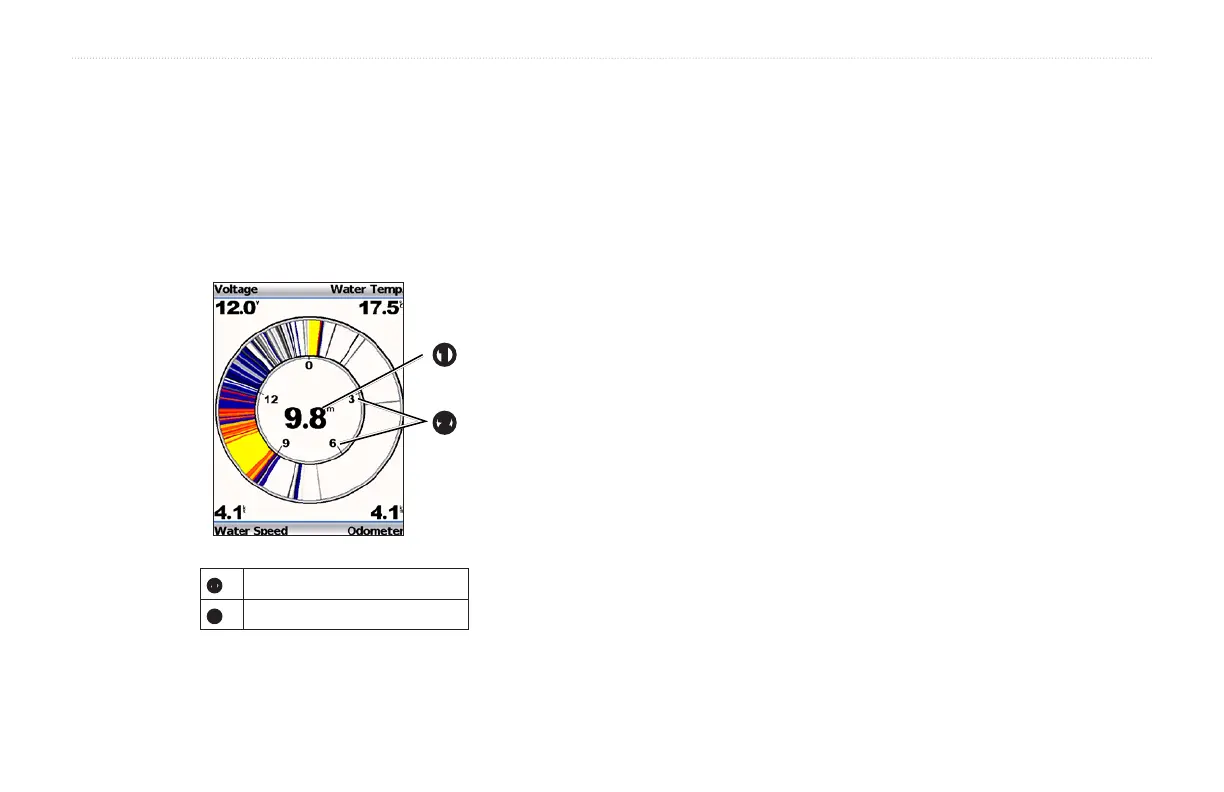
The Flasher page displays sonar information on a circular depth scale,
indicating what is beneath your boat. It is organized as a ring that starts at
the top and progresses clockwise. Depth is indicated by the scale inside the
ring. Sonar information ashes on the ring when it is received at the depth
indicated. The colors indicate different strengths of the sonar return (refer to
the table on page 2).
From any page, select MENU > Pages > Flasher.
➊
➋
➊
Depth at your present location.
➋
Depth scale.
The Numbers page displays numeric information instead of a graph.
From any page, select MENU > Pages > Numbers.
NOTE: The device must be connected to a speed-wheel transducer to use
the odometer.
From the Numbers page, select MENU > Reset Odometer.


 To Next Page