echo 200, echo 300c, echo 500c, and echo 550c Owner’s Manual 5
Viewing Pages
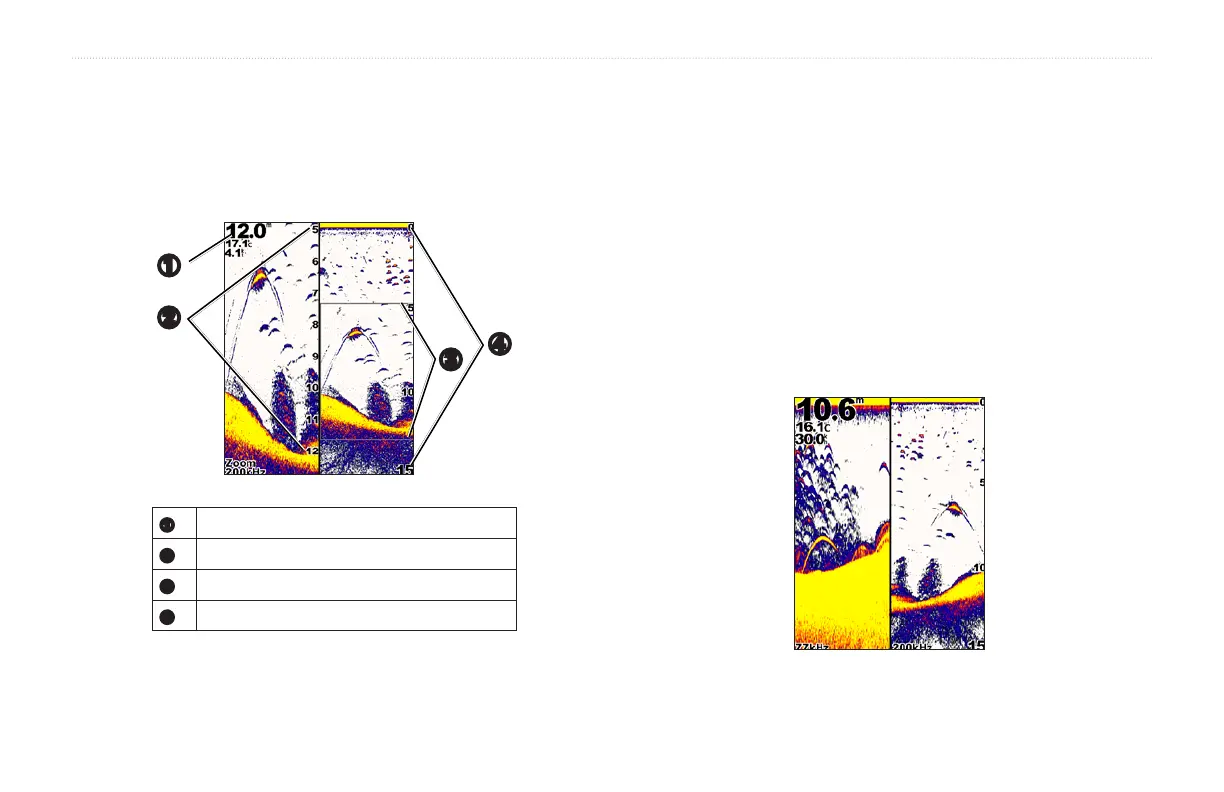
The Split Zoom page shows a full-view graph of sonar readings on the right
side of the screen, and a magnied portion of that graph on the left side of
the screen.
From any page, select MENU > Pages > Split Zoom.
➊
➌
➋
➍
➊
Depth, water temperature, and water speed.
➋
Zoomed depth scale.
➌
Zoom window.
➍
Depth range.
You can increase the width of the magnied portion of the Split Zoom page.
From the Split Zoom page , select MENU > Setup > Sonar Setup >
Split Size > Large.
On the Split Frequency page, the left side of the screen shows 77 kHz
frequency sonar data, and the right side of the screen shows 200 kHz
frequency sonar data.
NOTE: The Split Frequency page requires the use of a dual-beam
transducer.
From any page, select MENU > Pages > Split Frequency.


 To Next Page