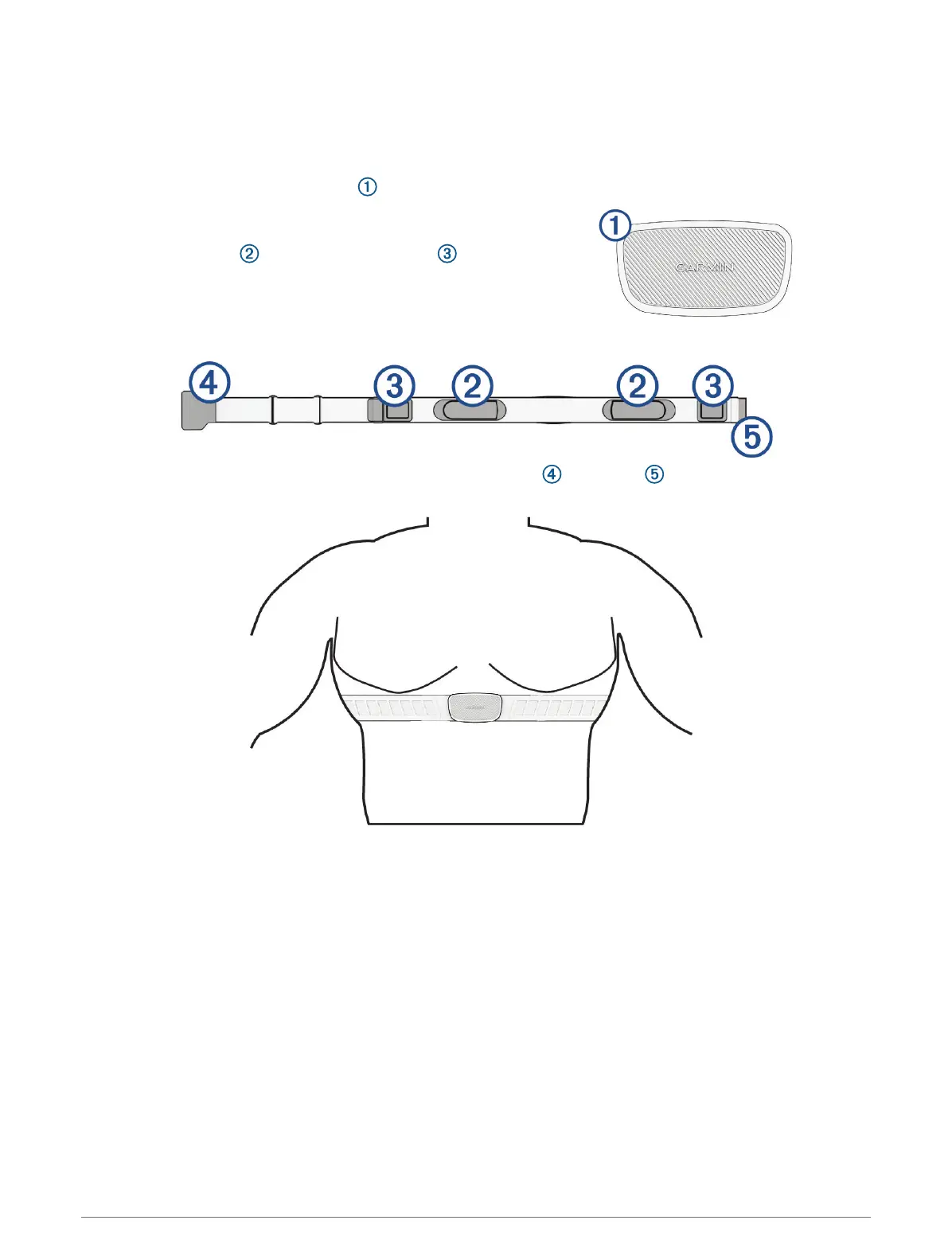
Putting On the Heart Rate Monitor
NOTE: If you do not have a heart rate monitor, you can skip this task.
You should wear the heart rate monitor directly on your skin, just below your sternum. It should be snug enough
to stay in place during your activity.
1 Snap the heart rate monitor module onto the strap.
The Garmin logos on the module and the strap should be right-
side up.
2 Wet the electrodes and the contact patches on the back
of the strap to create a strong connection between your chest
and the transmitter.
3 Wrap the strap around your chest, and connect the strap hook to the loop .
NOTE: The care tag should not fold over.
The Garmin logos should be right-side up.
4 Bring the device within 3m (10ft.) of the heart rate monitor.
After you put on the heart rate monitor, it is active and sending data.
TIP: If the heart rate data is erratic or does not appear, see the troubleshooting tips (Tips for Erratic Heart Rate
Data, page40).
Wireless Sensors 39



 To Next Page