Installing the Out-Front Mount
NOTE: If you do not have this mount, you can skip this task.
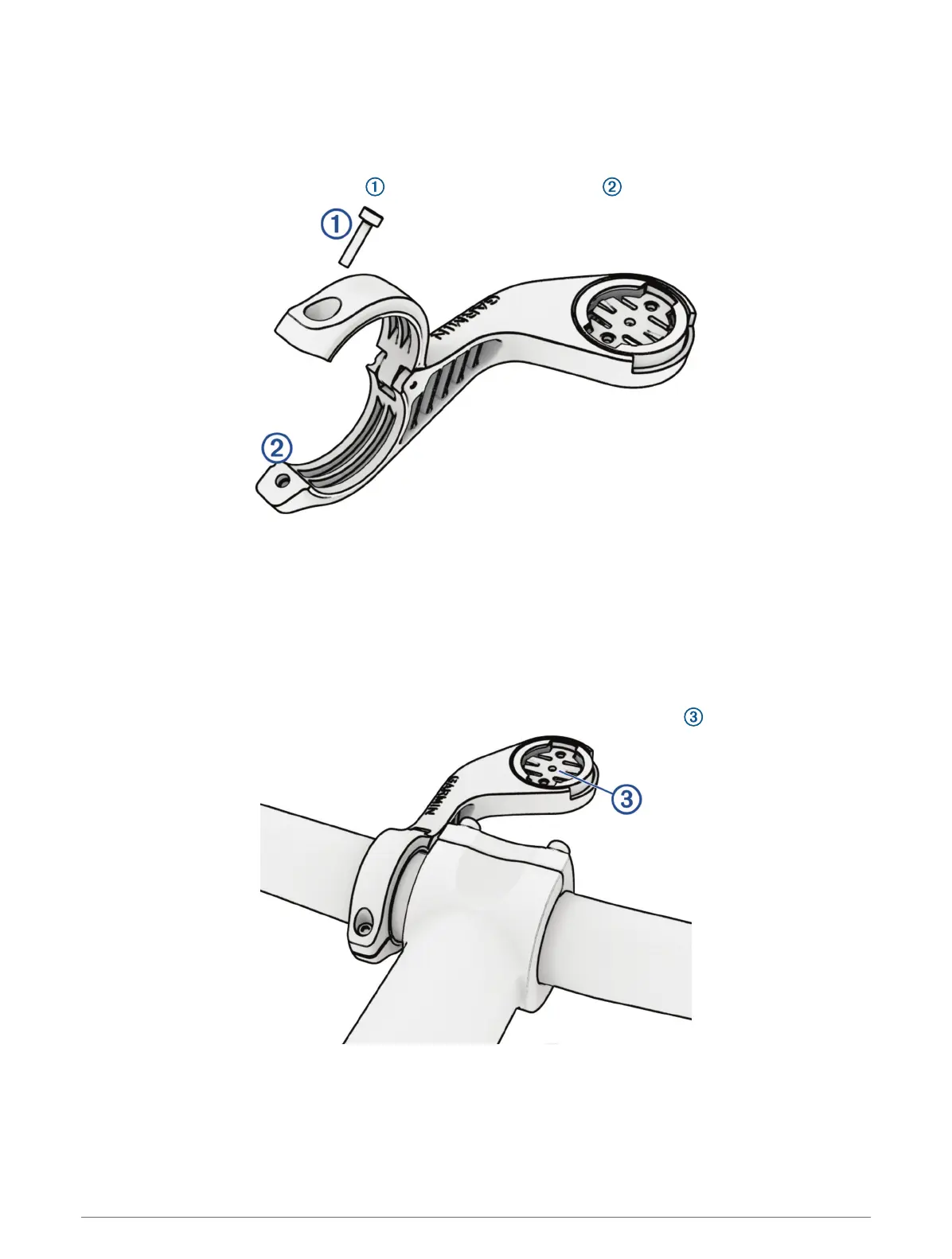
1 Select a secure location to mount the Edge bike computer where it does not interfere with the safe operation
of your bike.
2 Use the hex key to remove the screw from the handlebar connector .
3 Place the rubber pad around the handlebar:
• If the handlebar diameter is 25.4mm or 26 mm, use the thicker pad.
• If the handlebar diameter is 31.8mm, use the thinner pad.
• If the handlebar diameter is 35 mm, do not use a rubber pad.
4 Place the handlebar connector around the rubber pad.
5 Replace and tighten the screw.
NOTE: Garmin recommends tightening the screw so the mount is secure, with a maximum torque
specification of 7lbf-in. (0.8N-m). You should check the tightness of the screw periodically.
6 Align the tabs on the back of the Edge bike computer with the bike mount notches .
7 Press down slightly and turn the Edge bike computer clockwise until it locks into place.
Releasing the Edge
1 Turn the Edge clockwise to unlock the device.
2 Lift the Edge off the mount.
Device Information 61


 To Next Page