GPSMAP 640 Owner’s Manual 1
Getting Started
Getting Started
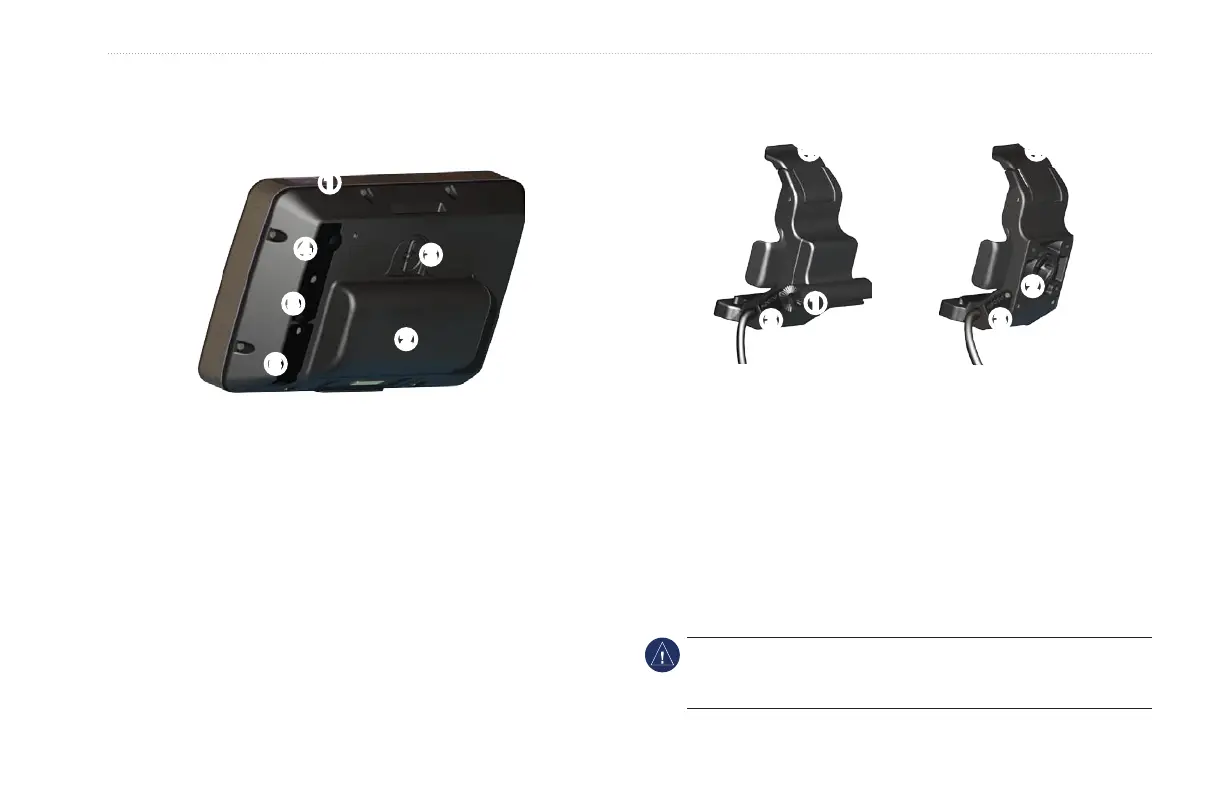
Identifying the GPSMAP 640 Features
➍
➊
➋
➌
➎
➏
➊
Power button—manually turn the device on or off.
➋
Battery—removable lithium-ion rechargeable battery.
➌
Battery locking ring—lift and rotate counter-clockwise to
release the battery.
➍
DC in—power the device and recharge the battery with an
external power cable.
➎
MCX connector—connect an external GPS antenna.
➏
USB connector—connect the device to a computer or to an
optional GXM 40 XM antenna (GPSMAP 640 only).
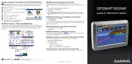
Identifying the GPSMAP 640 Mounting
Bracket Features
Marine
Mounting Bracket
➊
➌
➍
Automotive
Mounting Bracket
➋
➌
➍
➊
Bail-mount adapter—connect the marine mounting bracket to
the marine bail mount.
➋
Ball-socket adapter—connect the mounting bracket adapter to
a compatible automotive dash mount.
➌
Audio line out—connect the unit to an audio output source
with a standard
1
/
8
in. (3.5 mm) stereo audio plug.
➍
Locking tab—use to lock the device into the mount.
NOTICE: When you remove the GPSMAP 640 from the marine
mounting bracket, dry the metal contacts and use the attached
weather cap to prevent corrosion.















 To Next Page