Peking to Paris 2013 - Garmin 78s GPS Setup & Use Guide
Garmin 78s P2P2013 - Setup & Use V2.doc Page 11 of 15
3. Create a Waypoint at a Remote location
There is no built in procedure to create a Waypoint by entering a Name and Location. To
create a Waypoint at a remote location we must create a Waypoint at the current location,
then use the Waypoint Manager to edit the Latitude and Longitude to match the remote
location.
First step – Create a new Waypoint at the Current Location as detailed on the previous
page, noting the assigned Name.
Second step – Use the Waypoint Manager to edit the Waypoint location.
Main Menu >> Waypoint Manager
Reach the Waypoint Manager as follows
Press the MENU button twice to reach the Main Menu.
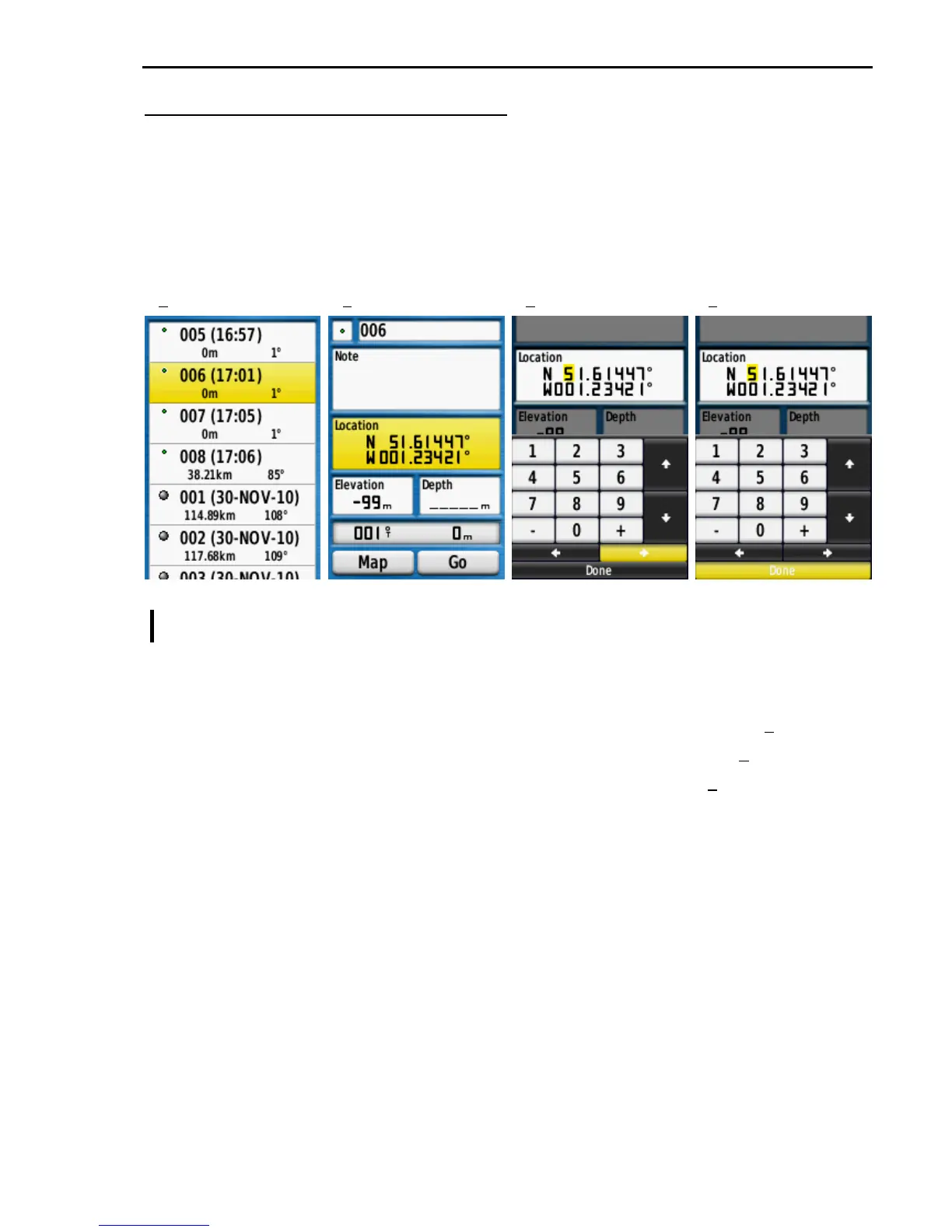
Select Waypoint Manager and press ENTER to show the Waypoint list as in (1) above.
Select the Waypoint to edit and press ENTER to display the screen as in (2) above.
Select the Location field and press ENTER to display the editor as in (3) above.
Highlight the digit to edit using the right & left arrows as in (3).
Change the digits by selecting the required digit and pressing ENTER.
Move to the next digit and continue until both Latitude and Longitude are as required.
When satisfied all is OK select Done as in (4) and press ENTER.
Note: The N (north) and W (west) values are changed using the Up and Down arrows on
the editor screen. For Peking Paris these should always be N (north) and E (east)
1 2 3 4











 To Next Page