Peking to Paris 2013 - Garmin 78s GPS Setup & Use Guide
Garmin 78s P2P2013 - Setup & Use V2.doc Page 7 of 15
Main Menu >> Setup >> Routing
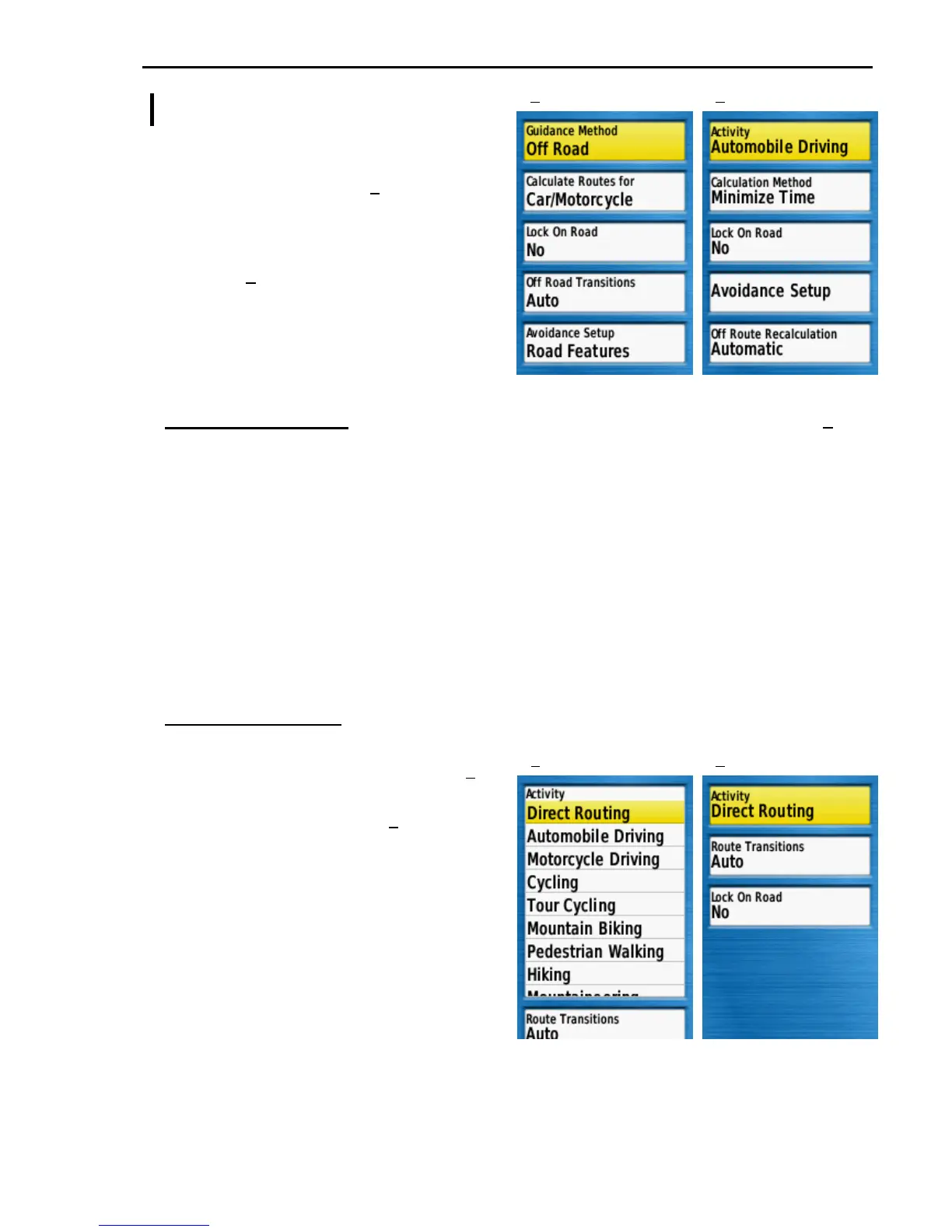
Garmin has recently changed the Garmin
78 Routing options. Earlier software
versions will be similar to (1) with
Guidance Method as the top screen
option.
Later software versions (after 3.90) will be
similar to (2) with Activity as the top
screen option. The Garmin User Guide
does not yet cover the Activity options.
Follow the Early or Late Routing setup
that matches your GPS.
Early Version Routing – (Software Version 3.90 & earlier). Set your GPS to match (1).
Guidance Method .......... Off Road
Off Road must be used for training and in remote areas such as Mongolia.
Calculate Routes for ...... Car/Motorcycle
Lock On Road ................ No
Otherwise your position will be distorted to make it fit the GPS mapping data.
Off Road Transitions ..... Auto
Auto is required so that Route guidance works automatically as each route point is
passed.
Avoidance Setup ............ Road Features
Ignore these settings
Late Version Routing – (Software Version 4.30 & later). Set your GPS as below
Select the Activity option and press
ENTER to display the Activity options (3).
Select Direct Routing and press ENTER to
return to the Activity screen (4). Notice the
screen now only has two further options.
Activity ............................ Direct Routing
This is important. All other options
will display an error warning when
trying to navigate to a Waypoint or
follow a Route.
Route Transitions ........... Auto
Auto is required so that Route
guidance works automatically as
each route point is passed.
Lock On Road ................ No
Otherwise your position will be distorted to make it fit the GPS mapping data.
1 2
3 4











 To Next Page