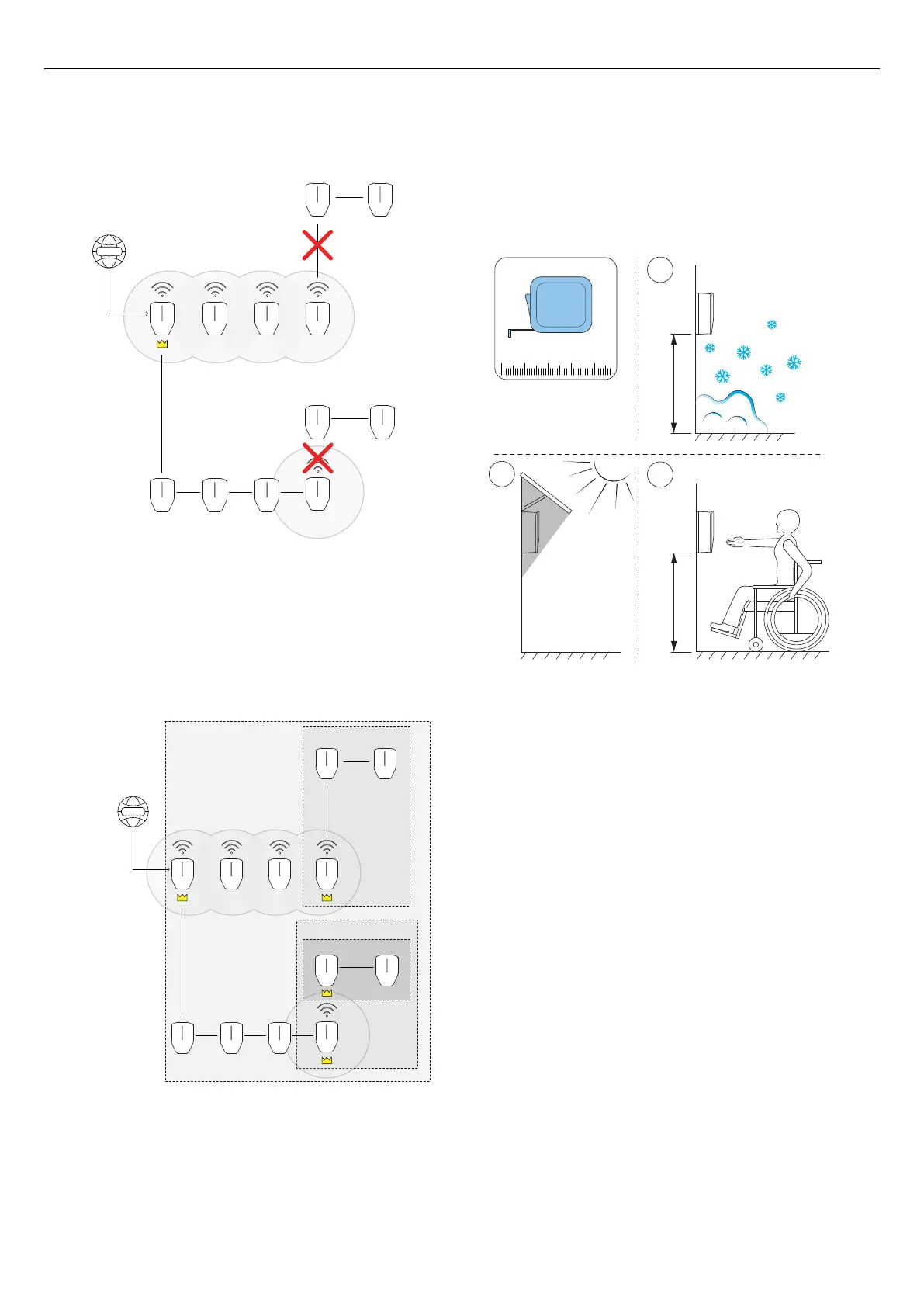
To solve the scenario the installer must do the following:
• Assign new master units according to the
illustration.
• Group the charging station units according to the
illustration.
4.11 TO DECIDE THE POSITION OF THE
CHARGING STATION
1. Avoid installing the charging station where snow
(A) can block access to the charging station.
2. Avoid installation in direct sunlight (B) and do not
install the charging station on a hot surface.
3. Make sure that the position of the charging station
is approved from an accessibility (C) perspective.
Comply with local requirements.
4.12 CABLE INSTALLATION
The GARO Entity is designed to work with both 400 V
TN-S (default) and 230 V IT.
If a 230 V IT system is to be used, the marking of the
installation bracket should be updated, using the
supplied marking stickers.
Once connected, the charging station will detect what
voltage system is uses. The only setting required is
phase connections. Refer to 4.12.5 To connect the
power cable to the terminal, page 28.
WWW
NOT POSSIBLE
Group A
Group A:1
Group A:2
Group A:2:1
WWW
SOLUTION
X*
Y*
B
A
C
1 2 3 4
23
Installation



 To Next Page