Home
Garrett
Metal Detector
ACE 150
Page 9
Garrett ACE 150 - Page 9
50 pages
Manual
Save Page as PDF
To Next Page
To Next Page
To Previous Page
To Previous Page
Loading...
Ace
150
•
Ace
250
7
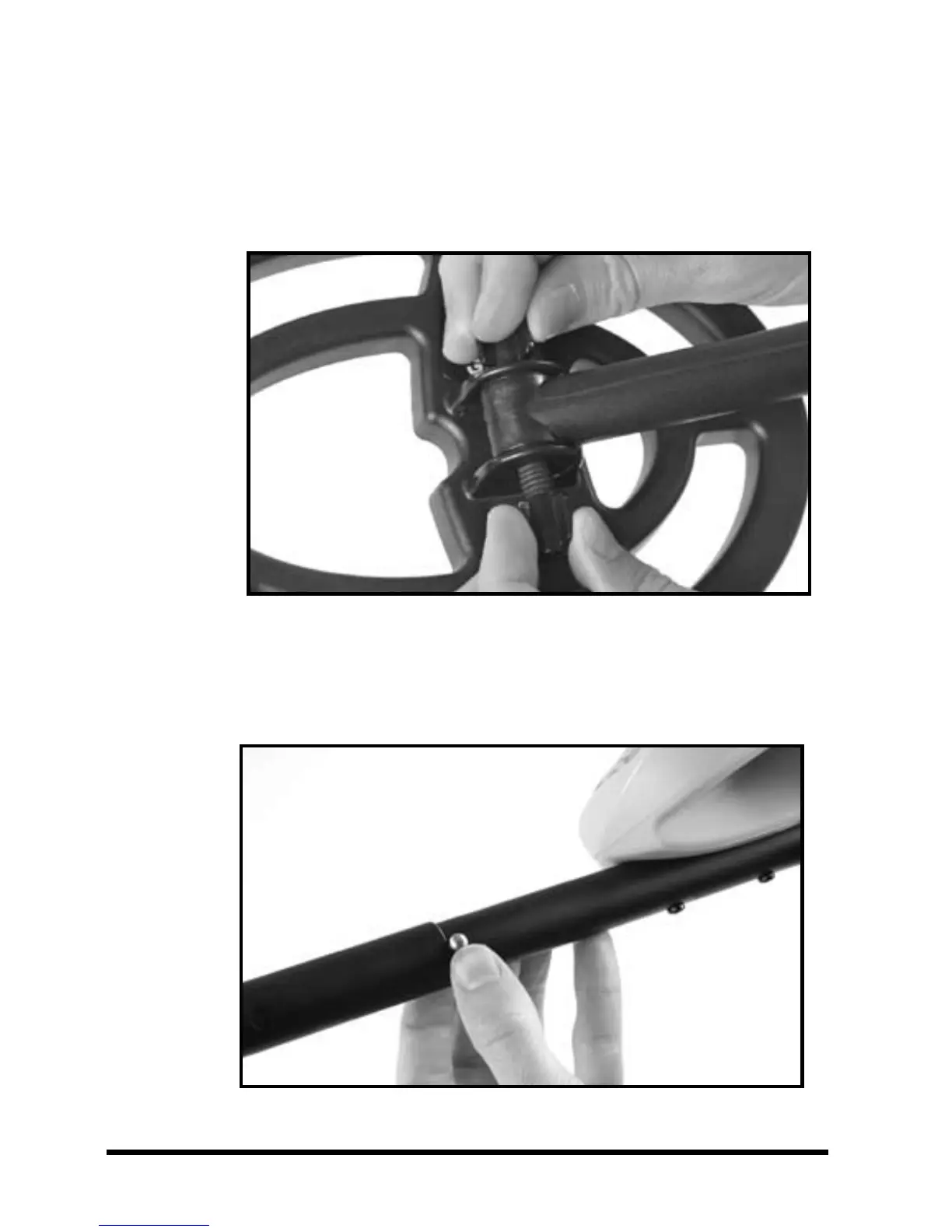
3.
Insert
the
threaded
bolt
through
the
holes
o
f
t
he
lo
w
e
r
s
te
m
a
nd
s
e
a
rc
h
co
i
l
.
H
an
d-
ti
gh
te
n
t
he
s
ea
rc
hc
oi
l
as
s
em
bl
y
with
the
remaining
wing
nut.
4.
Depress
the
spring
clip
and
insert
the
control
housing
into
the
upper
stem.
8
10
Table of Contents
Main Page
Table of Contents
5
ACE Illustration
6
ACE Parts
7
ACE Assembly
8
ACE 150 Features
12
ACE Features and Controls
12
Target ID Cursor
13
Upper Scale
13
Target ID Legend
13
Mode
13
Coin Depth
14
Low Battery Indicator
14
Headphone Jack
15
Tone ID
16
ACE 150 Controls
17
Sensitivity
17
MODE Pushbutton
18
Coins Mode
19
Jewelry Mode
19
ACE 250 Key Features
20
POWER Pushbutton
20
Battery Condition Indicator
21
ACE 250 Controls
22
DISCRIM Pushbutton
22
ELIM Pushbutton
22
PINPOINT Pushbutton
24
Five MODE Options
25
Hunting with Your ACE Detector
28
Digging a Target
30
Troubleshooting Guide
31
Code of Ethics
32
Caution
34
Bench Tests
36
Caring for Your ACE Detector
38
ACE Warranty / Service
40
ACE Accessories
43
RAM Books Order Form
47
Related product manuals
Garrett ACE 350
97 pages
Garrett ACE 200
11 pages
Garrett ACE 250
18 pages
Garrett EURO ACE
25 pages
Garrett ACE 300i
14 pages
Garrett ACE 400i
15 pages
Garrett ACE 200i
11 pages
Garrett TREASURE ACE 300
5 pages
Garrett ACE series detector
18 pages
Garrett MULTI-FLEX ACE APEX
26 pages
Garrett ACE Apex Multi-Flex
2 pages
Garrett AT Max
27 pages












 To Next Page