EasyManua.ls Logo

Garrett ACE 350 - ACE 350 Control Panel; Control Panel Elements and Labels

Garrett ACE 350
97 pages
Print Icon
To Next Page IconTo Next Page
To Previous Page IconTo Previous Page
Loading...
4
Garrett Metal Detectors
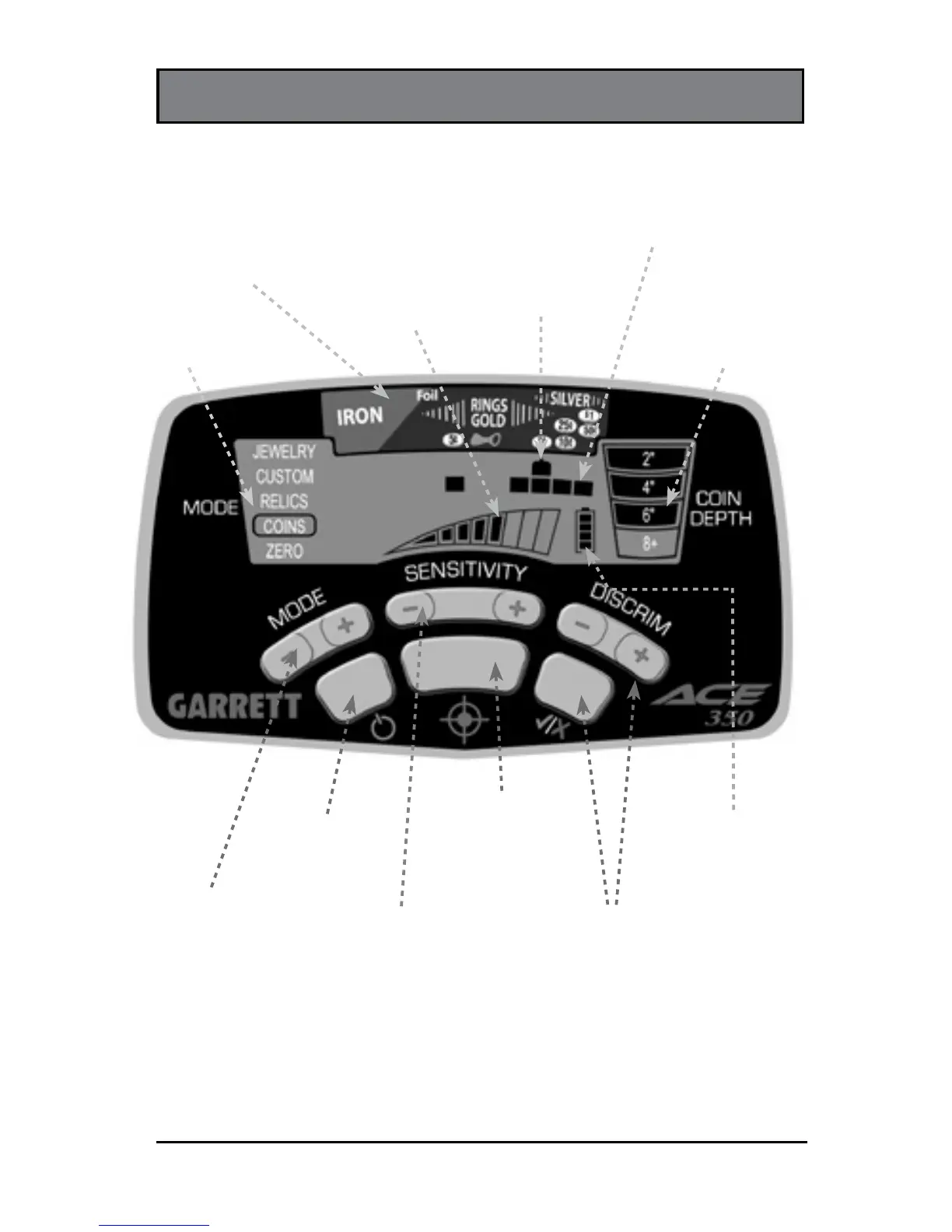
ACE 350 CONTROL PANEL
Battery Level
Indicator
DISCRIM and Accept/
Reject Pushbuttons
Use DISCRIM (+) or (-) to select a
cursor. Then use (/X) button to set
its discrimination on or off.
SENSITIVITY
Pushbutton
increases or
decreases
sensitivity.
MODE
Pushbutton
selects detection
mode (i.e.
discrimination
pattern).
ON / OFF
Power
Coin Depth
Indicator
indicates depth of
coin-sized target.
Mode
Indicator
Target ID Legend
indicates metal types.
Lower Scale
indicates notch
discrimination pattern.
Target ID Cursor
indicates probable
target identity.
Sensitivity
Setting
PINPOINT
Pushbutton
allows static detection
to precisely locate the
object.