CHAPTER 4: Playing and Creating Media Files
34
Playing music and movies
Playing audio and video files
Windows Media Player can play several types of audio and video files, including WAV,
MIDI, MP3, AU, AVI, and MPEG formats. For more information about using
Windows Media Player, click Help.
To play a file using Windows Media Player:
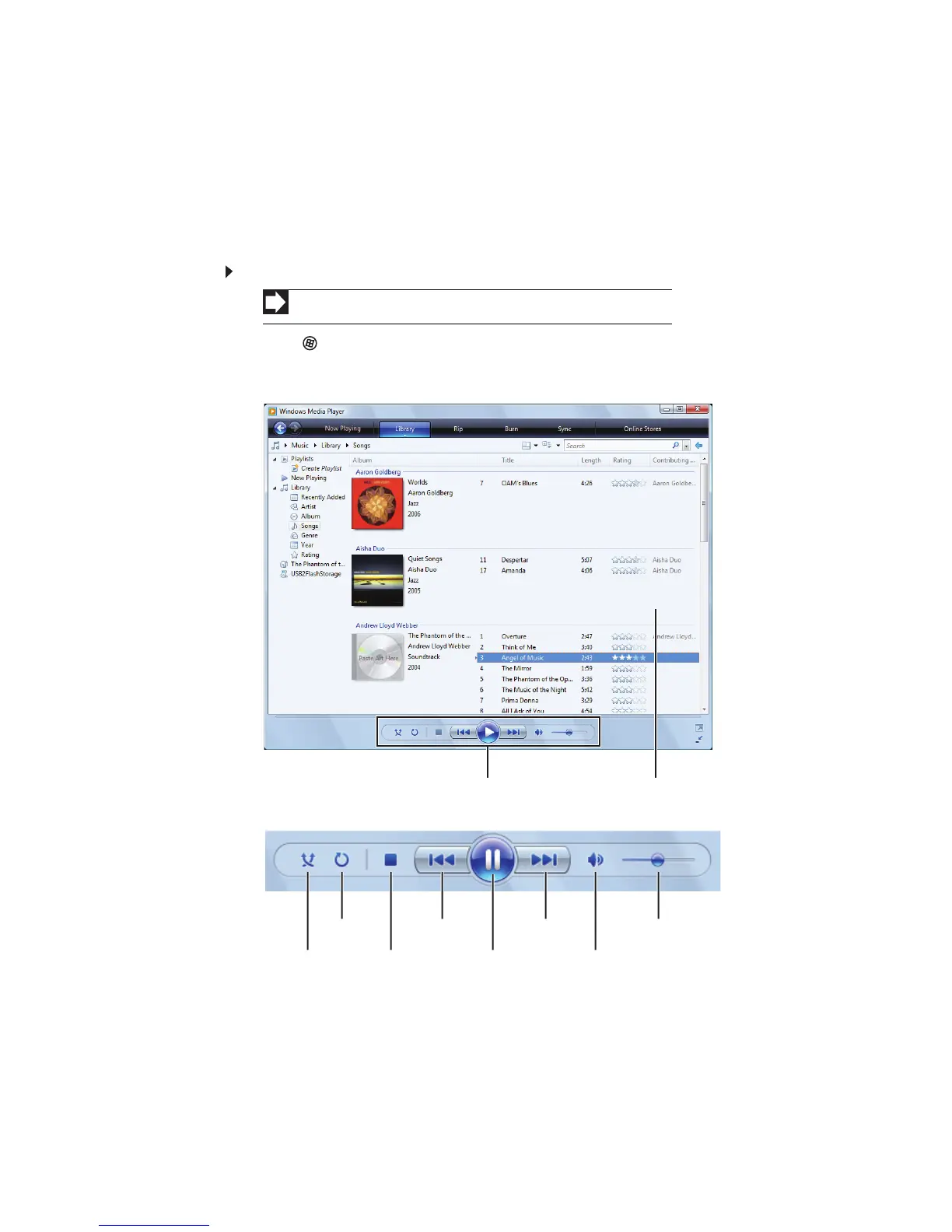
1 Click (Start), All Programs, then click Windows Media Player.
Windows Media Player opens.
2 Click Library, then double-click the media file you want to play.
3 Click one of the following to control playback:
• Shuffle randomizes the playback order of the files in the playlist.
• Repeat starts playing the list over again after it reaches the end.
• Stop stops playback and rewinds the current file to the beginning.
• Rewind quickly rewinds the current file (when you click and hold it) or skips
to the previous file in the playlist (when you click it).
Shortcut
Start Á Computer Á find the file Á double-click the file
Media libraryPlayback
Shuffle Stop
Rewind
Pause/Play
Fast forward Volume
Mute
Repeat



 To Next Page