49
TECHNOLOGIES LTD
Combi Addressable
20J 4~20mA Input
Set up procedure: 204D2C Issue N.v2
Data Sheet
ref C1180
NEW UNITS ARE SUPPLIED READY TO CONNECT TO A SYSTEM.
THE FOLLOWING PROCEDURE MAY NEED TO BE CARRIED OUT FOLLOWING CHANGES TO THE
SYSTEM:
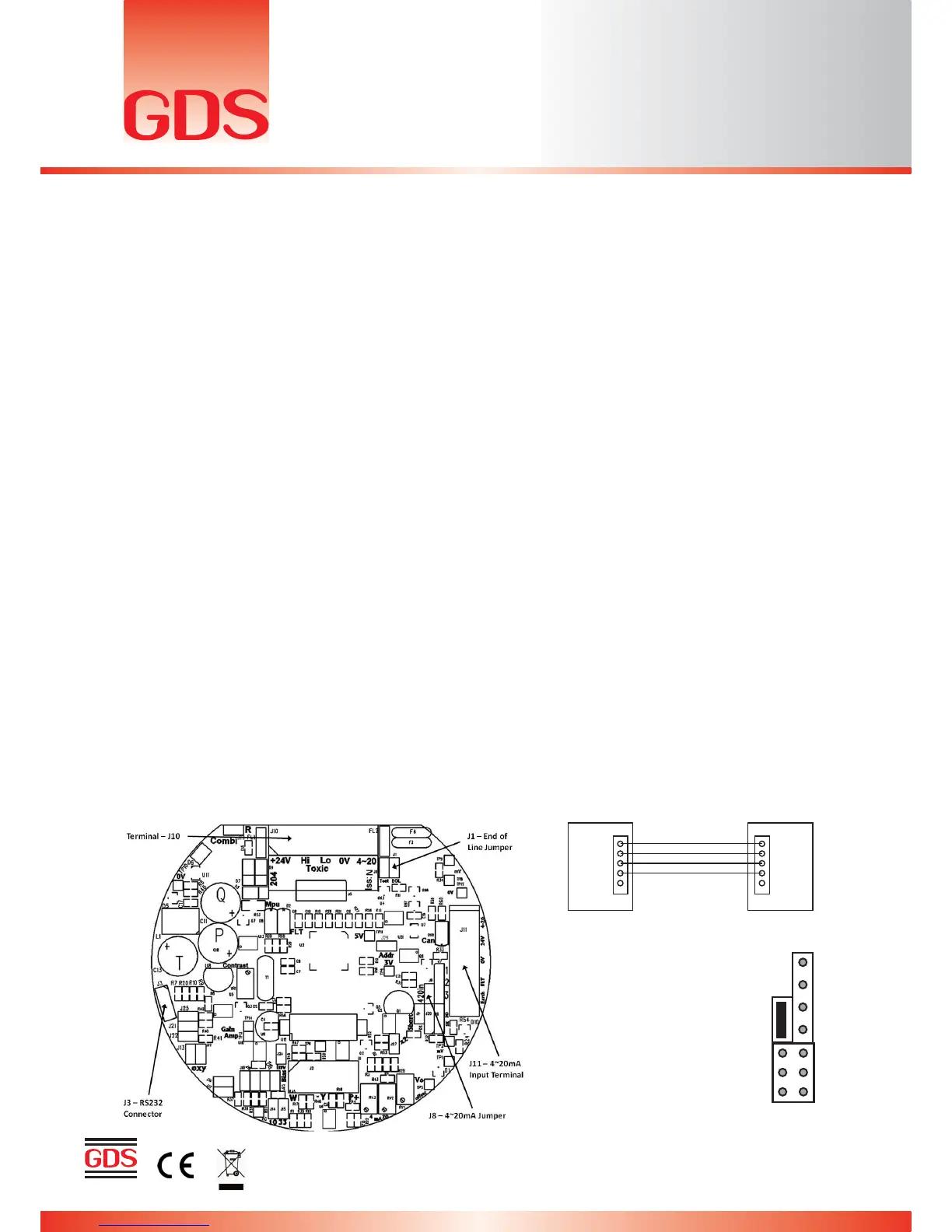
1. Insert J8 jumper to receive signal from external 4~20mA source (Fig.3)
2. Connect external 4~20mA source to the 4~20mA input terminal (J11) on the right hand side of the
board.
3. Connect terminal J10 as shown in Fig.2
4. Ensure that the CAN LED is ON and flashing occasionally.
5. Connect RS232 pod to connector J3 and to a PC running HyperTerminal at 4800 baud.
6. The HyperTerminal display shows a continuous data output and allows input from the PC keyboard.
a. Press C to enter calibration mode
b. Press shift $ to initialise the memory if new PCB (defaults to Flam %LEL)
c. Press G to change gas/signal to the type required for the cell/unit in use. (NOTE: When using a ‘user
gas’ press ‘E’ to edit name before using ‘G’ to select. Also make sure to select a vacant user gas
number, 61-68, as the addressable sensor will overwrite data entered at the Combi panel.
d. The range of the gas/signal selected will have a default setting which can be changed by pressing ‘R’
e. Press A and enter CAN address of this sensor
f. Press N to toggle the number of decimal places between 1 and 2 (i.e. dp=1 or dp=2)
g. Press B to toggle the deadband ON and OFF
h. Press F to toggle the external fault option ON or OFF (only available when external source has local
fault indication)
i. Press Z to zero the reading.
j. Press S to span the reading. Apply gas / signal from external source and press H or L to adjust the
reading.
k. Press space to exit the span.
l. Press X to exit the calibration mode.
7. Connect to a combi panel and ensure that the sensor reports in correctly. Note: that if this sensor is at
the end of the communication wires then it will need terminating by inserting jumper J1(EOL). The
continuous data output when connected to HyperTerminal is the same format as for the Flammable
sensor. The software used is identical.



 To Next Page