5
LED and LCD indicators
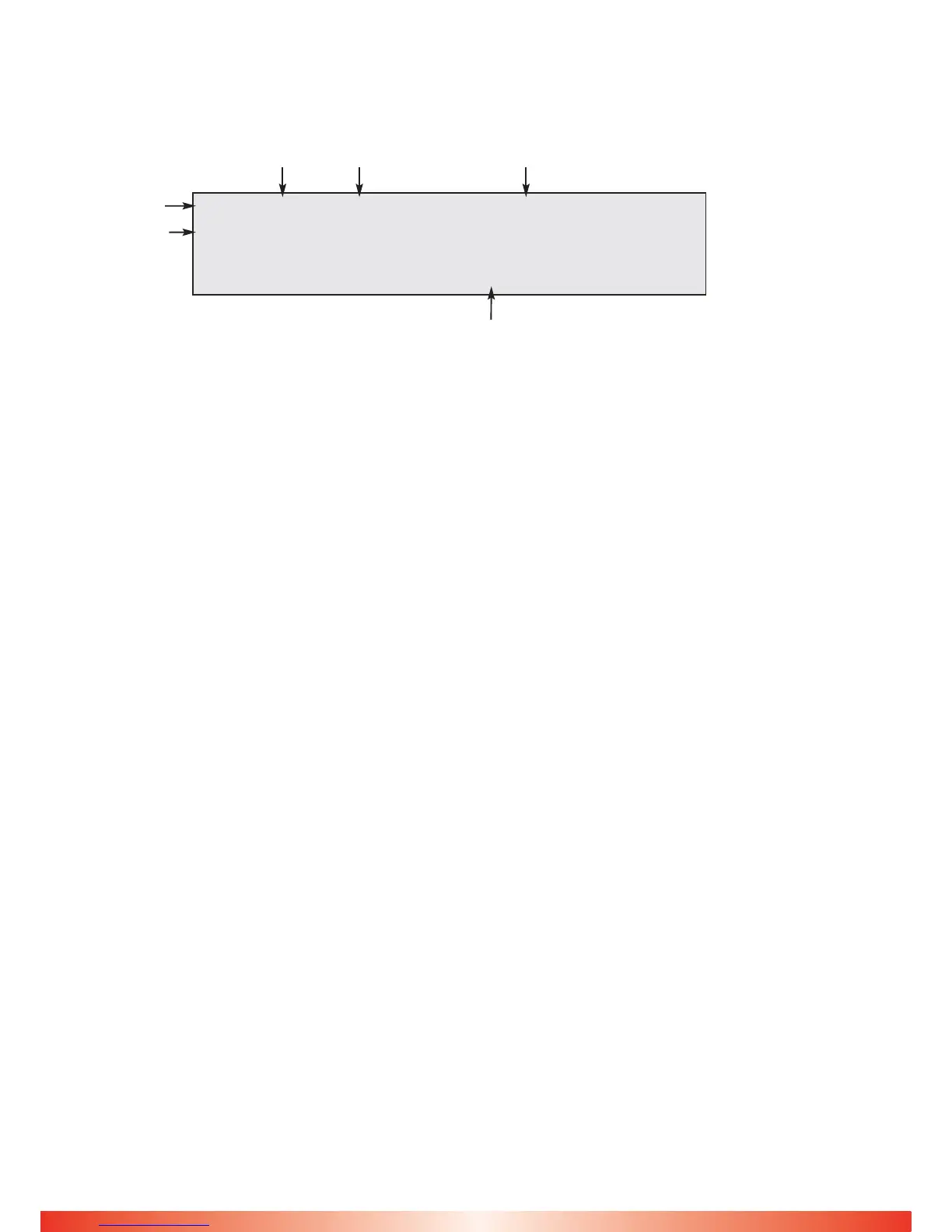
A four line 40 character LCD displays a range of information typically shown below.
Line 1 Standard 4~20mA sensor, values and gas type and location
Line 2 Addressable sensor, values and gas type and location
Line 3 General information, Number of Alarms, Faults and Connected sensors
E.g. D=4 means 4 direct sensors connected
E.g. A=6 means 6 addressable sensors connected
Line 4 Date and Time alternating with user text.
The top line displays the direct 4~20 inputs indicated by D. This will cycle through all
active sensors automatically but will hold on a specific sensor if it is in alarm.
Pressing + button (4) will stop the cycle on the current sensor for 999 seconds.
If a new alarm occurs, the display will show this sensor.
The type of gas and the text associated with this sensor is displayed.
To restart the cycle press the – button (2) or RESET (7)
The second line displays addressable inputs indicated by A. this will cycle through all
active addressable (CAN) sensors automatically but will hold on a specific sensor if it is in
alarm. Pressing + button (4) will stop the cycle on the current sensor for 999 seconds.
If a new alarm occurs, the display will show this sensor.
The type of gas and the text associated with this sensor is displayed.
The third line displays the number of alarms and faults present in the Combi system.
Normally these are zero. Additionally, the number of 4-20 and Addressable sensors in the
system are displayed.
The fourth line displays shows the internal clock reading together with the day and
date. All internal events use this clock to record the time of event.
If an alarm or fault event occurs, the clock display is substituted with the text for this
event and will alternate every second or so if the text is lengthy but will remain readable.
This text which describes the event (e.g. Modbus fail) is also the same text which is
stored in the event log which can be viewed separately. (see Event Log).
This line also alternates with user text, eg company name and telephone number.
Direct
sensor
Gas Value
D4 20 %LEL xxxxxxxx xxxxxxxxxxx
A6 10 PPM CP xxxxxxxx xxxxxxxxxxx
Alarms = 0 Faults = 0 Sensors D = 4 A = 6
12.24 Tue 31 Jul 2012 GDS Technologies Ltd 0113 2860166
Gas Type Customer Programmable text
Addressable
sensor
}
Continuously
updating
display lines
alternating user text
display (programmable)



 To Next Page