– 29 –
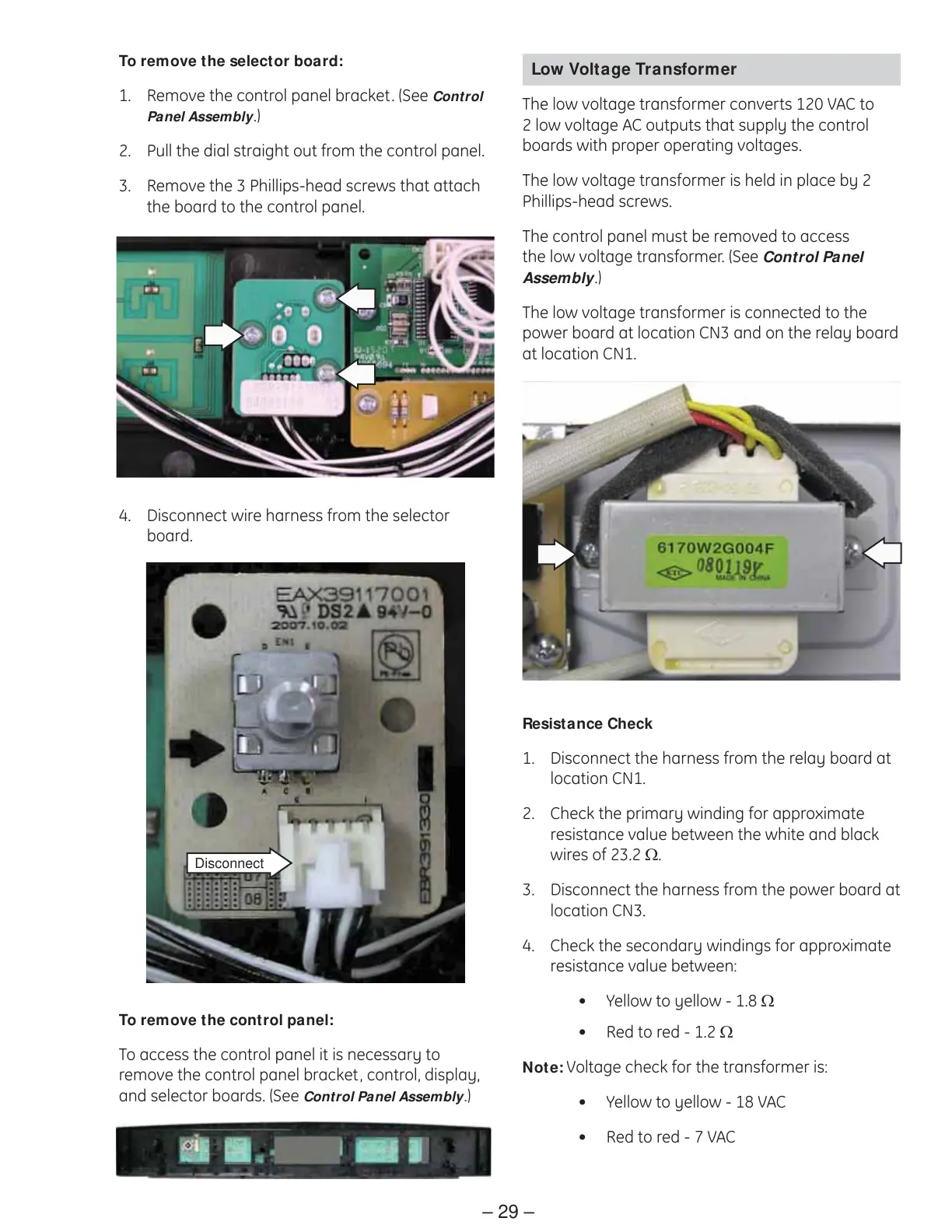
To remove the selector board:
Remove the control panel bracket. (See 1. Control
Panel Assembly.)
Pull the dial straight out from the control panel.2.
Remove the 3 Phillips-head screws that attach 3.
the board to the control panel.
To remove the control panel:
To access the control panel it is necessary to
remove the control panel bracket, control, display,
and selector boards. (See Control Panel Assembly.)
Disconnect
4. Disconnect wire harness from the selector
board.
Low Voltage Transformer
The low voltage transformer converts 120 VAC to
2 low voltage AC outputs that supply the control
boards with proper operating voltages.
The low voltage transformer is held in place by 2
Phillips-head screws.
The control panel must be removed to access
the low voltage transformer. (See Control Panel
Assembly.)
The low voltage transformer is connected to the
power board at location CN3 and on the relay board
at location CN1.
Resistance Check
Disconnect the harness from the relay board at 1.
location CN1.
Check the primary winding for approximate 2.
resistance value between the white and black
wires of 23.2 Ω.
Disconnect the harness from the power board at 3.
location CN3.
Check the secondary windings for approximate 4.
resistance value between:
Yellow to yellow - 1.8 • Ω
Red to red -• 1.2 Ω
Note: Voltage check for the transformer is:
Yellow to yellow - 18 VAC•
Red to red -• 7 VAC



 To Next Page