– 46 –
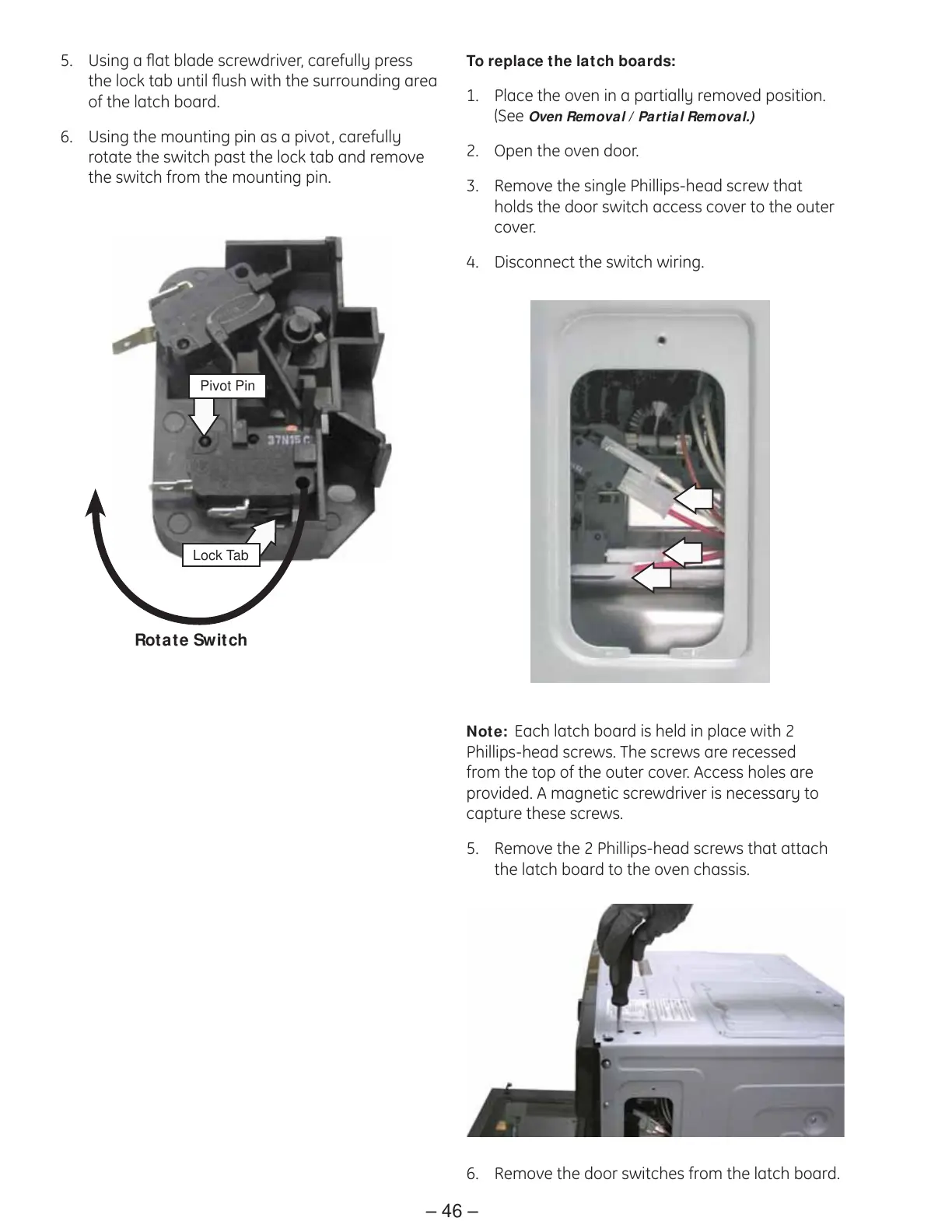
Lock Tab
Rotate Switch
Pivot Pin
5. Using a fl at blade screwdriver, carefully press
the lock tab until fl ush with the surrounding area
of the latch board.
6. Using the mounting pin as a pivot, carefully
rotate the switch past the lock tab and remove
the switch from the mounting pin.
Note: Each latch board is held in place with 2
Phillips-head screws. The screws are recessed
from the top of the outer cover. Access holes are
provided. A magnetic screwdriver is necessary to
capture these screws.
5. Remove the 2 Phillips-head screws that attach
the latch board to the oven chassis.
6. Remove the door switches from the latch board.
To replace the latch boards:
Place the oven in a partially removed position. 1.
(See
Oven Removal / Partial Removal.)
Open the oven door.2.
Remove the single Phillips-head screw that 3.
holds the door switch access cover to the outer
cover.
Disconnect the switch wiring.4.



 To Next Page