EasyManua.ls Logo

GE Centricity RA600 - Page 32

GE Centricity RA600
278 pages
Print Icon
To Next Page IconTo Next Page
To Previous Page IconTo Previous Page
Loading...
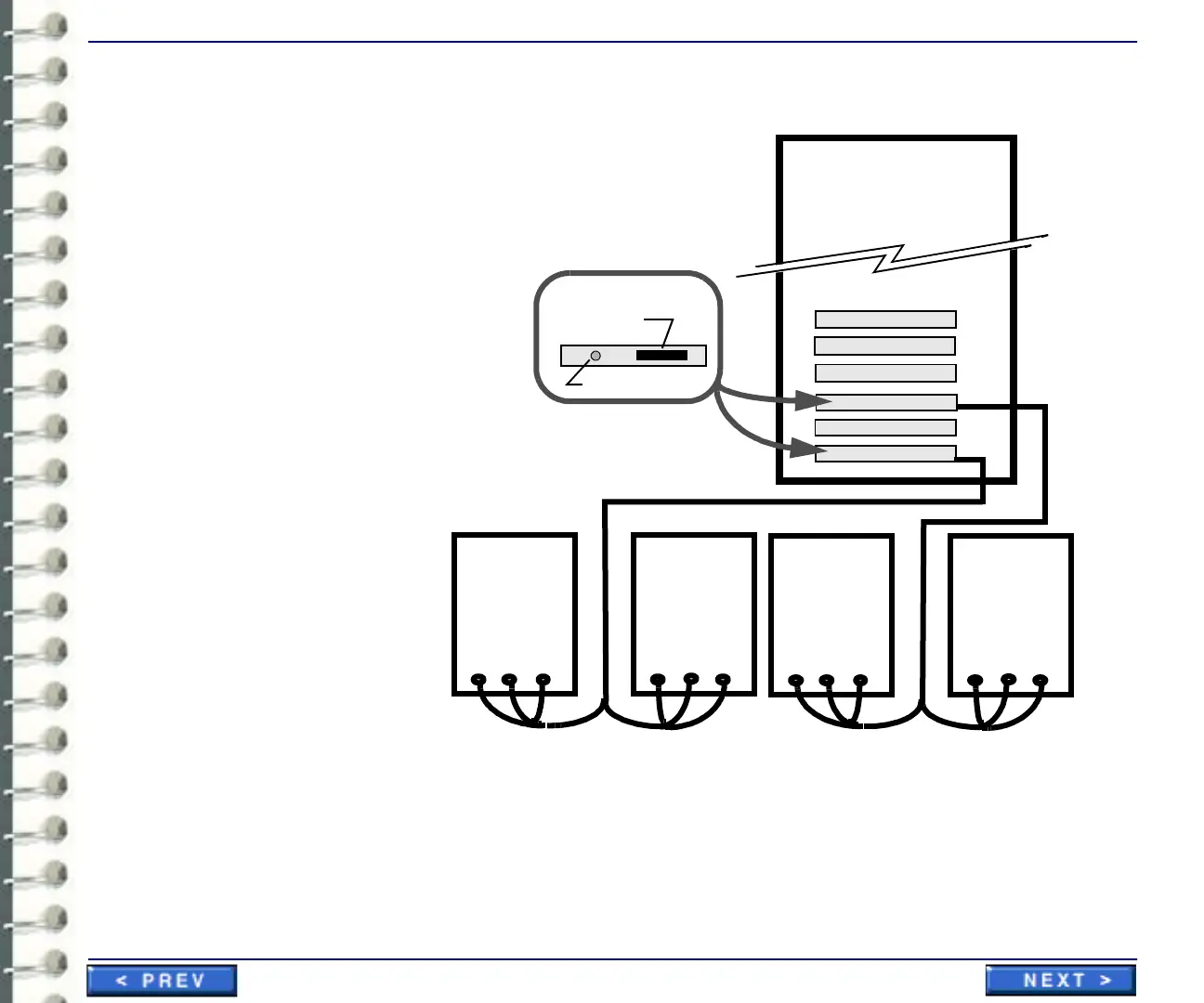
Hardware Installation IST 001 (A+) 2048 x 2506 Portrait Monitor Interconnections
Page 32
Illustration 3-2: interconnecting four barco monitors to workstation
Slot 4
Slot 3
Slot 2
Slot 1
Interface interconnections
to four Barco A 2048 x 2560
portrait monitors
Blank
Video Card
Blank
Video Card
Barco
Monitor 1
rear view
Barco
Monitor 2
rear view
(primary monitor)
Monitor cable
connector to
video interface
Calibrator connector
Video card connectors
cable 1cable 2
Barco
Monitor 3
rear view
Barco
Monitor 4
rear view
(primary monitor)
cable 1cable 2
Wht Blk Grn Wht Blk Grn
Vsync Hsync Video
Vsync Hsync Video
Vsync Hsync Video
Vsync Hsync Video
Blank
Blank
Slot 5
Slot 6

Table of Contents