EasyManua.ls Logo

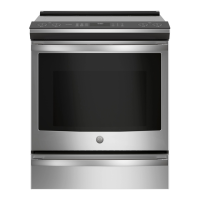
GE PHS93XYPFS - User Manual

GE PHS93XYPFS
80 pages
Print Icon
To Next Page IconTo Next Page
Loading...
Write the model and serial
numbers here:
Model # _________________
Serial # _________________
You can find them on a label
behind the door or drawer.
ESPAÑOL
Para consultar una version en
español de este manual de
instrucciones, visite nuestro sitio de
internet GEAppliances.com.
OWNER’S MANUAL
RANGES
Electric Induction Front Control
49-2000989 Rev. 2 06-22 GEA
30" Induction Range
PHS93X
GE is a trademark of the General Electric Company. Manufactured under trademark license.
SAFETY INFORMATION .......... 3
USING THE RANGE
Surface Units ........................... 8
Cookware for Induction Cooktop .........10
Precision Cooking ......................12
Oven Controls ..........................18
Settings ...............................19
Sabbath ...............................21
Oven Racks ........................... 22
Aluminum Foil and Oven Liners .......... 23
Cookware ............................. 23
Cooking Modes ........................ 23
Oven Door Camera ....................24
Oven Probe ........................... 25
Cooking Guide ........................ 26
Air Fry Cooking Guide .................. 27
CARE AND CLEANING
Cleaning the Range – Exterior ........... 28
Cleaning the Range – Interior ...........29
Cleaning the Glass Cooktop .............30
Oven Probe ............................31
Oven Light ............................ 32
Oven Door ............................ 33
Soft Close Drawer ..................... 33
TROUBLESHOOTING TIPS .......34
LIMITED WARRANTY ............ 38
ACCESSORIES ....................39
CONSUMER SUPPORT ...........40


Questions and Answers

  • R
    robertjohnsonSep 7, 2025
    Why is there a strong odor coming from my GE PHS93XYPFS?
    • C
      christopher16Sep 7, 2025
      If you notice a strong odor from your GE Ranges, it's likely due to the insulation around the inside of the oven, which is normal for the first few uses. This odor is temporary and will disappear after several uses or a self-clean cycle.
  • T
    Timothy CookAug 25, 2025
    What to do if my GE PHS93XYPFS oven does not work?
    • M
      Michael BaileyAug 25, 2025
      If your GE Ranges oven does not work, start by ensuring the range is fully plugged into a live, properly grounded electrical outlet. Check your home's fuse or circuit breaker and replace the fuse or reset the circuit breaker if needed. Verify that the oven controls are correctly set. Also, check to see if the oven is accidentally set to Sabbath Mode and disable it.
  • D
    Daniel ThompsonAug 25, 2025
    Why do clock and timer not work on my GE PHS93XYPFS Ranges?
    • S
      Steve RothAug 26, 2025
      If the clock and timer on your GE Ranges aren't working, begin by checking the fuse in your home or the circuit breaker and replace the fuse or reset the circuit breaker if necessary. Ensure that the range is completely plugged into a live, properly grounded electrical outlet. Also, check that the oven controls are properly set; refer to the Using the Kitchen Timer section for guidance.
  • S
    Seth KrauseSep 16, 2025
    Why did my GE PHS93XYPFS Ranges unit cancel my precision cooking mode?
    • D
      Dalton JamesSep 16, 2025
      To address a cancelled precision cooking mode on your GE Ranges, replace the AAA battery in the pan or charge the probe. Update the unit software via the SmartHQ mobile app and the pan software via the Hestan Smart Cooking app. If the precision cooking device has gone out of range or had a computation malfunction, or if the unit lost communication with the device, contact the device or unit manufacturer. If the problem persists under the same conditions but is not consistent in other use cases, restart the precision cooking mode and contact the unit manufacturer.
  • E
    Emily SmithSep 23, 2025
    What to do if plastic melted to the surface of my GE PHS93XYPFS?
    • J
      Jacqueline ContrerasSep 23, 2025
      If plastic has melted to the surface of your GE Ranges, it's because hot cooktop came into contact with plastic placed on it. Refer to the Glass surface—potential for permanent damage section in the Cleaning the glass cooktop section for guidance.
  • C
    Calvin JohnsonSep 12, 2025
    Why am I unable to set cook time or delay time on my GE PHS93XYPFS Ranges?
    • J
      Jonathan PerkinsSep 12, 2025
      If you are unable to set cook time or delay time on your GE Ranges, it is likely that you forgot to enter a cooking mode first.
  • M
    Mr. Gregory LewisSep 2, 2025
    Why does "LOCK DOOR" flash in the display of my GE PHS93XYPFS Ranges?
    • J
      Jennifer HubbardSep 2, 2025
      If the "LOCK DOOR" flashes in the display of your GE Ranges, it means the self-clean cycle has been selected, but the door is not closed. Make sure you close the oven door.
  • N
    Nicole SanchezSep 3, 2025
    Why won't my GE Ranges oven or cooktop stay set?
    • S
      Scott ShepardSep 3, 2025
      If your GE Ranges oven or cooktop won't stay set, it indicates a function error. Disconnect the power for at least 30 seconds, then reconnect it. If the issue repeats, further assistance might be needed.
  • J
    John FieldsSep 23, 2025
    Why does the camera stop and start intermittently while streaming on my GE Ranges?
    • D
      Donna GuzmanSep 23, 2025
      If the camera stops and starts intermittently while streaming or disconnects and must be manually restarted on your GE Ranges, it is due to a poor or suboptimal internet connection. Check your internet connection; if it is suboptimal, you may experience frequent resetting of the camera stream.
  • E
    Erin BarberAug 29, 2025
    Why is there excessive smoking during clean cycle on my GE Ranges?
    • A
      Angela RodriguezAug 29, 2025
      If you experience excessive smoking during a clean cycle on your GE Ranges, it's likely due to excessive soil or grease. Press the Cancel/Off pad and open the windows to ventilate the room. Wait until the LOCKED light goes off, then wipe up the excess soil and reset the clean cycle.

Summary

Safety Information and Precautions

Anti-Tip Device Installation

Ensures the range is secured by a properly installed anti-tip bracket to prevent tipping.

General Safety Guidelines

Read all safety instructions before using the appliance. Follow all warnings and precautions.

Fire Safety Procedures

Steps to take to prevent injury and fire spreading during a fire.

Appliance Operation Safety

Safety precautions for cooktop, oven, and self-cleaning operation.

Self-Cleaning Oven Safety

Safety guidelines for using the self-cleaning feature to prevent burns and damage.

Appliance Disposal and Compliance

Instructions for disposing or recycling your appliance and FCC compliance.

Using the Range: Features and Operation

Surface Units and Warming Zone

Explanation of induction cooking, warming zone, and element synchronization.

Cookware Selection and Use

Guidelines on selecting and using appropriate cookware for induction cooktops.

Precision Cooking System

Explanation of precision cooking feature, control modes, sensors, and Bluetooth devices.

Oven Controls and Settings

Overview of oven controls, settings, and connectivity options.

Cooking Guides and Recommendations

Suggested temperatures, cooking guides, and air fry recommendations for common foods.

Care and Cleaning Procedures

Oven Liners, Cookware, and Modes

Warnings on oven liners, cookware guidelines, and overview of cooking modes.

Specific Cooking Mode Instructions

Details on Convection Bake, Roast, Proof, Warm, and Precision Cooking modes.

Temperature Probe and Oven Camera

Instructions for using the temperature probe and oven door camera.

Exterior and Interior Cleaning

Instructions for cleaning the exterior, interior, glass cooktop, probe, light, door, and drawer.

Cooktop Surface Care

Daily cleaning, removing residue, and caring for the glass cooktop and sensor.

Oven Racks and Drawer Maintenance

Information on oven racks, extension racks, and servicing the soft close drawer.

Troubleshooting Range Issues

Basic Troubleshooting Steps

Common problems and solutions for surface units, cooktop glass, and oven performance.

Advanced Troubleshooting Topics

Solutions for oven operation, probe errors, camera issues, and connectivity.

Limited Warranty and Consumer Support

GE Appliances Range Warranty Details

Details on warranty coverage, exclusions, and implied warranties.

Accessories and Customer Support

Information on purchasing accessories and obtaining customer support.

GE PHS93XYPFS Specifications

General IconGeneral
Styleslide-in single oven
Colorstainless steel; fingerprint resistant stainless steel
Main Capacity5.3 cu. ft.
Cooking Programsbaked goods (no preheat). convection bake. convection roast. frozen pizza single rack (no preheat). frozen pizza multi rack (no preheat). frozen snacks single rack (no preheat). frozen snacks multi rack (no preheat). precision oven modes/recipes - air fry
Temperature Probeyes
Convectionyes
Inductionyes
Number of Burners5
Number of Racks3 self-clean heavy-duty oven racks. 6 rack positions
Control Typetouchpad; 7" full-color touch lcd screen. glide touch
Interior Lightyes
Remote Controlyes
Smart Homeamazon alexa. digiorno. drop. ifttt. innit. the google assistant
Wi-Fibuilt-in; yes
Power Consumption2, 850
Convection Power1, 500w
Fuelinduction; electric
Voltage240/208 volts
Current40
Weight and Dimensions IconWeight and Dimensions
Depth28 1/4 inch
Height37 1/4 inch
Width29 7/8"; 30 inch; 29 7/8 inch
Net Weight200 lbs.

Related product manuals