July 2003
6 PT878 Quick Start Guide
Keypad Description
Since you need to use the keypad in the procedures that follow,
you should familiarize yourself with the keys and their functions.
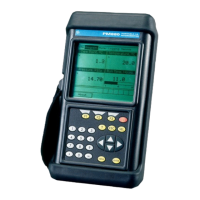
The PT878 keypad has 25 keys. The functions for each key are as
follows (see Figure 1 on the next page):
• 3 function keys ([F1], [F2], [F3]) — enable you to select the
special functions which appear at the bottom of the screen.
• 12 numeric keys (including - and .) — enable you to enter
numeric data.
• 4 arrow keys ([W ], [X], [S], [T]) — enable you to move
through the menu options.
• [?] Help key— enables you to access on-line help.
• [MENU] Menu key — enables you to access the Main Menu.
• [ENTER] — enables you to enter a particular menu, and
enters selected values into the PT878 memory.
• [SEL] — enables you to move between data measurements on
the screen.
• [ESC] — enables you to exit menus or menu options at any
time; cancels a numeric entry.
• Red key [ ] — turns the power ON or OFF, and toggles the
backlight ON or OFF.





 To Next Page