8
Using your thermostat.
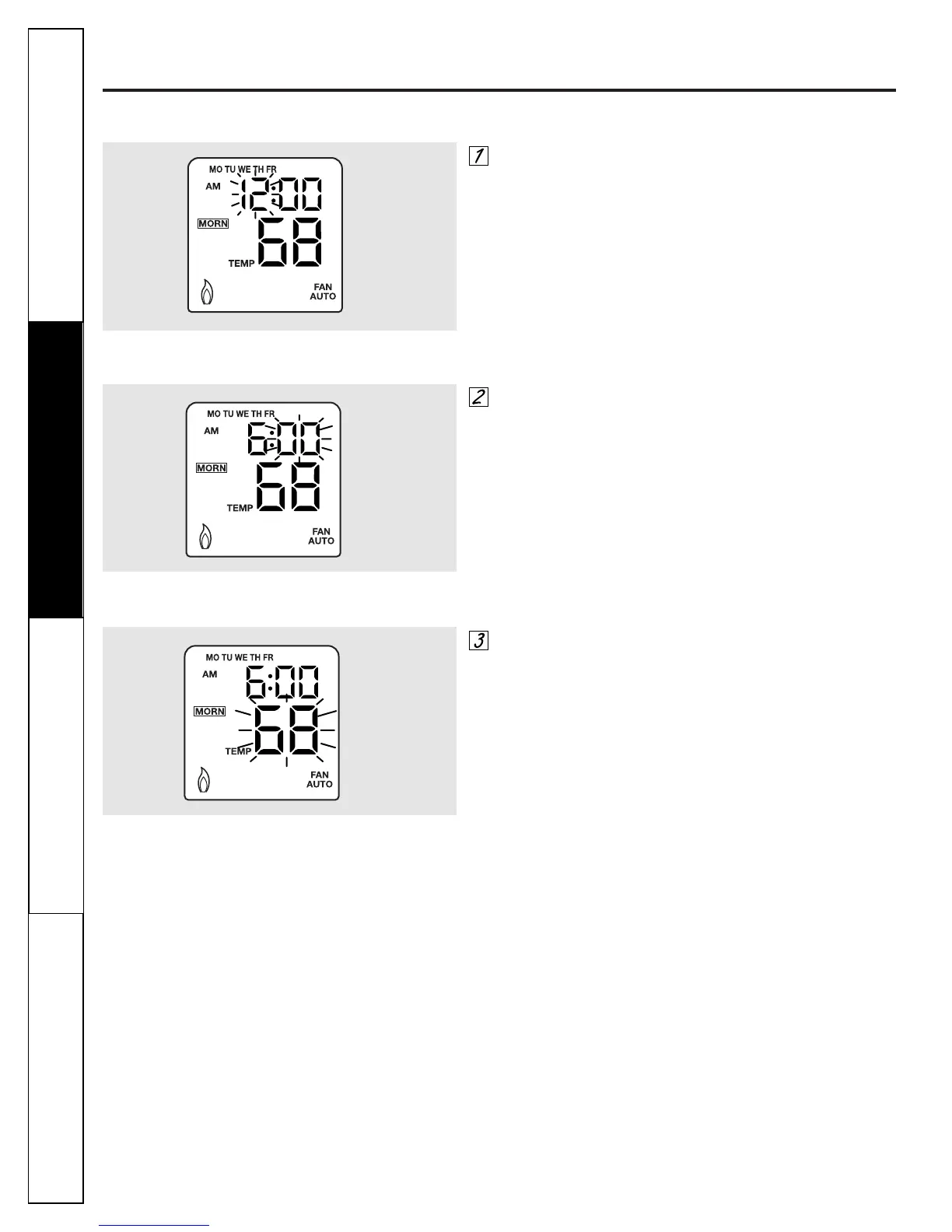
Press
PROGRAM
from the
NORMAL
mode. The program time-
hour will be flashing and the
MORNING
time period will be
active. Press ▲ or ▼ to adjust time. To change programming
days press
DAY/TIME
button. The order of the day
programming is:
■ Weekday Program (i.e. Monday through Friday)
■ Weekend Program (i.e. Saturday and Sunday)
■ 7 Day Program (i.e. Monday through Sunday on individual
days)
Programming Steps
Figure 13: Program Time-Hour Flashing
Press
PROGRAM
again. The program time-minute will be
flashing. Press ▲ or ▼ to adjust. Program time-minute
advances 10 minutes per step.
Figure 14: Program Time-Minute Flashing
Press
PROGRAM
again. The program temperature will be
flashing. Press ▲ or ▼ to adjust.
Figure 15: Program Temperature Flashing
Troubleshooting Tips Operating Instructions Safety InstructionsInstallation Instructions


 To Next Page